Newborn Christmas Announcement Photo at Home
Updated 2026-09-16 · PiXmas Editorial Team
Quick answer: The easiest way to get a newborn Christmas announcement photo at home is soft window light, a plain backdrop, and one calm window between feedings. If you want a polished Santa scene or wallpaper-ready portrait without props or studio lighting, PiXmas turns a single phone photo of your baby into styled Christmas portraits in minutes, no scheduling required.
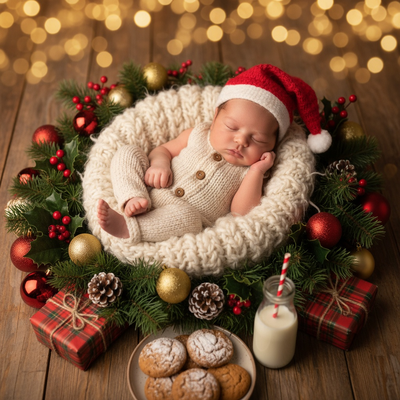
How do you take a newborn Christmas announcement photo at home?
Newborn photos work best when the baby is calm, fed, and warm.
Natural light from a window is softer and more flattering than overhead lights or flash.
A plain blanket, swaddle, or simple backdrop keeps the focus on the baby rather than a cluttered room.
Christmas touches like a small hat, stocking, or ornament can be added without a full studio setup.
What do you need for a DIY newborn Christmas photoshoot?
You do not need professional gear to get a usable announcement photo.
- A phone camera with good lighting
- A neutral or festive blanket for the background
- One or two small Christmas props, like a hat or ornament
- A second person to help hold or soothe the baby
How do you photograph a newborn without disturbing their sleep?
- Choose a time right after a feeding, when babies are naturally drowsy.
- Set up your light and background before bringing the baby in.
- Keep the room warm so the baby stays comfortable if unswaddled.
- Take several quick shots rather than one long session.
- Use a soft voice or white noise to keep the baby settled.
- Pick your best frame afterward instead of trying to get it perfect in the moment.
Can AI create a newborn Christmas announcement photo without a full shoot?
Yes. Apps like PiXmas can turn one clear phone photo of your baby into a styled Christmas portrait.
PiXmas is a native iOS app with a web version that also works in Android browsers, and a native Android app is coming.
With 800+ styles, PiXmas can place your newborn in a cozy Santa scene, a wallpaper-ready holiday backdrop, or a family group portrait, all generated from the images you already have.
This is useful for parents who want a shareable announcement photo but do not have time for props, lighting setup, or a photographer visit.
DIY vs Professional vs AI: Which fits a newborn Christmas photo?
| Option | Cost | Time Needed | Newborn Comfort | Style Variety |
|---|---|---|---|---|
| DIY home shoot | Low | 30 to 60 minutes | Depends on setup | Limited to what you can arrange |
| Professional photographer | Higher | Scheduling plus session time | Can be disrupted by travel | Set by photographer's style |
| PiXmas AI app | Low | A few minutes | No extra session needed | 800+ styles from one photo |
Limitations
AI-generated portraits work best when the source photo of the newborn is clear and well lit.
PiXmas cannot replace a real photo shoot if you want physical newborn milestone props captured in person.
Very young infants with closed eyes or mid-movement in the original photo may produce less accurate results.
For fine art prints or in-person keepsakes, a professional photographer may still be the better choice alongside an AI portrait.
For a newborn Christmas announcement at home, natural light and a simple setup handle the basics well. When you want a styled Santa scene or wallpaper-ready portrait without a full session, PiXmas turns one phone photo into festive AI family portraits in minutes.
Frequently asked questions
What's the best time of day to photograph a newborn at home?
Mid-morning or early afternoon usually offers the softest natural light near a window. Avoid direct sunlight, which can create harsh shadows on a newborn's face. Overcast days actually work well because the light is diffused and even.
Do I need professional equipment for a newborn Christmas photo?
No. A phone camera with good natural light is often enough for a home announcement photo. Simple props like a blanket, hat, or small ornament add a festive touch without needing studio gear.
Can I turn a newborn's photo into a styled Christmas portrait?
Yes. PiXmas lets you upload one photo of your baby and generates styled Christmas portraits, Santa scenes, or wallpapers from it. This works well when you already have a clear photo but want a more festive, polished look.
Is it safe to use an AI photo app with pictures of my baby?
Reputable apps like PiXmas only use the photo you upload to generate your requested portrait. As with any app, it is worth reviewing the privacy details before uploading personal photos of a newborn.
When should I book Christmas photos for an engagement, new home, or reunion?
Book Christmas life-moment photo sessions as early in fall as possible, especially for reunions, travel, or custom cards. Search interest for Christmas card photos rises in September and October and peaks in December, suggesting strong late-year demand (Tech Photo Guy – Google Trends for Photographers, 2018). Earlier planning leaves more time for coordinating relatives, editing, printing, and handling delays.
How long does it take to receive edited Christmas milestone photos?
Delivery time depends on the photographer’s workload, editing style, print lab, and whether the images require compositing or detailed retouching. Tell the photographer your card-mailing or announcement deadline before booking, and ask for separate delivery dates for proofs, final files, and prints. Build in extra time for family approvals, shipping delays, and requested revisions.