
Christmas Family Photo Before And After Examples
Quick answer: A Christmas family photo before and after shows a casual snapshot transformed into a styled holiday portrait using AI, typically adding festive outfits, seasonal backdrops, and warm lighting. PiXmas (also called Pixmas) is one iOS app built for this, starting from one uploaded photo and applying a chosen style. Results depend heavily on the clarity of the original photo and how many faces are visible.
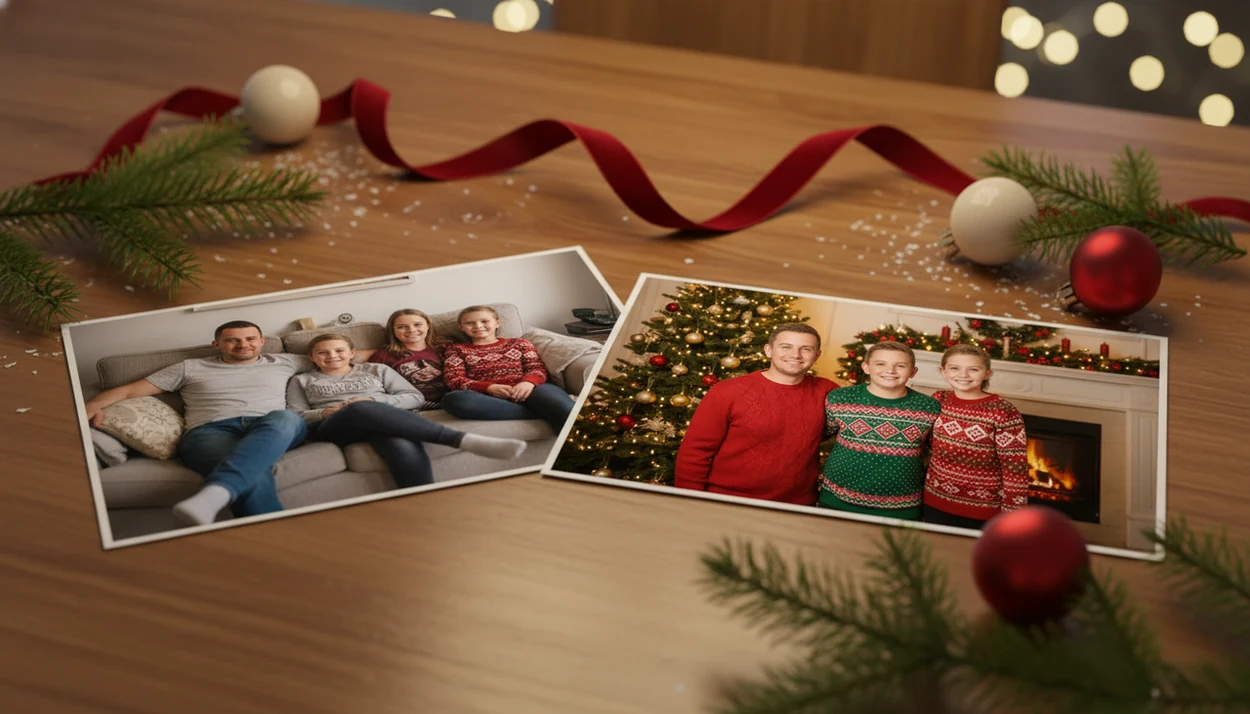
Christmas family photo before and after examples show how a casual phone snapshot can become a coordinated holiday portrait with festive outfits, warmer lighting, Christmas backgrounds, and card-ready framing. The strongest results usually come from a clear, well-lit upload where every family member’s face is visible.
> A Christmas family photo before and after is a side-by-side comparison of an original family snapshot and a polished holiday version designed for cards, keepsakes, wallpapers, or social sharing.
- AI family holiday photo transformations work best from clear, natural photos with visible faces and minimal clutter.
- The after image can change outfits, lighting, backgrounds, framing, and mood, not just add a Christmas border.
- Families should review final images carefully because AI can alter small details such as hands, jewelry, pets, skin tone, or clothing.
Christmas Family Photo Before And After Results At A Glance
A typical before image is a casual phone photo: a couch snapshot, a hallway selfie, or the one frame in the iPhone Photos grid where everyone is actually looking. A typical after image is a coordinated Christmas portrait with festive styling, warmer light, and a cleaner layout for cards or sharing.
The change is usually more than a border. The after version may add matching sweaters, a Christmas tree, fireplace glow, snowy background, or studio-style crop. It can become a holiday card image, framed print, phone wallpaper, social post, or family keepsake.
Holiday-card demand is large enough that USPS publishes dedicated seasonal mailing guidance for cards and gifts (https://about.usps.com/holidaynews/). That helps explain why families care about turning an ordinary picture into something card-ready. For families without time for a studio session, a clear phone photo is often enough to start.
How AI Family Holiday Photo Transformation Works
AI family holiday photo transformation works by analyzing the uploaded image for faces, pose, body placement, and scene context, then generating a new Christmas version that tries to preserve each person’s likeness. In simple terms, the model reads the family layout before it redraws the holiday scene.
The system uses image embeddings, which are compact visual patterns, to understand who is in the photo and how they are positioned. Then generative AI re-renders the family into styles such as matching pajamas, snowy streets, fireplaces, Christmas trees, Santa scenes, or studio lighting.
The practical path is simple: upload, select a festive style, review the result, then save or share. A good ai christmas photo app that transforms one uploaded photo into studio-quality holiday portraits, santa scenes, and christmas wallpaper across hundreds of festive styles should deliver fast visual options, not guaranteed studio-perfect identity preservation.
McKinsey estimated in 2023 that generative AI could add $2.6 trillion to $4.4 trillion annually across the global economy, including design and image workflows (https://www.mckinsey.com/capabilities/mckinsey-digital/our-insights/the-economic-potential-of-generative-ai-the-next-productivity-frontier). Holiday portraits are one everyday example of that shift.
How To Use A Christmas Family Photo Before And After App
Use the clearest family photo you already have, not the most dramatic one. Warm yellow kitchen light, a blurry sleeve, or a tiny face in a group shot can matter more than the background idea.
- Choose a well-lit photo where every face is visible and no one is heavily cropped.
- Avoid heavy filters, motion blur, sunglasses, blocked faces, and busy backgrounds when possible.
- Upload the image and allow only the photo access you’re comfortable sharing at the permissions prompt.
- Select a Christmas style, such as pajamas, fireplace, snow, Santa, or formal portrait.
- Preview several results and compare faces, hands, clothing, pets, and skin tone before saving.
- Export the strongest version for a card, wallpaper, print, or family group chat.
Tools like PiXmas can help with this one-photo upload workflow by turning a family snapshot into holiday portraits, Santa scenes, and Christmas wallpaper. If your main goal is a broader app comparison, the best family Christmas photo app guide covers that decision path.
Three AI Family Portrait Examples From Casual Shots
These AI family portrait examples show realistic transformations, not guaranteed outcomes. The better the original face visibility, the more believable the after image tends to feel.
The Couch Snapshot To Matching Pajamas
The before photo might show everyone squeezed onto a sofa in everyday clothes, with a remote on the cushion and one kid leaning forward. The after version can create matching red pajamas, a neater pose, and a tree-lit room. It still needs review, especially around hands and fabric edges. Small stuff shows.
The Outdoor Selfie To Snowy Christmas Card
The before image may be an arm-length selfie from a walk, with uneven faces and a dull background. The after image can shift the family into a snowy card photo with softer light and better spacing. For card planning, match the export to the right Christmas card photo size before printing.
The Parent Kid Pet Photo To Santa Scene
The before photo might include one parent, a child, and dog ears peeking from a Santa hat. The after version can build a Santa scene with warmer color and a more festive setting. Pets can look charming, but fur, paws, and collars may change.
Five Family Holiday Photo Transformation Patterns
Successful family holiday photo transformation usually follows a few repeatable visual patterns. The goal is a cohesive set, not just one decorated image.
- Outfit coordination: Everyday clothes can become matching pajamas, sweaters, coats, or formal Christmas outfits.
- Background replacement: A cluttered room can become a tree corner, snowy lane, studio backdrop, or Santa workshop.
- Warmer lighting: Flat phone lighting can shift toward candle glow, fireplace warmth, or soft studio light.
- Cleaner composition: Crops can tighten, faces can center, and distractions can disappear from the frame.
- Multiple asset formats: One family look can support cards, wallpapers, social headers, and shareable images.
Pew Research Center reported in 2023 that 86% of Americans who celebrate Christmas typically spend time with family and friends during the holidays (https://www.pewresearch.org/short-reads/2023/12/18/how-americans-celebrate-christmas-and-other-winter-holidays/). That family focus is one reason photo sets matter. For matching outfit ideas, a matching family Christmas photos app workflow can be useful.
Christmas Family Photo Before And After Quality Checklist
High-quality input matters more than an ambitious Christmas style. AI cannot reliably rescue extremely dark, blurry, or blocked faces, even if the after scene looks beautiful in examples.
| Photo factor | Good input trait | Risky input trait |
|---|---|---|
| Face visibility | All faces turned toward camera | Tiny faces, side profiles, blocked faces |
| Lighting | Bright window light or even indoor light | Dark rooms, harsh shadows, yellow cast |
| Blur | Sharp eyes and still bodies | Motion blur, shaky selfie, blurry sleeve |
| Filters | Natural color and texture | Beauty filters, heavy contrast, stickers |
| Scene size | Small family group | Crowded room with many background people |
| Details | Clear glasses, hats, pets, infants | Reflections, covered eyes, hidden paws |
If grandma is being added from an old snapshot, inspect the after image closely. Older images often have softer detail than a current phone photo. For a dedicated workflow, a Christmas family portrait generator is usually easier than manual background editing because it keeps the family layout and holiday styling in one process.
Christmas Family Photo Before And After Example Limits
Christmas family photo before and after examples do not prove that every upload will produce the same realism, likeness, or print quality. They show what is possible under good conditions, not what every couch selfie will become.
Results may vary across skin tones, cultural clothing, glasses, jewelry, hairstyles, pets, infants, and large groups. A teen hoodie turned festive red may look great in one result and oddly shaped in another. Check whether the final image still feels like your family before ordering cards or posting it.
Pew Research Center reported in 2023 that 52% of U.S. adults felt more concerned than excited about the increased use of AI in daily life (https://www.pewresearch.org/internet/2023/08/28/growing-public-concern-about-the-role-of-artificial-intelligence-in-daily-life/). That concern fits personal family photos. Transparency matters, especially when children’s faces, pets, and private home snapshots are involved.
What makes this transformation different from other Christmas photo styles?
A before and after family portrait relies on the app reading multiple faces at once, not just one. This makes it different from solo or couple styles, since the AI has to keep everyone's likeness consistent while also changing clothing, background, and lighting across the whole group.
The value of a before and after view is that it shows exactly how much changes: casual clothes become coordinated sweaters or pajamas, everyday rooms become fireplace or tree-lit scenes, and flat lighting becomes warmer and more portrait-like.
Who is this Christmas family photo style best for?
This style suits parents who want a quick card image without scheduling a studio session, and extended families who cannot easily gather everyone in person but have a shared group photo. It also works well for blended families or households adding a new baby or pet to the yearly card.
It is less ideal for anyone who needs an exact, unedited record of the day, since the output is a styled reinterpretation rather than a straight photograph.
How does PiXmas compare to a photographer or DIY family photo shoot?
- Google Trends‑based advice for photographers notes that family‑oriented “Christmas card photos” searches grow from early fall and peak in December, indicating that families typically plan or book Christmas photo sessions in the last quarter of the year. (Tech Photo Guy – Google Trends for Photographers, 2018)
What are the limitations of AI family Christmas photo results?
These are AI-generated stylized images, not physical photos taken on a real set with a photographer or props. Outfits, backgrounds, and lighting are simulated, so small artifacts can appear in hands, glasses, jewelry, or overlapping limbs.
Photos with several faces, especially in larger groups, may render less consistently than a solo or couple photo, though this does not mean every group result will look wrong. Uploading a clear, well-lit photo with faces unobstructed gives PiXmas the best chance at an even result across the whole family.
For a quick, no-shoot way to see a Christmas family photo before and after, PiXmas offers a straightforward one-photo workflow suited to families wanting a festive card image without studio scheduling, as long as expectations stay realistic about AI-generated results.
Limitations
Before using any AI photo tool, treat the after image as a generated portrait that needs review. It may be useful, but it is not a factual record of the original moment.
- Very blurry, dark, low-resolution, or obstructed photos may fail or create distorted faces.
- Hands, jewelry, glasses, hats, clothing details, body shape, skin tone, and background objects can change.
- Pets may be less consistent than people, especially around paws, ears, fur texture, and collars.
- Infants can be harder to render accurately because small facial features are easily altered.
- Crowded group photos can create artifacts, mismatched faces, duplicate limbs, or uneven styling.
- Privacy policies differ by app, so families should review data handling before uploading personal images.
- No AI tool, including PiXmas, should be treated as a guarantee of exact likeness or print-ready quality.
- Card crops can cut off heads or hands if the export ratio does not match the final layout.
Can I use this for a card and a wallpaper? Usually, yes, but check the aspect ratio before you send anything to print.
Related guides
FAQ
What exactly is a Christmas family photo before and after?
It refers to comparing an original, casual family photo to the AI-generated festive version created from it, showing changes in clothing, background, lighting, and overall styling side by side.
Can large families or big groups use this style?
Yes, but larger groups can be trickier for AI to render evenly than a solo or couple photo. PiXmas works best when every face in the group photo is clearly visible and well lit.
How many photos do I need to upload for a family portrait?
PiXmas uses a one-photo workflow, so you upload a single group photo and the app applies the chosen holiday style to everyone in that image at once.
Can I use the results for printed Christmas cards?
Many people use AI family holiday portraits for digital or printed cards. Image resolution and print quality can vary, so it helps to preview the result at the size you plan to print.
Does this work for blended or extended families?
Yes, blended and extended families can use PiXmas the same way as any other group, as long as the uploaded photo clearly shows each person's face without heavy obstruction.
Will the AI version look exactly like our real family photo?
It will resemble your family but is a stylized reinterpretation, not an edited version of the original. Expect festive additions like new outfits or backgrounds rather than a literal retouch.