
Christmas Photo Benefits For Family Cards And Keepsakes
Quick answer: AI family Christmas portraits let you turn one uploaded family photo into a coordinated, card-ready holiday image without scheduling a studio session or matching outfits in person. PiXmas (Pixmas) is an iOS app built around this one-photo workflow, applying a chosen style with festive wardrobe, backdrop, and lighting in minutes. The main benefit for family cards is speed and visual consistency across parents, siblings, and multi-generational groups.
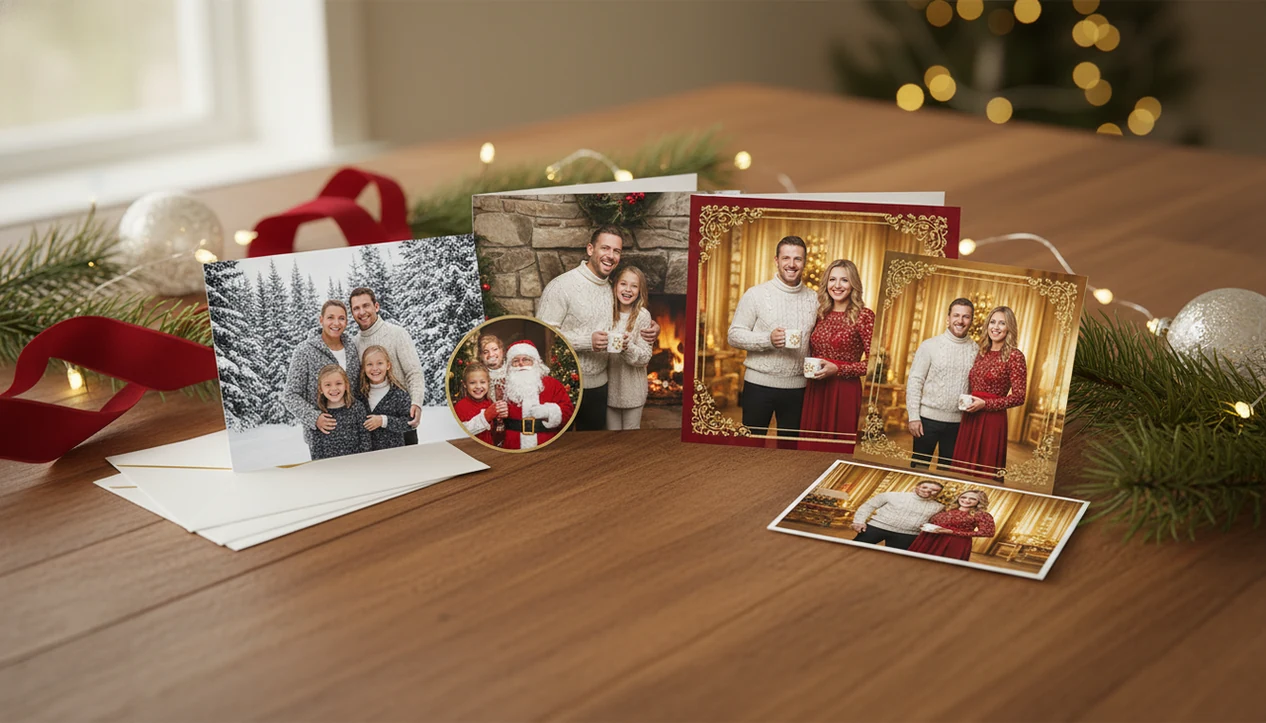
Christmas photo benefits for family cards include more polished portraits, faster card creation, lower stress, and reusable holiday images from photos families already have. Compared with rushed phone snapshots or a studio appointment, AI Christmas photos can give families coordinated scenes, festive styling, and print-ready options without rescheduling everyone’s December.
Definition: Christmas photo benefits for family cards are the practical advantages of using intentional, card-ready holiday portraits instead of casual snapshots for printed cards, digital greetings, keepsakes, and seasonal sharing.
TL;DR
- AI Christmas photos can turn one clear uploaded photo into multiple festive card looks, Santa scenes, portraits, and wallpapers.
- The biggest quality factor is the input photo: clear faces, good lighting, and an uncrowded background produce better card-ready results.
- Family-card benefits include lower cost, faster turnaround, easier style changes, and less pressure on kids, pets, or camera-shy relatives.
Christmas Photo Benefits For Family Cards, Defined Simply
Christmas photo benefits for family cards are not only about making a picture look prettier. The bigger value is that a thoughtful holiday portrait communicates care, displays well on a fridge or mantel, and becomes easier to keep after the season ends.
A dark hallway snapshot can still be meaningful, but card printing is not kind to blur, clutter, warm yellow kitchen light, or a sleeve crossing the frame. A card-ready portrait gives the recipient a clearer view of the people, the season, and the message.
Holiday cards also do a social job. They help families stay in touch with grandparents, cousins, old neighbors, and friends who may not see the kids grow week by week.
Tools like PiXmas fit this practical use case: PiXmas is a Christmas photo app that transforms one uploaded photo into holiday portraits, Santa scenes, and Christmas wallpaper for families, couples, pet owners, and creators.
Five AI Family Card Benefits Readers Should Know
- High-quality holiday portraits are more likely to be displayed, remembered, and kept than low-quality snapshots because the faces, mood, and seasonal theme are easier to read.
- AI Christmas photo apps can create multiple studio-style looks from one well-lit everyday photo, including snow scenes, fireplace portraits, Santa moments, and card-friendly crops.
- AI family card images can reduce costs compared with professional studio sessions and print packages, especially when the family only needs one strong image for cards.
- The original input photo is the biggest quality driver for believable AI portraits; clear faces beat heavy filters, tiny group faces, and motion blur.
- Easy re-runs let families change backgrounds, outfits, or compositions without rescheduling a shoot or asking a tired child to smile again.
On the iPhone Photos grid, this is often the difference between six nearly identical kid snapshots and one where everyone is actually looking. Use that one.
How AI Christmas Photo Benefits Work Behind The Card Image
AI Christmas photo benefits work by taking one clear uploaded photo, reading face and pose information, then generating festive styling around the recognizable subject. In simple terms, the app studies the image structure, builds image embeddings, and uses that visual map to create a seasonal portrait output.
The process usually changes lighting, background, outfit cues, props, color palette, and composition. It should not invent a new family from nothing. It builds a Christmas scene around the person, couple, child, pet, or family member already present in the upload.
That distinction matters before printing. If the face is tiny in a group shot, the result may feel less personal. If the face is clear and the lighting is not fighting the app, the output can become a studio-style portrait, Santa scene, Christmas wallpaper, or family-card image.
Good AI Christmas photo apps deliver studio-style holiday portraits, Santa scenes, and Christmas wallpaper from one uploaded photo, not a guaranteed replacement for every professional portrait session.
How To Use AI Christmas Photos For Family Cards
Use AI Christmas photos for family cards by starting with the clearest real photo you have, then treating the generated result like a print file, not just a phone preview. The practical workflow is simple: upload, style, inspect, and export before dropping the image into a card design.
- Choose one sharp, front-facing image where the faces are visible, the lighting is even, and nobody is lost in shadow or motion blur. A simple everyday photo can work better than a dramatic but messy holiday snapshot.
- Upload the image to PiXmas or another Christmas pictures app, then give the tool a clean subject to build around instead of a tiny face in a crowded group frame.
- Select a card-friendly theme, crop, and background style that leaves room for greetings, names, or the year if the card layout needs text.
- Review the result closely before printing. Zoom in on hands, teeth, eyes, pets, jewelry, eyeglasses, collars, and background details.
- Export the highest-resolution version available, then place that saved file into the card layout instead of relying on a small preview image.
Holiday Portrait Advantages Versus Phone Snapshots And Studio Sessions
AI holiday portraits sit between casual phone snapshots and professional studio sessions: faster and usually cheaper than a studio, but more polished than most December phone photos. The tradeoff is control versus authenticity.
| Option | Time | Cost | Polish | Scheduling | Re-runs | Kid or pet stress | Export flexibility |
|---|---|---|---|---|---|---|---|
| Phone snapshot | Minutes | Low | Mixed | None | Easy, if everyone cooperates | Low to medium | Depends on crop and resolution |
| Studio session | Hours to weeks | Higher | High | Required | Harder | Medium to high | Often tied to package choices |
| AI holiday portrait | Minutes to an evening | Usually lower | Medium to high | No appointment | Easy | Lower | Strong for cards, posts, and wallpapers |
Phone snapshots win for authenticity and speed. They often lose on lighting, clutter, and card polish, especially when the phone was propped against a coffee mug and everyone moved at once.
Studio sessions can be excellent, but they require travel, posing, fees, outfit planning, and print decisions. For families comparing options, a best family Christmas photo app guide is useful when the goal is a card image, not a full portrait package.
For practical alternatives, compare PiXmas with card-design or printing workflows such as Shutterfly, Minted, Canva, or a local portrait studio; those options may win when you need physical print fulfillment, designer templates, or photographer-directed posing.
Best Christmas Photo Card Examples For Families And Keepsakes
One strong Christmas portrait can carry the whole season’s visual theme across printed cards, digital greetings, social posts, phone wallpapers, and small gifts. That lifecycle value is easy to miss when people think only about the card front.
- Classic family card portrait: A centered, smiling family image works for folded cards, flat cards, and framed keepsakes.
- Santa scene: A child portrait with Santa styling can feel special for grandparents, especially when the small hands gripping a candy cane still look natural.
- Cozy living-room card: A fireplace or blanket scene gives the card warmth without needing a staged home shoot.
- Pet-inclusive card: A dog or cat portrait can anchor the card when pets are part of the family story.
- Matching wallpaper set: The same theme can become a lock-screen image for parents or relatives.
For families starting from one usable image after dinner, a Christmas family portrait generator can turn that single file into several card-minded options.
When AI Family Card Benefits Matter Most
Does AI help most when a family is short on time, patience, or a usable holiday portrait? Yes, especially when December is already crowded and the card still needs one image that looks intentional.
High-stress family photo situations
AI family card benefits matter most for busy families who missed the studio window, parents with infants, neurodivergent kids, pets, or camera-shy relatives, and long-distance families trying to create coordinated looks without meeting in one place. December 23 after bedtime is a real use case. No studio appointment is left, but the card file still has to go out.
They also matter when one theme needs to stretch across cards, wallpapers, keepsakes, and social sharing. For matching outfits or coordinated crops, a matching family Christmas photos app can be simpler than rebuilding the look in a design tool.
Low-benefit family card situations
The benefit is lower when a family already has a professional holiday portrait they love, or when documentary accuracy matters more than seasonal styling. School photos, memorial images, and once-in-a-lifetime portraits deserve extra care. Don’t force a snow scene onto a memory that was never about snow.
Cost And Time Benefits Of AI Christmas Photos For Cards
Cost and time benefits matter because holiday cards compete with the rest of December’s budget. The U.S. Bureau of Labor Statistics Consumer Expenditure Surveys reported average household holiday-related spending of $1,347 in 2022, including categories such as gifts, cards, decorations, and food.
Professional photography has real labor behind it. The BLS Occupational Employment and Wage Statistics page for photographers reported median hourly photographer earnings of $19.31 in 2023, and portrait packages can also include session fees, travel, styling, products, and print costs. A studio may be worth it, but it is not only the shutter click.
AI Christmas photos can reduce friction because one generated set may support several uses. After the family chooses a card-ready image, the same asset can appear on a printed card, phone wallpaper, digital greeting, and social post.
For last-minute senders, AI Christmas card images are often easier than a studio session because the practical path is upload, select a festive style, review the result, then save or share. A last minute Christmas card photo app is built around that deadline pressure.
What photo should you upload for the best family Christmas card?
Start with a sharp, well-lit photo where every face is clearly visible and not turned away from the camera.
Simple backgrounds and minimal motion blur help the style apply cleanly to hair, glasses, and clothing edges.
For larger families, a group photo where everyone is facing forward tends to hold up better than a photo taken at an angle or from far away.
If your family photo mixes indoor and outdoor lighting, a more evenly lit shot usually gives PiXmas more accurate detail to work from.
Who is this AI family Christmas photo style best for?
It suits busy parents who want a card-ready image without coordinating outfits or booking a session during a packed holiday calendar.
Blended and multi-generational families often benefit because everyone can be styled consistently even if the original photo was taken casually.
Families spread across different cities can use one shared photo instead of trying to schedule an in-person shoot together.
Families who want pets included can often use a photo with the pet already in frame, since results depend on what is visible in the uploaded image.
How does PiXmas compare to a photographer or a DIY family photoshoot?
- Google Trends‑based advice for photographers notes that family‑oriented “Christmas card photos” searches grow from early fall and peak in December, indicating that families typically plan or book Christmas photo sessions in the last quarter of the year. (Tech Photo Guy – Google Trends for Photographers, 2018)
For families who want a coordinated, card-ready photo without the logistics of a studio session, PiXmas offers a fast, one-photo workflow that fits busy holiday schedules. Families prioritizing documentary accuracy or large-format wall art may still prefer a traditional photographer.
Limitations
AI Christmas portraits can be useful, but they still need a careful review before cards are ordered or prints are gifted.
- AI portraits depend heavily on the quality of the uploaded image.
- Blurry, dark, cropped, side-facing, or heavily filtered photos can produce weak results.
- Hands, teeth, jewelry, eyeglasses, text, tiny details, and pet features may need close checking.
- Large-format prints can reveal artifacts that are less visible on small holiday cards.
- Privacy and data handling should be reviewed before uploading family, child, or pet photos; the FTC recommends checking app permissions and how personal data is collected, used, and shared: https://consumer.ftc.gov/articles/how-protect-your-privacy-apps.
- AI styling can feel less authentic if the chosen scene does not match the family’s personality.
- Professional photography may still be better for once-in-a-lifetime portraits, documentary accuracy, or large wall art.
- Export size matters. A pretty phone preview can still disappoint if the saved file is too small for the card layout.
Before ordering, zoom in on the preview. Teeth, paws, and necklace chains are where odd details often hide.
Related guides
FAQ
What is an AI family Christmas card photo?
An AI family Christmas card photo is a stylized holiday portrait generated from an existing photo of your family, rather than one taken during a live photoshoot. The app applies festive wardrobe, backdrop, and lighting to the uploaded image to create a card-ready result.
Can I include pets in a family Christmas card photo?
Yes, if your pet is visible in the photo you upload to PiXmas, it can appear as part of the styled family image. Results depend on how clearly the pet is shown in the original photo.
How many people can be in one uploaded family photo?
PiXmas can work with photos containing multiple family members, though results for larger groups may be less consistent than for a solo or couple photo. Clear, forward-facing faces in the original photo generally produce better results.
Do I need professional wardrobe or styling for a family card photo?
No separate wardrobe is required since PiXmas applies holiday styling to your uploaded photo. This is one reason families use it instead of coordinating outfits for a traditional photoshoot.
How long does it take to get a family Christmas card photo?
Using PiXmas, a styled family Christmas photo is typically ready within minutes of uploading a photo and choosing a style, which is faster than scheduling and completing a studio session.
Can I print the AI family photo directly as a card?
PiXmas produces the styled image, which you can then send to your own printing service or card provider. Reviewing the image for accuracy in faces and details before printing is recommended.