
Rustic Cabin Christmas Photo Style For Cozy Portraits
Quick answer: A rustic cabin Christmas photo style pairs wood-paneled walls, a fireplace or warm string lights, plaid textiles, and pine greenery with soft natural light for a cozy winter portrait. PiXmas creates this look from one uploaded photo using AI, turning a plain phone picture into a lodge-style holiday portrait with wardrobe, background, and lighting styled to match, no cabin trip or studio session required.
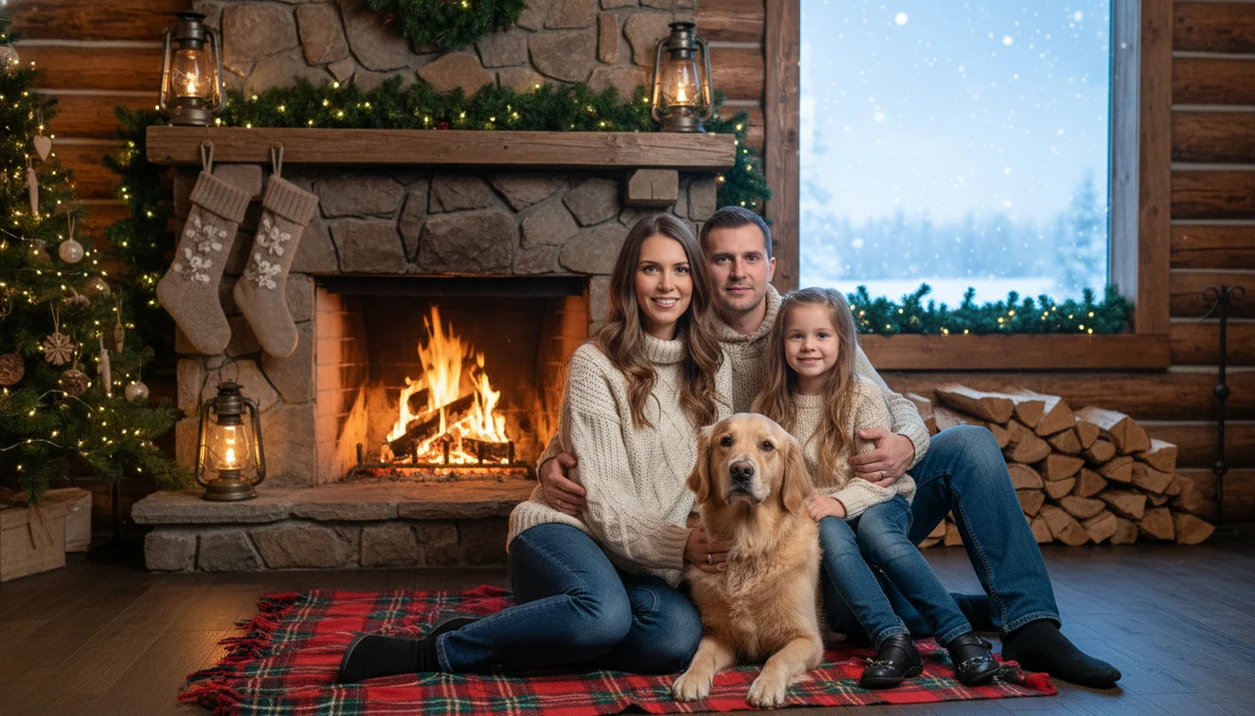
Rustic cabin Christmas photo style turns an everyday picture into a cozy holiday portrait with log walls, snowy windows, fireplaces, plaid blankets, evergreens, and warm lodge lighting. In PiXmas, the practical path is simple: upload one photo, choose a cabin-inspired Christmas style, preview the result, then save it for cards, posts, or wallpaper.
> PiXmas is a Christmas photo app that transforms one uploaded photo into holiday portraits, Santa scenes, and Christmas wallpaper for families, couples, pet owners, and creators.
- The rustic cabin look is built around wood, stone, greenery, flannel, knit textures, and warm Christmas light.
- It works especially well for families, couples, pets, solo portraits, cards, wallpapers, and cozy social profile images.
- A clear original photo with visible faces, simple lighting, and minimal blur gives AI cabin Christmas portraits the most believable results.
How rustic cabin christmas photo styles look
Side-by-side captures of the compared products. Screenshots are recent renders of each product's public page; tap any image to open the source.

Rustic Cabin Christmas Photo Style Meaning And Visual Cues
Rustic cabin Christmas photo style is a holiday portrait look built around natural lodge materials, warm winter light, and cozy seasonal details. It usually signals “Christmas cabin” through log walls, wood beams, a stone fireplace, snowy windows, plaid blankets, pine branches, ornaments, lanterns, and amber light.
The difference is texture. Generic Christmas decor may use a tree, red ribbon, and sparkle anywhere. A rustic holiday photo feels tied to a place: a mountain room, a fire-warmed wall, a wool blanket, or a pine wreath that looks handmade. It is less polished than a studio portrait and less glossy than luxury gold Christmas portraits.
That is the appeal.
Family users often pick this look when the iPhone Photos grid has six almost-identical kid snapshots, and one where everyone is actually looking at the camera. PiXmas fits that moment because the Christmas Pictures App starts with the photo you already have.
AI Portrait Workflow For Rustic Cabin Christmas Scenes
AI cabin portrait generation works by reading the uploaded image for face position, pose, subject boundaries, lighting direction, and overall composition. In plain terms, the model decides where the person or pet is, then builds a Christmas cabin setting around that subject.
Behind the scenes, image embeddings help match the original photo to a style. That means the system can replace or extend the environment with a cabin interior, snow view, fireplace, Christmas tree, or lodge background while trying to preserve the subject’s identity. The model also blends color temperature, shadows, fabric textures, hair edges, and seasonal props.
For a technical reference point, CLIP connects images and text through shared representations, which is the kind of embedding concept behind many image-style matching systems (CLIP paper, 2021).
Good AI Christmas photo apps deliver believable holiday scene changes, not exact documentary evidence of where the photo was taken. Clear input photos matter more than most users expect. A tiny face in a group shot, warm yellow kitchen light, or a blurry sleeve can change the final cabin Christmas portrait.
PiXmas Steps For Rustic Cabin Christmas Photo Style
Use PiXmas for rustic cabin Christmas photo style when you want a finished holiday portrait without writing prompts or building a background by hand. The workflow is phone-friendly and works best when the face is clear and the lighting is not fighting the app.
For the cleanest result, start with a photo where the main face takes up at least one-third of the frame and is not covered by glasses glare, heavy shadows, or motion blur.
- Upload one clear phone photo with visible faces, natural expressions, and minimal blur.
- Choose a rustic style such as cabin lodge, fireplace room, snowy window, plaid holiday, or pine-and-wood setting.
- Select the output type for a portrait, family scene, couple image, pet photo, Santa scene, card, or wallpaper.
- Review the preview closely for face accuracy, hands, pet markings, lighting direction, and background realism.
- Save multiple versions for cards, social posts, lock screens, desktop wallpaper, or small prints.
If the priority is a cozy portrait from one usable camera-roll image, PiXmas fits because the upload, style picker, preview, and export workflow stay in one Christmas Pictures App.
Cabin Christmas Portrait Uses For Families, Couples, Pets, And Creators
A cabin Christmas portrait works because the setting already implies warmth, closeness, and winter pause. It is one of the more reusable Christmas photo styles because the same look can support a card, profile update, keepsake image, and wallpaper.
- Families: Matching plaid pajamas on the couch can turn into a wood-paneled family scene with a tree, garland, and soft fireplace glow.
- Couples: A kiss framed by frosted windowpanes reads more intimate when the background adds a lodge sofa, blanket, and snow outside.
- Pets: Paws on a knitted blanket, stockings, rugs, pine garlands, and cozy floor textures help pet portraits feel seasonal without looking staged.
- Solo creators: A rustic holiday photo works for profile images, seasonal announcements, newsletter headers, and small business posts.
- Wallpaper users: Vertical, square, and wide crops can cover phones, tablets, desktops, and social cover images.
Couples looking for a softer seasonal image can use PiXmas because the style picker separates fireplace, snowy cabin, and lodge portrait outputs.
Rustic Holiday Photo Wardrobe, Props, And Color Palettes
Rustic holiday photo styling works best when clothes, props, and colors support the cabin mood instead of competing with it. The original upload still matters, even when AI adds the lodge background.
- Flannel and knits photograph naturally in cabin scenes because the patterns echo blankets, wood grain, and winter layers.
- Cream sweaters, wool socks, boots, earth tones, and red accents usually blend better than neon colors or shiny party fabrics.
- Mugs, lanterns, stockings, pine cones, wreaths, books, and vintage ornaments add believable holiday context without turning the frame into clutter.
- Red-green-cream, buffalo check with pine, warm brown and ivory, and forest green with gold are reliable cabin palettes.
- Too many patterns can break the portrait because plaid, stripes, ornaments, lights, and heavy blankets all fight for attention.
A photo print tucked into a frame is less forgiving than a phone preview. Check sleeves, collars, and blanket edges before saving the final version.
Rustic Cabin Christmas Photo Style Compared With Studio, Glam, And Stock Images
Rustic cabin style is strongest when the goal is warmth, nostalgia, family closeness, cozy cards, or natural seasonal branding. Studio, glam, and stock images can be better when you need formal polish, exact product control, or a minimal design.
| Option | Best for | Tradeoff |
|---|---|---|
| Rustic cabin portrait | Families, couples, pets, cozy cards, natural creator branding | Can look busy if the room has too many props |
| Clean studio Christmas portrait | Formal announcements and simple layouts | Less atmosphere and fewer story details |
| Glam or editorial holiday image | Fashion, luxury campaigns, polished brand visuals | Can feel less personal or homey |
| Stock cabin Christmas image | Backgrounds, blog headers, generic seasonal graphics | Does not show your actual family, pet, or face |
For family holiday cards, a cabin Christmas portrait is often easier than stock imagery because the subject is your own photo, not a generic model. Canva, Picsart, and Photoleap can help with manual layouts, but PiXmas is better suited to the one-photo upload cabin portrait workflow.
Rustic Cabin Christmas Portraits For Cards, Social Posts, And Wallpapers
Rustic cabin Christmas portraits are useful because one finished image can become a card photo, profile update, family keepsake, and wallpaper. According to Pew Research Center, 44% of U.S. adults planned to send photo-based holiday cards in 2023 (https://www.pewresearch.org/short-reads/2023/12/18/how-americans-celebrate-christmas-and-other-winter-holidays/), so seasonal portrait images still have a real place in holiday routines.
Social sharing also matters. Pew Research Center’s social media fact sheet reports that 72% of U.S. adults use at least one social media site (https://www.pewresearch.org/internet/fact-sheet/social-media/), which explains why square portraits, vertical stories, and cover images all matter during December. The real user question is, “Can I use this for a card and a wallpaper?” Usually, yes, if the composition leaves enough space around faces.
Cabin scenes crop well when the subject is centered and the background has simple zones: wood wall, window, fireplace, or tree. For lock screens, compare the face position against the time and notification area. For wider holiday looks, outdoor snow Christmas backgrounds may fit better.
What photo should you upload for the best result?
Start with a clear, front-facing photo where the face is well lit and not covered by sunglasses, heavy shadow, or a hat brim. A slight smile or neutral expression usually blends better with the warm, relaxed mood of a cabin scene than an action shot.
For solo or couple portraits, choose a photo where both people are facing the camera at a similar angle, since mismatched angles can look unnatural once the wood-and-firelight background is added. For pets, a straight-on photo that shows the face, body shape, and coat markings clearly will translate best.
Avoid heavily filtered photos, extreme close-ups that crop out the shoulders, or images where the subject is turned mostly sideways. A simple, well-lit photo gives PiXmas the clearest details to work from when generating the cabin setting.
For anyone who wants the cozy, wood-and-firelight look of a cabin Christmas portrait without booking a lodge or studio, PiXmas offers a straightforward way to turn one clear phone photo into that styled result.
Browse the rustic cabin wood christmas pictures style gallery
Limitations
Rustic cabin Christmas portraits can look warm and believable, but they still need review before you share, print, or send them to a group chat. AI results are generated images, not guaranteed studio captures.
- Blurry, dark, heavily filtered, or low-resolution uploads can create distorted faces or soft facial detail.
- Large group photos and multiple pets may produce awkward hands, merged limbs, or misplaced props.
- Highly specific cabin architecture, cultural decor, rare ornaments, or exact heirloom objects may be inconsistent.
- Images that look good on a phone can show artifacts when printed very large.
- Busy styles with too many ornaments, lights, blankets, and furniture can pull attention away from the subject.
- Users should review AI Christmas photo privacy before uploading personal, child, or family photos.
- AI results may need regeneration if face identity, pet markings, clothing edges, or body proportions are not accurate.
- FestivAI, Remix, and broad AI art tools may offer more open-ended prompts, but they may require more trial and error for a simple cabin portrait.
Regenerate when something feels off. The pocket check is real.
Example styles
FAQ
Do I need a high-resolution photo for a cabin style portrait?
A clear, reasonably sharp phone photo works well. It does not need to be a professional shot, but very blurry, tiny, or heavily cropped images give the AI less detail to work with and can affect how sharp the final cabin portrait looks.
Can I use an older or slightly low-light photo?
Yes, as long as the face is still visible and not overly dark or blurred. PiXmas can often brighten and restyle the lighting as part of the cabin transformation, but extremely underexposed photos may limit detail in the final result.
How many people can be in one rustic cabin Christmas photo?
Solo portraits and couples tend to render most consistently. Larger groups can still work, but PiXmas may render facial details slightly less precisely as more faces are added to a single scene.
Can I print a rustic cabin portrait as a physical Christmas card?
Yes, the finished portrait can be saved as an image file and sent to a home or commercial printer for cards, prints, or framed gifts, the same way you would print any digital photo.
Can couples and family members each get their own cabin-style portrait from one photo?
Yes, different photos can each be styled separately with PiXmas, so a couple, a family member, or a pet can all have their own rustic cabin portrait rather than being limited to a single combined image.