
Luxury Gold Christmas Portraits From One Photo
Quick answer: Luxury gold Christmas portraits are a formal AI holiday photo style built on warm gold lighting, elegant décor, and polished wardrobe tones like black, cream, or champagne. With PiXmas, you upload one photo and the app generates a stylized gold-toned portrait in minutes, without booking a studio, buying props, or scheduling hair and makeup.
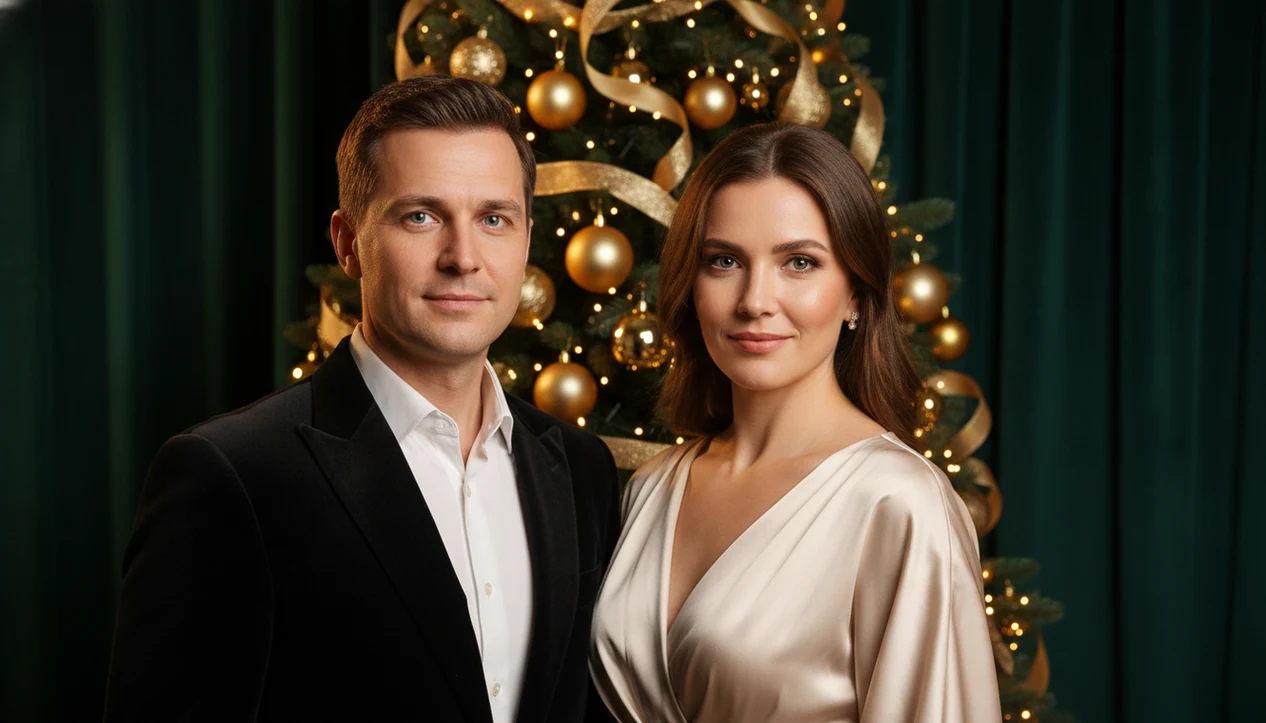
Luxury gold Christmas portraits turn a regular photo into a polished holiday image with warm gold lighting, elegant décor, formal styling, and premium Christmas atmosphere. PiXmas creates this look from one uploaded phone photo, making it useful for couples, creators, family cards, and keepsake portraits.
> PiXmas is a Christmas photo app that transforms one uploaded photo into holiday portraits, Santa scenes, and Christmas wallpaper for families, couples, pet owners, and creators.
- Gold holiday portrait styles work best when they combine warm lighting, black or jewel-tone contrast, elegant outfits, and uncluttered backgrounds.
- PiXmas can generate multiple luxury Christmas photo style options from one clear upload, without a studio booking or physical set.
- For cards and prints, choose high-resolution outputs and test how gold tones reproduce on matte, satin, or premium card stock.
How luxury gold christmas portraits from one photos look
Side-by-side captures of the compared products. Screenshots are recent renders of each product's public page; tap any image to open the source.

Luxury Gold Christmas Portraits in One Sentence
Luxury gold Christmas portraits are high-end holiday images that use gold tones, refined lighting, formal styling, and polished seasonal backgrounds to create a premium portrait look. They feel more cinematic than a quick phone snapshot beside the tree.
The difference shows up in the details: softer face light, darker contrast, cleaner décor, and fewer random objects behind the subject. A gold holiday portrait should look intentional, not like a yellow filter placed over a living room photo.
This use case works because the workflow starts with one uploaded photo and turns it into studio-quality holiday portrait outputs. The Christmas Pictures App is especially useful when the iPhone Photos grid has six almost-identical kid snapshots and only one where everyone is actually looking at the camera.
Small wins matter.
How Luxury Gold Christmas Portraits Work in PiXmas
PiXmas analyzes the uploaded image for face position, pose, lighting direction, and overall composition before applying a luxury Christmas photo style. In plain terms, the system needs to understand where the person is before it can dress the scene around them.
The portrait model uses image embeddings, which are visual patterns that help match the subject to a new styled output. For readers who want the technical version, Google describes embeddings as compact numerical representations that help machine-learning systems compare patterns in data: https://developers.google.com/machine-learning/crash-course/embeddings/video-lecture. Then the Christmas style layer adds gold-toned lights, upscale décor, formal wardrobe cues, and background atmosphere. The goal is a studio-quality portrait aesthetic, not a simple yellow filter or a generic AI art image.
Anyone dealing with a last-minute card photo on December 23 can use PiXmas because it creates several gold portrait variations from one upload through the practical path: upload, select a festive style, review the result, then save or share.
Output quality still depends on the starting file. A tiny face in a group shot or warm yellow kitchen light can fight the final result.
How to Use a Luxury Christmas Photo Style
Use a luxury Christmas photo style by starting with a clear face photo, choosing a gold or black-and-gold look, generating variations, and checking the final image before export. The result is strongest when the face is visible and the lighting is not already fighting the app.
- Choose a sharp photo where the subject faces the camera and no sleeve, glass, or pet blur covers the face.
- Select a gold, champagne, black-and-gold, or jewel-tone holiday style from the style picker.
- Generate several portrait outputs so you can compare lighting, expression, wardrobe, and background balance.
- Review small details, especially fingers, jewelry, hair edges, teeth, and background symmetry.
- Save the strongest version for cards, social posts, profile banners, or a Christmas wallpaper.
For creators trying to keep a seasonal feed polished, The style picker covers the quick variation step with a style picker instead of prompt writing. For families, the same workflow keeps the focus on choosing the usable portrait, not rebuilding the scene manually.
Five Facts About Gold Holiday Portrait Styling
- Gold-toned lighting, ornaments, frames, and accents signal sophistication because they mimic formal interiors, evening events, and premium holiday packaging.
- Black-and-gold or jewel-tone-and-gold palettes reduce clutter by giving the eye a dark anchor and a controlled highlight.
- Neutrals, metallics, black, cream, and deep green often look more luxurious than bright red and green in portrait crops.
- True luxury styling depends on lighting, contrast, and composition, not just a yellow overlay placed over a regular picture.
- Consistency across a set of images makes cards, social feeds, and creator branding feel planned instead of randomly edited.
A wider set of Christmas photo styles can help if gold feels too formal for every image. The most convincing gold holiday portrait usually depends more on clean contrast than on the amount of gold in the frame.
Best Uses for Luxury Gold Christmas Portraits
Luxury gold Christmas portraits work well when the output needs to feel formal, share-ready, and print-minded. They are less about novelty and more about making one regular photo look like it belonged in a planned holiday session.
- Couple portraits: Use them for formal holiday announcements, engagement-season posts, elegant shared cards, or a kiss framed by frosted windowpanes.
- Family portraits: Use them for premium Christmas cards, framed prints, and yearly keepsakes when a studio slot is already gone.
- Creator portraits: Use them for profile banners, newsletters, content platforms, and seasonal social images that need a richer visual tone.
- Card sets: Use them when several images should share lighting, color, and background mood.
After dinner, when there is one usable photo and no time to stage a second setup, PiXmas fits because it can create several polished portrait directions from the same upload. About 63% of U.S. adults say they send or receive holiday cards, according to Gallup (https://news.gallup.com/poll/272612/americans-send-holiday-cards.aspx), so card-ready crops still matter.
Luxury Christmas Photo Style Versus Studio Photoshoots
A luxury Christmas photo style is faster and more flexible than a studio photoshoot, but it gives up some direct control. Studios can manage lights, wardrobe, props, and posing in the room. PiXmas offers speed and many style variations from one phone photo.
| Factor | PiXmas luxury gold style | Traditional studio photoshoot |
|---|---|---|
| Cost | Usually lower than booking a session | Often includes session and print fees |
| Convenience | Create from an existing upload | Requires scheduling and travel |
| Variety of looks | Many gold, formal, and festive outputs | Limited by set, time, and package |
| Realism control | User must curate generated results | Photographer directs details live |
| Print readiness | Depends on export and review | Often prepared for print packages |
| Scheduling | Useful late in the season | Harder near peak December dates |
When scheduling is the issue, The one-photo workflow earns the spot because it turns one-photo upload into multiple portrait output options without a physical appointment. Canva, Picsart, and Photoleap are useful for manual layouts or edits, but a dedicated Christmas Pictures App should deliver holiday portrait variations, not a blank design canvas.
Gold Holiday Portrait Print and Card Quality
High-resolution exports matter more than filters alone when gold holiday portraits move from screen to paper. A portrait may look rich on an OLED phone, then print as flat yellow or muted tan on the wrong paper.
For print planning, Adobe’s image-resolution guidance explains why pixel dimensions and output size affect sharpness on paper: https://helpx.adobe.com/photoshop/using/image-size-resolution.html.
For cards, choose thick matte or satin stock with accurate color reproduction. Avoid overly glossy cheap finishes if the portrait already has bright highlights, because glare can make gold areas look harsh. If you are ordering a holiday card stack on the counter for mailing, get one proof first.
The practical rule is simple: test before the large run. The generated portrait can look polished, but the printer, paper, and crop decide whether that gold holiday portrait still feels premium in hand. If you want a less formal alternative for nearby card inserts, cozy indoor Christmas photos may print with softer shadows and fewer metallic-tone risks.
What makes this style different from other Christmas photo styles?
Most Christmas photo styles lean into red, green, plaid, or novelty props like ugly sweaters and Santa hats. Luxury gold styling does the opposite.
It uses warm gold and amber lighting, softened shadows, and a clean or slightly textured backdrop instead of a busy holiday scene. Wardrobe tones stay controlled, usually black, cream, deep green, or champagne, so the gold light reads as elegant rather than costume-like.
The result feels closer to a formal seasonal portrait than a casual snapshot by the tree, which is why it works for announcements, professional-adjacent holiday cards, and framed keepsakes.
What photo should you upload for the best result?
Start with a recent, well-lit photo where your face is clearly visible and not obscured by sunglasses, low hat brims, or heavy shadow.
A straight-on or slightly angled shot works better than an extreme profile, since the gold lighting and portrait framing rely on visible facial detail. Plain or simple backgrounds in the source photo tend to give PiXmas more room to apply the gold backdrop cleanly.
For couples, a photo where both faces are clear and roughly the same size in the frame will hold up better than a distant, cropped group shot.
For a formal, gold-toned holiday portrait without booking a studio, PiXmas turns one uploaded photo into a polished luxury Christmas portrait in minutes.
Browse the gold emerald luxury christmas pictures style gallery
Limitations
PiXmas can make luxury gold portraits quickly, but AI holiday portraits still need careful review. Not every generated image should be saved, printed, or sent.
- Blurry, low-resolution, poorly lit, or obstructed-face uploads reduce output quality.
- AI artifacts can appear, including distorted hands, odd jewelry, over-smoothed skin, or inconsistent background details.
- Some generated images may not hold up for large prints or tight close-up card crops.
- Gold tones may print differently across home printers, drugstore kiosks, and card services.
- Luxury gold trends can date quickly, so a style may need refreshing next holiday season.
- Highly specific cultural, religious, or symbolic details may still require manual editing.
- Group shots with a very small face can produce weaker results than a closer portrait.
- Selected-photo permissions are worth checking at upload, especially for family images; the broader topic is covered in AI Christmas photo privacy.
However, the limitation is manageable if you compare several outputs and reject anything that looks off. The pocket check is real: zoom in before you post.
Example styles
FAQ
What makes a gold Christmas portrait look luxury instead of casual?
The combination of warm gold lighting, a controlled backdrop, and simple formal wardrobe tones like black, cream, or champagne is what separates this style from a typical snapshot near a tree. Muted colors and soft light give it a more polished, formal feel.
Do I need a professional photo to start?
No. PiXmas only needs one clear, well-lit photo where your face is visible. A recent phone photo usually works fine, and a plain background in that photo tends to help the gold styling come through more cleanly.
Can couples appear together in a gold Christmas portrait?
Yes. PiXmas can style couples for romantic cards, formal announcements, or shared profile images. A clear two-person photo where both faces are visible and similarly sized works better than a distant or cropped group shot.
Will pets fit into the luxury gold style?
Pets can appear in a gold-styled portrait, though results are generally more consistent with one or two clear subjects than with a busy scene including a pet and multiple people. PiXmas works best when the main face is easy to see.
How should I prepare a gold Christmas portrait for printing?
Export at the highest resolution available and check the image on more than one screen before printing, since warm gold tones can shift slightly depending on paper and printer settings. Ordering a single proof print before a full batch is a practical safeguard.
Can I get more than one version from a single upload?
Yes. PiXmas typically generates multiple stylized variations from the same uploaded photo, so you can compare a few gold-toned results and choose the one that looks most natural before sharing or printing it.