
Pajama Morning Christmas Photos From One Uploaded Picture
Quick answer: Pajama morning Christmas photos are cozy, styled images that place you, your family, or your pet in matching or coordinated pajamas near a tree, fireplace, gifts, or couch. Using PiXmas, you upload one existing photo and the app generates the pajama-morning scene around it, so you skip matching outfits, staging a room, or scheduling a shoot. The result mimics a relaxed Christmas morning without a real photoshoot.
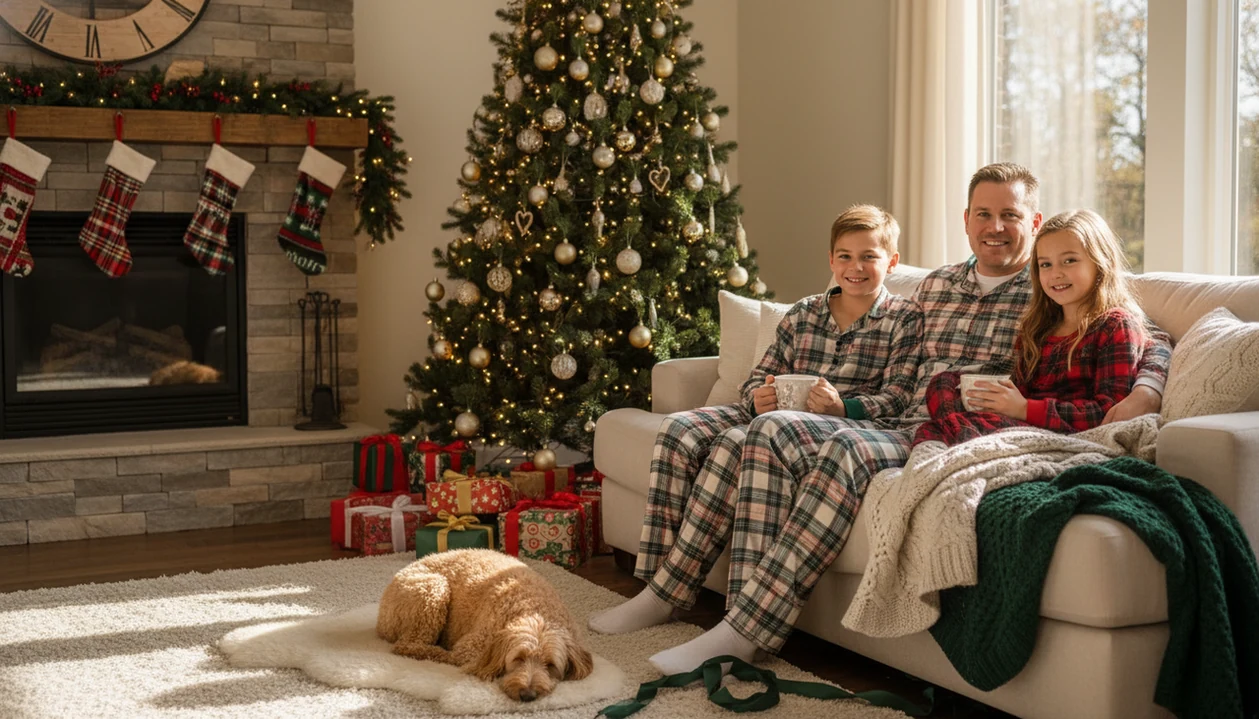
With PiXmas, pajama morning Christmas photos turn a simple snapshot into cozy holiday images with the tree, gifts, couch, fireplace, Santa scenes, or Christmas-card styling. You can upload one existing phone photo and create polished matching-pajama Christmas portraits without staging a full Christmas morning shoot.
> PiXmas is a Christmas photo app that transforms one uploaded photo into holiday portraits, Santa scenes, and Christmas wallpaper for families, couples, pet owners, and creators.
- Use coordinated pajamas, simple colors, and one clean source photo to make the Christmas morning aesthetic look intentional.
- One pajama photo can become multiple festive scenes for cards, social posts, wallpapers, and keepsakes.
- The best results still start with a clear, well-lit, uncluttered image, even when an AI Christmas photo app handles the holiday styling.
How pajama morning christmas photos from existing pictures look
Side-by-side captures of the compared products. Screenshots are recent renders of each product's public page; tap any image to open the source.

How pajama morning Christmas photos work in a Christmas morning photo app
Pajama morning Christmas photos work by using one clear source image, detecting the people or pets in it, preserving recognizable faces, then rendering them inside festive morning scenes. The practical path is upload, select a festive style, review the portrait output, then save or share.
The image model reads visual cues from the upload, including face position, clothing shape, body posture, and lighting. In plain terms, it needs a usable photo before it can make a believable tree, couch, fireplace, or Santa scene. Matching plaid pajamas on the couch usually give the system better signals than a cropped group shot where one face is tiny.
Christmas morning imagery is familiar because it appears in a widely shared tradition. The National Retail Federation reported that 91% of U.S. adults celebrate Christmas in its 2022 holiday report source.
If the priority is fast Christmas morning variety, one-photo generation works best for cards, wallpapers, Santa scenes, and portrait outputs that do not need to match a real room exactly.
Best matching pajama Christmas photos for families, couples, kids, and pets
Matching pajama Christmas photos do not need identical pajamas. Coordinated red, cream, navy, green, plaid, stripes, and soft neutrals often look more natural than everyone wearing the exact same print.
- Family gift-opening portraits: Multigenerational families can use couch or tree-side poses for holiday cards and framed prints.
- Couple coffee-by-the-tree photos: Couples can choose softer indoor scenes for profile photos, cards, or a phone-friendly Christmas wallpaper.
- Kids-in-pajamas scenes: Siblings work well in bedhead, gift-opening, or Santa surprise scenes, especially when one photo catches everyone looking.
- Pet-friendly pajama portraits: Pets can join when they are visible and calm, like a golden retriever in fake snow or a cat tucked near a blanket.
Parents trying to make one shareable image from six almost-identical kid snapshots should test family, kids-only, and Santa options from the same source photo instead of rebuilding the scene each time.
For broader seasonal looks beyond pajamas, the same source photo can also branch into Christmas photo styles.
How to use PiXmas for pajama morning Christmas photos
Start with the photo you already have, then test several Christmas morning scenes before choosing the final card or print image. Most households already have the capture device nearby; the U.S. Census Bureau reported that 92% of U.S. households had at least one smartphone user by 2021 source.
- Choose a clear pajama photo where faces are sharp, eyes are visible, and pajamas are not hidden.
- Crop distractions such as cords, laundry piles, and the blurry sleeve at the edge of the frame.
- Upload the image to PiXmas and check the photo-access prompt before allowing selected photos only.
- Select Christmas morning styles such as couch, tree, fireplace, gift-opening, or Santa portrait scenes.
- Save several versions for cards, sharing, wallpaper, or printing after comparing the face details.
Solo creators looking for a Christmas morning photo app can use this mobile workflow to move from camera roll to Christmas portrait without prompt writing.
Test more than one scene.
Pajama morning Christmas photo ideas that look cozy instead of staged
Cozy pajama morning Christmas photos look believable when the scene includes small interactions, not stiff posing. The goal is warm and print-minded, not a catalog set.
- Couch cuddle: Let shoulders touch, keep hands relaxed, and add one blanket instead of five props.
- Tree-side gift opening: Use half-opened gifts and turned heads to make the moment feel active.
- Bedhead morning scene: Keep the hair a little imperfect and let the pajamas do the seasonal work.
- Fireplace portrait: Choose soft sitting poses and avoid dramatic angles that make faces look warped.
- Santa surprise scene: A red velvet Santa chair beside tiny sneakers can read as magical without becoming noisy.
Gift-opening scenes make sense culturally. A 2023 Pew Research Center survey found that 82% of U.S. adults expected to give or receive Christmas gifts source.
Families who want warmth over studio stiffness often do better with cozy indoor Christmas photos because the setting supports pajamas, blankets, pets, and softer expressions.
Pajama morning Christmas photos in PiXmas versus a real photoshoot
This workflow is useful for fast variety from one existing pajama photo, while a real photoshoot is better for exact home memories and documentary moments. Good Christmas photo apps deliver reusable portrait outputs, not a replacement for every family photograph.
| Factor | PiXmas pajama workflow | Real pajama photoshoot |
|---|---|---|
| Setup time | Minutes after choosing a source photo | Longer planning, cleaning, lighting, and scheduling |
| Cost | App-based creation from existing images | Photographer fee, props, travel, or studio costs |
| Location control | Generated tree, couch, fireplace, Santa, or snow scenes | Exact home, studio, or outdoor location |
| Style variations | Many outputs from one upload | Limited by time, set, clothing, and cooperation |
| Realism | Strongest with clear faces and simple poses | Strongest for true family behavior and movement |
| Best use case | Cards, wallpapers, Santa scenes, polished portraits | Large groups, toddlers in motion, real Christmas morning memories |
For last-minute holiday cards, this is often easier than staging a home shoot because the same source image can produce a card image, wallpaper, and Santa portrait in one workflow.
Photo checklist for better matching pajama Christmas photos
Better matching pajama Christmas photos start with light, faces, and clothing clarity. AI styling helps, but it cannot fully rescue a dark photo with hidden faces and busy patterns.
Use window light when possible. Avoid harsh overhead shadows from warm yellow kitchen light, especially if one person is already partly in shadow. Check sharpness by zooming into eyes before uploading. If the face goes soft, choose another frame from the iPhone Photos grid.
Keep backgrounds simple. Laundry baskets, visible cords, and toy piles can confuse the final scene, even if they feel normal in the room. Make sure pajama tops are visible, not covered by bulky coats or blankets.
Red, green, cream, navy, plaid, and neutral palettes blend easily into holiday scenes. Matching pajama Christmas photos can be shot on December 10 and still styled to look like Christmas morning.
Small messes show up.
Related PiXmas features for Christmas cards, Santa scenes, and wallpaper
The same uploaded pajama photo can become a holiday card image, Santa portrait, snowy cabin scene, fireplace portrait, or Christmas wallpaper. The workflow works best when you treat the upload as a reusable content set, not a single throwaway picture.
A practical set might include one group shot, one parents-only shot, one kids-only shot, one pet shot, and a few individual portraits. That gives you options for cards, lock screens, social posts, and small framed gifts. If someone asks, “Can I use this for a card and a wallpaper?” the answer usually depends more on crop and aspect ratio than on the pajama style.
Grandparents who want quick share-ready images usually need three exports from the same upload: a card crop, a phone wallpaper crop, and one Santa-style portrait for texting.
For a different seasonal direction, a pajama image can also move into a rustic cabin Christmas photo style or outdoor snow Christmas backgrounds.
What makes a pajama morning style different from a posed holiday photo?
A pajama morning photo is meant to look unplanned, even though it is styled. The strongest versions avoid stiff, camera-aware posing and instead lean on natural gestures like sitting close, holding a mug, or mid-laugh near the tree.
Because PiXmas builds the scene from your uploaded photo rather than a live shoot, it can apply soft morning-style lighting and a cozy backdrop without needing you to actually wake up early, decorate a room, or coordinate pajamas in person.
What kind of source photo works best for this style?
A clear, front-facing photo with visible pajama details (collar, plaid, stripes, or a graphic print) gives the most consistent result. Even lighting and an unobstructed face matter more than the quality of the room in the original picture, since the background is restyled.
Photos where hands or arms cover the pajama pattern, or where the face is partially turned away, tend to produce less reliable results.
For a cozy pajama morning look without coordinating outfits or staging a real scene, PiXmas turns one uploaded photo into a styled Christmas morning image quickly, with the understanding that results are AI-generated and work best from a clear, front-facing source photo.
Browse the pajamas morning bedtime christmas pictures style gallery
Limitations
Generated pajama morning scenes are faster, but they still depend on the source photo and the style you choose. They are not the right answer for every family image.
- Blurry, dark, low-resolution, or heavily filtered photos may produce weaker facial detail.
- Clutter, hidden faces, extreme poses, and busy pajama patterns can reduce realism.
- Some people dislike matching pajamas or find the whole aesthetic too staged.
- AI scenes may not preserve your exact home layout, gift wrap, ornament placement, or documentary Christmas morning details.
- Large groups, babies, pets in motion, and complex hands can be more challenging.
- A real photographer may be better for toddlers running, grandparents interacting, or one-time family gatherings.
- Canva, Picsart, Photoleap, and similar editors may offer more manual layout control if you want to build a card design from scratch.
- Review AI Christmas photo privacy before uploading sensitive family or child images.
For families who need exact memories, a real camera roll still matters more than generated scenery because documentary value comes from the moment itself.
Example styles
FAQ
What exactly is a pajama morning Christmas photo?
It is a styled holiday image that shows the look of a relaxed Christmas morning: matching or coordinated pajamas near a tree, gifts, fireplace, or couch. It can be captured live or generated from an existing photo to skip the staging and scheduling.
Do pajamas in the photo need to match exactly?
No. Coordinated colors, stripes, plaids, or neutrals typically look as polished as identical matching sets. PiXmas works from whatever pajama details are visible in your uploaded photo rather than requiring a specific matching set.
Can I use an older photo instead of a new one?
Yes, an older photo can work well as long as faces are clear, lighting is reasonably even, and pajama details are visible. Screenshots, heavily filtered images, and very small faces in group shots tend to produce weaker results.
Will a photo with the whole family work the same as a solo photo?
Group photos can work, but results may be less consistent than a solo or couple photo, especially if faces are small or turned. For the most reliable pajama morning look with PiXmas, a clear, front-facing photo helps.
Can pets be included in a pajama morning photo?
Yes, pets can be included if they are clearly visible, reasonably still, and not blocking anyone's face in the original photo. Fast-moving or turned-away pets may need a clearer follow-up photo for a better match.
Can I turn the finished pajama photo into a Christmas card?
Yes, once PiXmas generates the styled pajama morning image, it can be saved and used for holiday cards, prints, or digital sharing just like any other finished photo.