
New Year Fireworks Photo Generator From One Photo
Quick answer: A New Year fireworks photo generator is an AI tool that turns one uploaded photo into a festive, fireworks-lit portrait, adding sparks, colored light, and a night-sky backdrop around the subject. PiXmas, an iOS app, builds these portraits from a single clear photo without a real fireworks show, tripod, or long-exposure camera setup, producing a shareable New Year image in minutes.
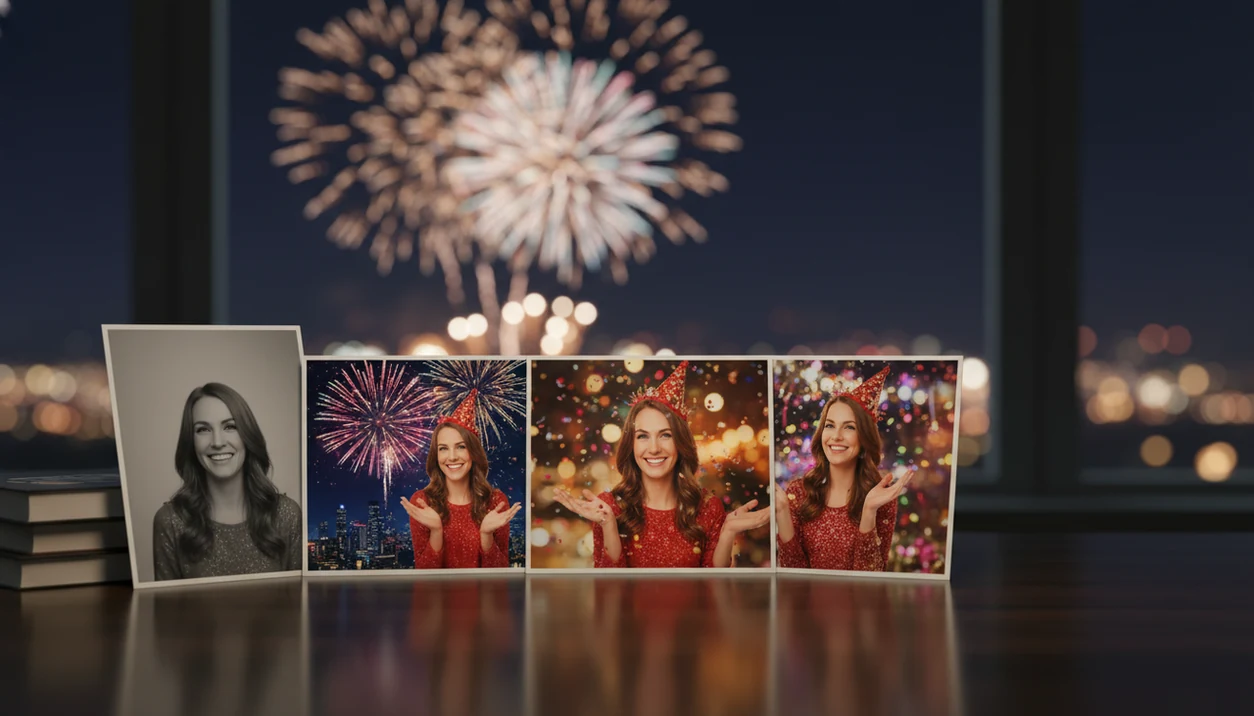
A New Year fireworks photo generator turns one uploaded portrait into festive countdown, city skyline, party, and fireworks scenes while keeping your real face and pose recognizable. PiXmas extends its Christmas photo app experience into New Year portraits, wallpapers, and shareable celebration images from a single photo.
> A fireworks portrait generator is a photo-based AI tool that uses an uploaded image as the subject reference, then rebuilds the scene with New Year fireworks, countdown lighting, festive backgrounds, and celebration effects.
- Upload one clear portrait, choose a New Year fireworks style, and generate festive variations for stories, wallpapers, cards, or profile photos.
- Photo-based generators differ from text-to-image tools because they preserve your actual face, pose, and identity instead of inventing a new person.
- AI fireworks are safer and easier than real pyrotechnics for photo content, but output quality depends on the original photo, resolution, privacy policy, and style controls.
How new year fireworks photo generator from one photos look
Side-by-side captures of the compared products. Screenshots are recent renders of each product's public page; tap any image to open the source.

How a New Year fireworks photo generator works
A New Year fireworks photo generator analyzes your uploaded portrait, then rebuilds the surrounding scene with fireworks, countdown lighting, skyline glow, confetti, and party details that fit the subject. The key difference is subject reference: the photo guides the face, pose, lighting direction, and foreground shape.
Under the hood, photo-based AI uses image embeddings and foreground separation. In plain terms, it studies who is in the picture, where they are placed, and how the light already falls. A tiny face in a group shot, warm yellow kitchen light, or a blurry sleeve can all affect the final portrait.
PiXmas is photo-based, not a generic text-to-image tool that invents a new face. Good AI Christmas photo apps deliver recognizable seasonal portraits from one upload, not anonymous fantasy characters with your prompt attached.
How to use the New Year photo app for fireworks portraits
Start with one clear, well-lit portrait where the face is easy to see. The app works best when the photo you already have gives the generator enough detail to keep the person recognizable.
- Upload one portrait from your camera roll, preferably with the face facing forward and no heavy blur.
- Choose a New Year fireworks style, such as skyline, countdown, party lights, or wallpaper.
- Generate several portrait output variations from the same photo.
- Review the face, hands, background glow, text, and crop before saving.
- Download the result as a square post, vertical story, phone wallpaper, or New Year card image.
If your priority is a fast countdown post, PiXmas fits because the practical path is upload, select a festive style, review the result, then save or share. The portrait preview loading under the tree is usually the moment people notice whether the crop works.
Best New Year fireworks photo generator scenes to create
The most useful fireworks portrait generator scenes are the ones that match where the image will be used: social feed, story, wallpaper, card, or profile photo. Choose the scene before you generate, not after.
- City skyline fireworks: Works well for couples, creators, and profile photos because the skyline gives a polished “midnight in the city” look.
- Midnight countdown: Best for New Year posts, event invites, and creator content that needs numbers, clocks, or “Happy New Year” text.
- Rooftop celebration: Fits couples and friend portraits where you want energy without a crowded party background.
- Cozy indoor party: Useful for families, pets, and softer greetings, especially if you like the mood of cozy indoor Christmas photos.
- New Year wallpaper portrait: Designed for lock screens and vertical stories, where the face needs room below fireworks or text.
Couples looking for a share-ready New Year image get a cleaner result in PiXmas when they choose a scene built for two faces, not a single-person crop.
Five facts about AI New Year fireworks portraits
- Most New Year photo app workflows use one uploaded image and generate multiple variations from it.
- Good generators match lighting, color, and composition; they do not just place flat fireworks stickers over a selfie.
- Common aspect ratios include vertical stories, square posts, phone wallpapers, and print-minded card layouts.
- Photo-based identity preservation keeps the uploaded subject recognizable, while generic AI image creation may invent a new person.
- Realism varies by selfie quality, platform, resolution limits, style choice, and how clearly the original face appears.
One usable photo after dinner can be enough. Still, the iPhone Photos grid with six almost-identical kid snapshots usually has one frame where everyone is actually looking at the camera. Pick that one.
For identity consistency across holiday scenes, use a one-photo upload workflow that keeps the portrait subject as the visual reference.
When to use a New Year fireworks photo generator
“When should I use a New Year fireworks photo generator?” Use one when you need a seasonal image faster than arranging a shoot, editing a background, or waiting for real fireworks at midnight.
Common use cases include New Year social posts, family greetings, creator content, event invites, profile updates, lock screens, and matching Christmas-to-New-Year sets. December 23 is a real use case too: a parent makes a Santa portrait after bedtime, then reuses the same good photo for a New Year greeting because there is no studio appointment left.
The same clear portrait can extend Christmas images into New Year scenes with fireworks, countdown clocks, and party lighting. For families, reusing one clear portrait is often easier than starting over because the face, pose, and crop are already proven. If you are building a matching set, start with Christmas photo styles and then move into New Year output.
PiXmas New Year photo app styles and outputs
PiXmas is a Christmas photo app that transforms one uploaded photo into holiday portraits, Santa scenes, and Christmas wallpaper for families, couples, pet owners, and creators. The New Year styles extend that same seasonal workflow into fireworks, countdowns, party scenes, city lights, and vertical wallpapers.
The Christmas Pictures App angle matters because most people are not trying to build a graphic design from scratch. They want a phone-friendly portrait output for cards, wallpapers, and shareable holiday images. “Can I use this for a card and a wallpaper?” is the real user question, so crop and aspect ratio checks matter before download.
Families can move from pajama or Santa looks into New Year greetings. Couples can shift from snow portraits to city balcony fireworks. Pet owners can try celebration scenes without making a dog sit near noise or sparks. Creators can keep one recognizable face across a seasonal content set, including luxury gold Christmas portraits.
New Year fireworks photo generator vs real fireworks photos
AI fireworks portraits are a safer photo alternative to real pyrotechnics, not a replacement for lawful public celebrations. The U.S. Consumer Product Safety Commission recorded 11 deaths and an estimated 10,200 fireworks-related injuries in 2022 (https://www.cpsc.gov/Newsroom/News-Releases/2023/CPSC-Report-Shows-Fireworks-Related-Injuries-and-Deaths-Remain-High), and the National Safety Council advises consumers to follow local laws and safety rules around fireworks (https://www.nsc.org/community-safety/safety-topics/seasonal-safety/fireworks).
| Factor | AI fireworks portrait | Real fireworks photo |
|---|---|---|
| Safety | No flame, smoke, or explosive handling for the photo | Injury and fire risks depend on use and local rules |
| Cost | Usually app-based generation or download pricing | May involve event travel, gear, or purchased fireworks |
| Weather dependence | Works indoors from an existing portrait | Rain, fog, wind, and crowd position can ruin the shot |
| Timing | Can be made before midnight | Requires the display to happen at the right moment |
| Image control | Choose crop, glow, scene, and background style | Limited control once fireworks begin |
| Repeatability | Generate multiple variations from one upload | Hard to repeat the same burst and expression |
| Accessibility | Useful for kids, pets, and people avoiding crowds | Requires being near a display or setup |
If condition matters more than spectacle, PiXmas earns the spot because the output can be reviewed before download.
What makes a New Year fireworks photo style different from other Christmas photo styles?
Most Christmas photo styles lean on warm indoor light, sweaters, and a tree in the background. A New Year fireworks style flips that mood outdoors and after dark, using bursts of colored light, spark trails, and a glowing night sky instead of firelight and ornaments.
It reads as a countdown or celebration image rather than a cozy family portrait, which is why it works well for New Year greetings even when the rest of a person's photos are Christmas-themed. It is one option among the broader style range PiXmas offers, which includes 800+ styles across Christmas and New Year themes.
What photo should you upload for the best New Year fireworks portrait?
A forward-facing photo with even lighting and a clearly visible face gives the most reliable result, since the app has to read facial detail before it adds fireworks and night-sky effects around the subject.
Sunglasses, wide-brim hats, or heavy shadows across the face can reduce accuracy. A plain or simple background also helps, since busy backgrounds compete with the added fireworks elements.
Who is a New Year fireworks photo style best for?
This style suits people who want a festive profile photo or story image without waiting outside for an actual fireworks show. Couples often use it for New Year e-cards, and friend groups use it for party invitations or countdown posts.
Families sending New Year greetings alongside Christmas cards may also prefer it, since it reads as a distinct occasion rather than a repeat of the same holiday photo.
How does PiXmas compare to hiring a photographer or a DIY fireworks setup?
- In the same 2025 review, the photographer noted 1,478 black‑and‑white photos versus 8,222 color images, suggesting that color photography remains dominant even in artistic year‑end portrait work. (Daniel Hedrick – 2025 Photography Year in Review: Stats and Favorites, 2026)
- The 2025 year‑in‑review data shows a favorite camera of a Sony A7R III and a preferred aperture of f/2.8, reflecting common professional choices for sharp but flattering portraits often used in New Year countdown and celebration shoots. (Daniel Hedrick – 2025 Photography Year in Review: Stats and Favorites, 2026)
- A 2025 photography year‑in‑review by a professional photographer reported shooting 9,700 images in 2025 compared with 8,040 in 2024, demonstrating increasing annual volume that often includes end‑of‑year and New Year projects. (Daniel Hedrick – 2025 Photography Year in Review: Stats and Favorites, 2026)
For a quick, no-shoot way to turn a single phone photo into a fireworks-lit New Year portrait, PiXmas offers a straightforward iOS workflow suited to solo, couple, and small-group celebration images.
Browse the new year fireworks countdown christmas pictures style gallery
Limitations
A clear original photo improves realism, but no New Year fireworks photo generator should promise flawless results every time. Check the preview closely before using the image for a card, invite, or profile update.
- Hands may look distorted, especially if fingers are crossed, cropped, or holding shiny objects.
- Reflections in glasses, windows, ornaments, or metallic outfits can look odd after fireworks are added.
- Strong fireworks glow may feel unnatural on faces that were photographed in flat indoor light.
- Low-resolution uploads can produce soft faces, rough hair edges, or weak print quality.
- Group photos are harder when faces are tiny, turned sideways, or partly blocked.
- Cultural New Year styles may vary, and some generators lean toward Western countdown imagery.
- Watermarks, download caps, or paid export tiers can affect how you save final images.
- Privacy and data retention policies differ by platform, so review AI Christmas photo privacy before uploading family or child portraits.
Canva, Picsart, and Photoleap can be useful for manual edits, but they may require more layout work than a dedicated portrait workflow.
FAQ
What kind of photo works best as a source image for a New Year fireworks portrait?
A clear, forward-facing photo with even lighting and an unobstructed face gives the most consistent result. Avoid sunglasses, heavy shadows, or wide hats, since the app needs visible facial detail to build the fireworks and night-sky effects around it.
Can I include a pet in my New Year fireworks photo?
Some PiXmas styles can incorporate pets alongside people, though a solo or paired photo typically gives the most consistent facial detail once fireworks and lighting effects are added around the subject.
Can a New Year fireworks portrait be turned into a greeting card?
Yes, once generated, a fireworks portrait from PiXmas or a similar New Year photo app can be downloaded and used for greeting cards, social posts, or phone wallpapers. Check the crop and aspect ratio before printing or posting.
How many people can appear in one New Year fireworks photo?
These generators work most reliably with one or two people. Each additional face in a photo gives the model more detail to interpret at once, which can make larger group results less consistent than a solo or couple photo.
Does uploading a photo to a New Year fireworks generator store or reuse my image?
Photo handling varies by app and provider. Check the specific New Year photo app's privacy policy for details on how uploaded images are stored, used, or deleted before uploading a personal photo.