
AI Christmas Photo App Vs Filter App For Real Holiday Portraits
An AI Christmas photo app rebuilds an uploaded image as a new holiday portrait, while a filter app decorates the existing photo with frames, stickers, overlays, or color effects. Choose AI for a different setting, outfit, or portrait style; choose a filter when the original photo already works and only needs a festive touch. Review likeness and export quality before printing either result.
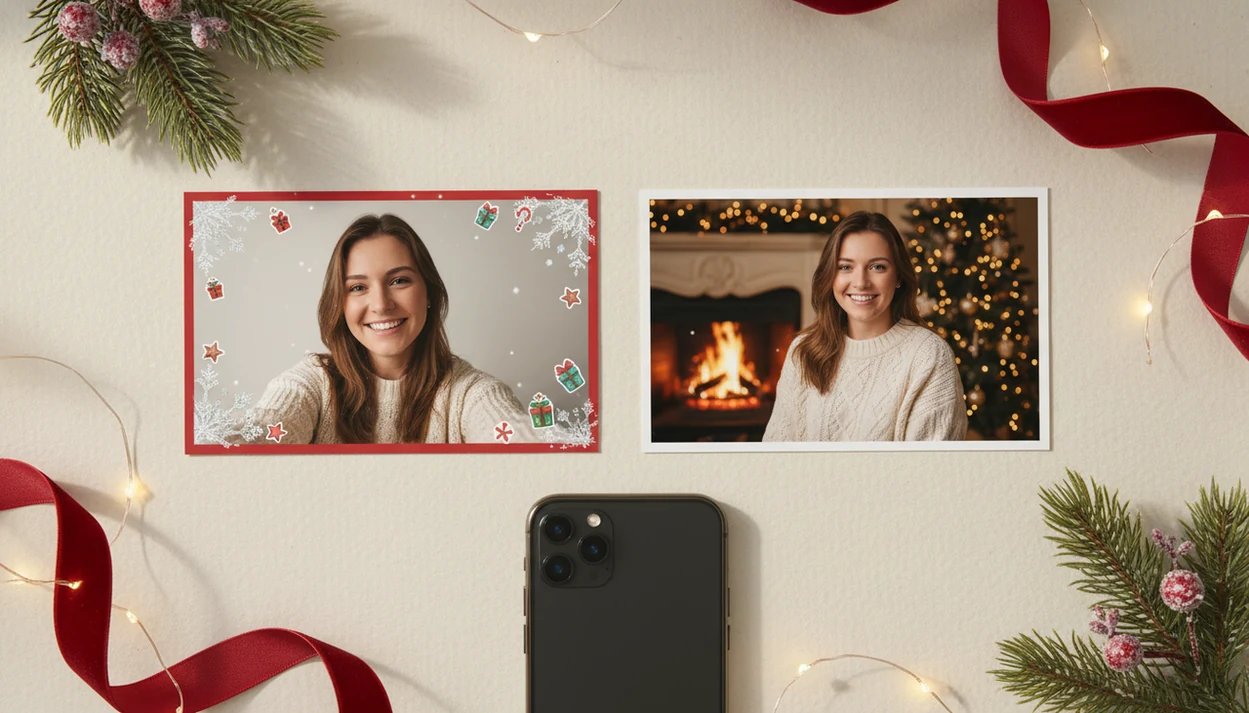
An AI Christmas photo app is the better choice when you want a new holiday portrait, Santa scene, festive outfit, or card-ready image; a filter app is better when you only want to decorate the original photo quickly.
> PiXmas is a Christmas photo app that transforms one uploaded photo into holiday portraits, Santa scenes, and Christmas wallpaper for families, couples, pet owners, and creators.
- Choose an AI Christmas photo app when you want the image rebuilt into a new festive portrait or scene.
- Choose a filter app when you want quick stickers, frames, snow overlays, borders, or color effects.
- For realistic holiday cards and studio-style portraits, likeness preservation and export quality matter more than the number of filters.
AI christmas photo app vs filter app, side by side
Side-by-side captures of the compared products. Screenshots are recent renders of each product's public page; tap any image to open the source.

AI Christmas Photo App Vs Filter App At A Glance
An AI Christmas photo app generates a new holiday image from your source photo, while a filter app decorates the original photo. The difference matters most when you are making a card, wallpaper, or portrait that should look newly staged.
| Comparison point | AI Christmas photo app | Christmas filter app |
|---|---|---|
| Output type | New generated portrait or scene | Original photo with effects |
| Likeness | Attempts to preserve the uploaded face | Keeps the original face unchanged |
| Scene changes | Can change background, outfit, lighting, props | Usually adds overlays or borders |
| Speed | Often needs preview and selection time | Usually faster |
| Control | Style picker or generation choices | Stickers, frames, sliders |
| Realism | Can look portrait-like, but varies | Real face, less rebuilt scene |
| Best use cases | Santa scenes, cards, wallpapers, family portraits | Casual posts, quick festive edits |
Phone-first editing matters too; Pew reports that 91% of U.S. adults own a smartphone, which shapes how people capture, edit, and share holiday images source.
How AI Christmas Photo Apps And Filter Apps Work
AI Christmas photo apps work by reading the uploaded image, identifying the subject, then generating a new holiday version in the selected style. Filter apps work more simply: they keep the original photo and place effects, templates, stickers, frames, or color changes on top.
In an AI workflow, the app looks for identity cues such as face shape, hair, pose, clothing edges, and scene context. It may turn those cues into image features, meaning a machine-readable summary, then use generation to create a Santa portrait, snowy background, festive outfit, or wallpaper composition. Clear lighting and a visible face help because the app has more reliable detail to preserve likeness; shadows, blur, sunglasses, or heavy crops give it less to work with.
- Upload a clear source photo with the face visible.
- Select a holiday style, such as portrait, Santa scene, card image, or wallpaper.
- Generate previews that rebuild the scene rather than only decorating it.
- Review common trouble spots, including hands, glasses, pets, tiny faces, and group shots.
- Save the strongest result after checking likeness and background details.
Many modern apps blend these methods, so one product may include AI generation, fixed templates, frames, stickers, and filter effects in the same editor.
Christmas Filters Vs AI Photos: The Real Output Difference
Christmas filters vs AI photos is a difference between decorating a photo and generating a new holiday version of it. A filter usually keeps the same room, pose, lighting, and face, then adds snowflakes, Santa hats, frames, stickers, borders, or red-green color grading.
AI photos can change more of the image. They may restyle the background, outfit, lighting, pose style, and holiday setting while using the uploaded face as the source. That is why a warm yellow kitchen snapshot can become a fireplace portrait, if the input is clear enough.
Watch the wording. Some apps use “AI” for basic effects, so judge the result rather than the label. If the output is just a border on the same picture, it behaves like a filter. If the scene is rebuilt, it is closer to AI generation.
Image-To-Image AI Christmas Photo Generation Behind The Scenes
Image-to-image AI Christmas photo generation starts with a source photo, analyzes the subject, and creates a new festive image from that visual reference. In plain terms, the model looks for identity cues, pose structure, and image features, then restyles them into a Christmas setting.
The technical idea is often described through image embeddings and generative diffusion. A simple translation: the system converts the photo into patterns it can work with, then builds a new image that follows the chosen style. An AI Christmas photo app can use this kind of one-photo upload workflow for holiday portraits, Santa scenes, and Christmas wallpaper.
Template-based editing works differently. It places fixed overlays on top of the original, like a frame or snowfall layer. Generative models can do more, but they can also misread hands, glasses, hair, pets, or tiny faces in a group shot.
The blurry sleeve matters.
AI Photo Generator Vs Filter Use Cases For Holiday Portraits
AI photo generator vs filter choices usually turn on the final use. AI wins when the original room, outfit, lighting, or background is not festive enough for the image you want.
- AI is stronger for studio-style portraits because it can rebuild the setting, not just tint it.
- AI fits Santa scenes because the sack, chair, workshop, or snowy background can be generated.
- AI helps with couple portraits, pet portraits, and family images when you want a new seasonal look.
- AI works well for wallpapers because the composition can be designed for a phone screen.
- AI is often better for card-ready images when likeness and export size both hold up.
If the priority is a last-minute holiday card image, an AI Christmas photo app fits because the practical path is upload, select a festive style, review the result, then save or share. For broader install guidance, the download AI Christmas photo app page covers the setup path.
Christmas Filter App Use Cases For Quick Festive Edits
Filter apps win when speed and preservation matter more than transformation. They are useful when you like the original photo and only want a festive layer for a casual social post.
Common outputs include snowflakes, Santa hats, frames, stickers, red-green color effects, string lights, and borders. A filter is also less likely to alter identity because it sits on top of the photo rather than rebuilding the face or body. That makes it helpful for the one shot where everyone is smiling and you do not want facial changes.
People are also online almost constantly. Pew reports that 46% of U.S. adults describe their internet use that way, which helps explain demand for fast, share-ready edits source.
Parents who only need a playful story post may be better served by a filter app than by waiting for multiple generated previews.
6 Steps To Use An AI Christmas Photo App Or Filter App
Choose the outcome before choosing the app. A decorated original, portrait, Santa scene, wallpaper, and holiday card image each need a different workflow.
- Choose the final use first: decorated original, portrait, Santa scene, wallpaper, or card image.
- Select an AI Christmas photo app for a rebuilt scene, or a filter app for overlays and frames.
- Upload a clear, well-lit photo where the face is visible and not heavily cropped.
- Compare previews for likeness, hands, accessories, pets, clothing, and background details.
- Check the export size before sharing, printing, or ordering a card.
- Save the best version, then test it in the place you will use it: card preview, phone wallpaper, profile image, or social post.
The right fit for families making a Santa portrait after bedtime on December 23 is the AI option because it starts with the phone photo already in the camera roll and turns it into a share-ready Santa scene. For kid-focused scenes, the download Santa photo app workflow is the closer match.
AI Christmas Photo App Vs Filter App Decision Checklist
Should you pick an AI Christmas photo app or a filter app? Pick AI for a reimagined holiday portrait; pick a filter for a decorated original.
Use AI for family portraits, couple images, pet Christmas scenes, creator profile photos, wallpapers, and holiday cards where the background or outfit needs to change. Use a filter when the original photo is already strong and only needs sparkle, a frame, or a quick seasonal mood.
It does not guarantee perfect realism, so preview the face and small details before exporting.
Who Should Pick An AI Christmas Photo App Or A Filter App
Pick an AI Christmas photo app when you need a new holiday image, not just a dressed-up snapshot. Pick a filter app when the photo already works and you only need a fast festive layer.
The AI route fits families trying to make a card from a normal phone photo, couples who want a polished seasonal portrait, pet owners who want a Santa scene, creators refreshing a profile image, and last-minute card makers who need a fireplace, snowy street, or wallpaper-style composition without staging a shoot. It is also the better match for Christmas cards, portraits, Santa scenes, phone wallpapers, and profile images where the background, outfit, or mood should change.
Use this quick split before you upload:
- Choose AI if the room, clothing, or background is the main problem.
- Choose AI if the final image needs to look like a new portrait or card design.
- Choose a filter if the faces are perfect and you want to preserve them exactly.
- Choose a filter if you only need a quick post, frame, snow effect, or sticker.
- Skip both for very dark, blurry, private, or sensitive photos unless you are comfortable with the app’s upload policy.
Evidence Behind AI Christmas Photos And Filter Apps
The evidence supports the main split: AI Christmas photo apps are built for generated transformation, while filter apps are built for faster decoration. The strongest claims are about user behavior, image-generation mechanics, and platform permission rules; product quality still has to be checked app by app.
Pew Research’s smartphone and internet-use findings explain why holiday editing is phone-first and share-ready. Accessible explainers on diffusion describe the basic image-generation idea: a model learns patterns, then builds a new image from a prompt or reference instead of simply placing a sticker on top. Apple and Google platform documentation also matters because photo apps must request access to selected photos, libraries, cameras, or uploads depending on the workflow.
Use the evidence this way:
- Treat smartphone ownership and sharing habits as context for demand, not proof that one app is better.
- Use diffusion and image-generation basics to explain why AI can change backgrounds, outfits, and lighting.
- Check app-store listings and permission prompts before uploading private family photos.
- Separate general technical capability from product-specific results such as likeness, export size, speed, and retention.
- Review each generated image manually, because evidence about the category does not guarantee a perfect Santa portrait.
Christmas Filters And AI Photos: 5 Common Myths
These myths cause many people to choose the wrong editing path. The cleanest rule is simple: decide whether you want a new image or the same image dressed up.
- Same-tool myth: A filter app and an AI Christmas photo app are not the same thing. Filters decorate; AI generation can rebuild the image.
- More-is-better myth: More stickers do not always improve a photo. A crowded frame can make a holiday card look busy.
- AI-realism myth: AI does not always mean photorealistic or studio-quality output. Some styles are intentionally illustrated or stylized.
- Exact-likeness myth: Generative apps can change faces, pets, hands, clothing, and accessories.
- Same-privacy myth: Upload handling and retention policies vary by product.
Creator looking for a polished profile image should consider an AI Christmas photo app because the Christmas Pictures App workflow focuses on portrait output rather than stacking stickers. Good AI Christmas photo apps deliver generated holiday scenes, not a one-click miracle.
What photo should you upload for the best result?
A clear, front-facing photo with even lighting gives an AI Christmas photo app the most detail to work with. Avoid sunglasses, heavy shadows, or hats that cover the hairline, since these can confuse the generation process.
A solo or couple photo tends to produce the most consistent likeness because there is less detail for the AI to reconstruct. Photos with several people or overlapping faces can still be used, but results across faces may be less consistent than a single clear subject.
A recent, well-lit photo taken on a phone is usually enough to start.
How does an AI Christmas photo app compare to a photographer or DIY setup?
Each option trades speed and cost for control over the final image. The table below outlines the general differences.
| Factor | AI Christmas Photo App | Professional Photographer | DIY Editing or Filter App |
|---|---|---|---|
| Time | Minutes in-app from an existing photo | Scheduling plus shoot time required | Minutes, but limited to overlay edits |
| Cost | App-based pricing | Typically higher session cost | Often free or low cost, limited features |
| Setup | None, works from a phone photo | Studio or location shoot with wardrobe and lighting | None, but no scene or background change |
A photographer offers full physical control over the scene but takes more time and coordination. A filter app is fast but only decorates the existing photo rather than building a new one.
For a fast, low-effort festive touch to an already good photo, a filter app remains the quicker option.
Limitations
No Christmas photo app type is flawless. Check these limits before you upload, save, print, or send a card order before midnight.
- AI-generated holiday portraits can misrender faces, hands, clothing, pets, accessories, or group-photo details.
- Filter apps are limited because they usually decorate the image rather than rebuild the full scene.
- “Studio-quality” is not a standardized claim. It depends on the model, input photo, and selected style.
- Low-resolution, crowded, poorly lit, or heavily cropped photos may produce weaker results.
- A tiny face in a group shot may not give an AI model enough detail to preserve likeness.
- Privacy and data retention vary by app, so review upload policies before granting photo access.
- Apps such as Canva, Picsart, Photoleap, Remix, and FestivAI may mix filters, templates, and AI features differently.
For print-minded users, AI output usually depends more on source-photo clarity than on the number of festive styles. Start with the photo you already have, but choose the clearest one.