
Romantic Christmas Photo Generator For Couples
Quick answer: A romantic Christmas photo generator is an AI app, such as PiXmas, that turns one uploaded couple selfie into festive holiday portraits. Typical scenes include fireside glow, candlelight, snowy windows, and decorated trees, with cozy sweaters or formal winter wardrobe added by the AI. Results depend on how clear and well-lit the original selfie is.
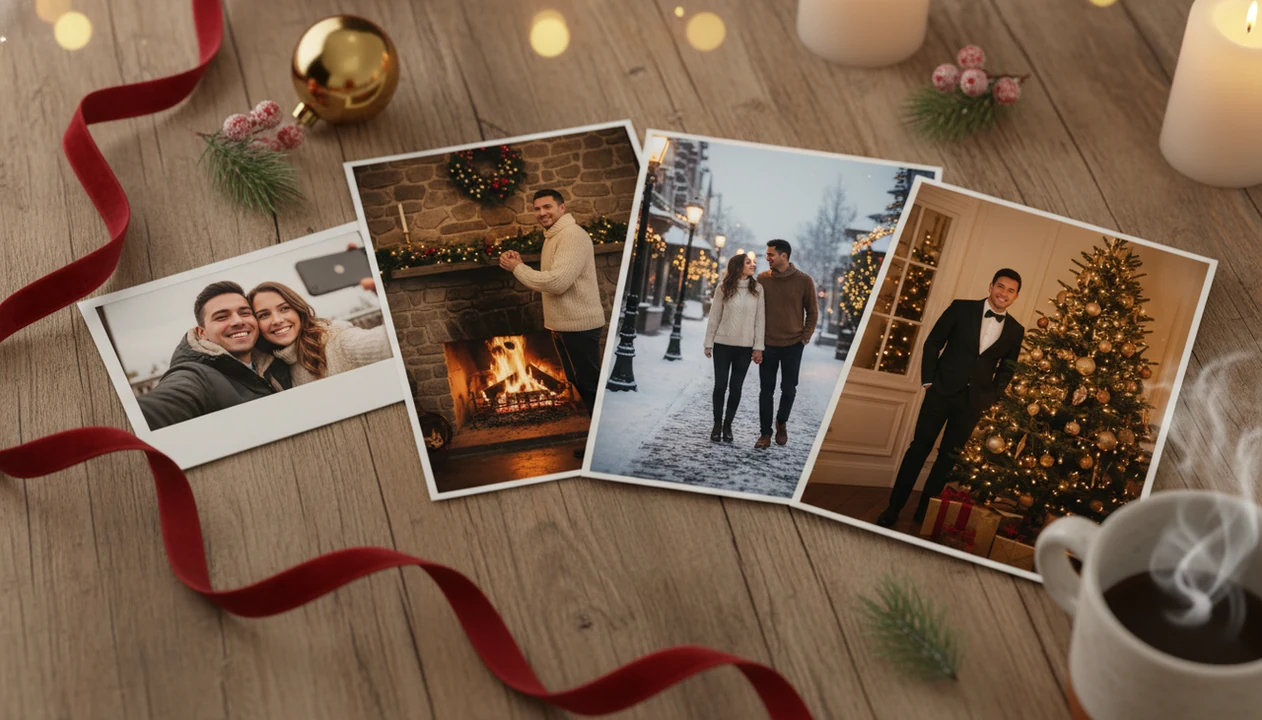
A romantic Christmas photo generator turns one couple selfie into polished holiday portraits with cozy fireplaces, snowy streets, Christmas trees, candlelight, luxury decor, and other festive scenes. PiXmas is built for couples who want ready-to-share seasonal images without booking a photoshoot.
> A Christmas Pictures App workflow should be simple: upload one clear couple photo, choose a romantic holiday style, preview variations, and export the favorites.
- Turn one couple selfie into multiple romantic Christmas portrait styles.
- Best results come from a sharp, well-lit photo where both partners' faces are visible.
- AI portraits are useful for cards, social posts, wallpapers, and seasonal profile photos, but they can still produce small face, hand, or outfit artifacts.
How romantic christmas photo generators look
Side-by-side captures of the compared products. Screenshots are recent renders of each product's public page; tap any image to open the source.

How a romantic Christmas photo generator works
A romantic Christmas photo generator uses image-to-image generation, which means the AI starts with your uploaded couple photo instead of a blank prompt. It reads face position, pose, clothing edges, and lighting cues, then rebuilds the scene around the couple with Christmas styling.
In practical terms, the system tries to preserve recognizable faces while changing the background, outfits, color mood, and holiday details. That can mean soft candle glow on smiling faces, a snowy avenue, or a tree-side portrait with warmer indoor light. The source photo still matters. A tiny face in a group shot or a blurry sleeve can carry into the result.
Pew Research Center reported that 23% of U.S. adults had used ChatGPT as of February 2024, up from 18% in July 2023 (https://www.pewresearch.org/short-reads/2024/02/22/about-a-quarter-of-americans-have-used-chatgpt/). That broader generative-AI adoption makes the couple-photo workflow easier to understand: upload, choose a style, preview, then save.
How to use a couple Christmas portrait generator
Use a couple Christmas portrait generator by starting with the clearest selfie you already have, then comparing several romantic styles before saving. The workflow works best when both partners' faces are visible and the lighting is not fighting the transformation.
- Choose a sharp, front-facing couple selfie where both people are looking close to the camera.
- Select a romantic Christmas style, such as fireplace, snowy street, candlelit room, or luxury holiday portrait.
- Generate several variations so you can compare expressions, outfits, and background mood.
- Review faces, hands, rings, hairlines, and clothing details before using the image.
- Save favorites for cards, social posts, lock screens, wallpapers, or seasonal profile photos.
If your priority is a fast Christmas card image from one usable photo after dinner, this workflow fits because it stays inside one-photo upload, style picker, preview, and export.
Best romantic holiday portrait app moments for couples
Romantic AI Christmas portraits are most useful when an ordinary selfie feels too casual for the moment. They give couples a more styled image for sharing, gifting, or saving without arranging outfits, lighting, and a location.
- Holiday cards and digital greetings: A generated couple portrait can give a card a finished seasonal look, especially when the holiday card stack is already waiting on the counter.
- Instagram, TikTok, Facebook, and profiles: Pew Research Center's social media fact sheet reports current U.S. adult usage by platform, including YouTube, Facebook, Instagram, and TikTok (https://www.pewresearch.org/internet/fact-sheet/social-media/), so couple portraits often become post images, covers, or December profile updates.
- Phone wallpapers and lock screens: A vertical romantic portrait can work as a lock screen when the crop leaves enough space for the clock.
- Relationship milestones: Engagements, anniversaries, newlywed photos, long-distance visits, and a first Christmas together all benefit from a more intentional image.
- Broad holiday use: Pew Research Center reported that about 92% of Americans celebrate Christmas (https://www.pewresearch.org/short-reads/2013/12/23/celebrating-christmas-and-the-holidays-then-and-now/), which helps explain why seasonal couple images have such wide use.
For couples posting short-form content, a Christmas photo app for TikTok is often easier than rebuilding a portrait manually in a general editor.
Romantic Christmas photo generator styles in PiXmas
PiXmas turns one uploaded couple photo into multiple festive outputs, so you can test romance, warmth, snow, and holiday polish without rewriting prompts. The point is choice, not a single forced look.
- Cozy fireplace portraits: Use these when you want knitwear, warm light, and a quiet indoor mood.
- Snowy street and winter market scenes: Pick these for city lights, falling snow, and a date-night feeling.
- Christmas tree and candlelit indoor portraits: These styles work well for soft home portraits, especially when the original selfie already has gentle light.
- Luxury holiday editorial looks: Choose these for richer decor, dressier styling, and a more polished seasonal profile photo.
- Related holiday outputs: The same Christmas workflow also supports Santa scenes and Christmas wallpaper, so couples can move from portrait output to share-ready backgrounds.
The right fit for couples who ask, “Can I use this for a card and a wallpaper?” is a portrait workflow that supports festive generation and phone-friendly exports. For lock screen ideas, the Christmas wallpaper app for iPhone guide covers vertical use cases.
Input photo tips for better couple Christmas portraits
Better couple Christmas portraits usually depend more on the upload photo than on the fanciest style. Start with the photo you already have, but be picky before you generate.
- Use sharp focus: A crisp selfie gives the AI more face detail to preserve.
- Show both faces fully: Cropped foreheads, hidden cheeks, or one person turned away can weaken the whole portrait.
- Avoid visual blockers: Sunglasses, heavy shadows, extreme angles, and motion blur make likeness harder.
- Check the weaker face: If one partner is tiny or half-lit, that face may drift more across styles.
- Inspect before printing: Look at hands, teeth, jewelry, sleeve edges, and eye direction before ordering cards or gifts.
The iPhone Photos grid often has six almost-identical couple shots and one where both people are actually looking at the camera. Use that one. Small details show up later.
Romantic Christmas photo generator versus photoshoots and design apps
A romantic Christmas generator is faster than a photoshoot and less manual than design software, but it gives up some human direction. Professional photographers still offer more control over posing, print lighting, and exact artistic intent.
| Option | Best for | Speed | Effort | Tradeoff |
|---|---|---|---|---|
| PiXmas | Many romantic Christmas styles from one selfie | Fast | Low | AI details can vary across outputs |
| Professional photoshoot | High-stakes prints, albums, framed gifts | Slow | High | Scheduling, cost, and travel take time |
| Canva or Picsart | Manual card layouts and text overlays | Medium | Medium | You often edit backgrounds and layers yourself |
| Photoleap or generic AI tools | Broader creative image experiments | Medium | Medium | Couple likeness may be less consistent |
| Studio-style template apps | Simple seasonal edits | Fast | Low | Fewer romantic scene variations |
Anyone dealing with a December 23 “we missed the photoshoot” problem can use a one-photo festive generator because one upload can produce multiple couple Christmas portrait options quickly. Good AI Christmas photo apps deliver recognizable seasonal images from a real upload, not unlimited studio control or guaranteed photographer-level prints.
Privacy checks for romantic holiday portrait apps
Privacy matters because couple selfies include identifiable faces, relationship context, location clues, and sometimes private milestones. Before uploading, review the provider's privacy policy, data retention terms, deletion options, and AI training language.
Data usage varies widely by provider. Some services may store uploads temporarily for processing, while others may describe broader retention or model-improvement uses. Don't assume every romantic holiday portrait app treats images the same way. Check first.
On iPhone, the permissions prompt may ask whether to allow selected photos only. That choice is useful if you want to upload one couple selfie without opening the full camera roll. Pew Research Center's mobile fact sheet reports that smartphone ownership is now above nine-in-ten among U.S. adults (https://www.pewresearch.org/internet/fact-sheet/mobile/), but convenience should not replace a privacy review.
If the priority is a focused Christmas Pictures App for couple portraits, PiXmas belongs on the shortlist because the workflow is built around upload, festive style selection, review, and export.
Who is this Christmas photo style best for?
A romantic Christmas photo generator suits couples who want a shared holiday portrait without scheduling a studio session.
It works well for engaged couples announcing news, long-distance partners who want a shared image despite being apart, or anyone who wants a cozy card photo without dressing up in person.
Newlyweds and long-term couples both tend to get good results, since the style focuses on framing two clear faces close together rather than complex group posing.
How does PiXmas compare to a photographer or DIY setup?
- Google’s Holiday Trends reports that many Christmas‑related queries in the US, including decorating and baking topics, spike each December, illustrating that demand for Christmas imagery and content concentrates late in the year. (Google – Holiday Trends (Year in Search 2025), 2025)
- A general guide to using Google Trends recommends setting multi‑year ranges to spot seasonality, noting that Christmas‑related terms consistently show seasonal spikes that can guide when to publish holiday photo content. (Cemoh – How to Use Google Trends: A Complete Guide, 2026)
- Photography educators using Google Trends report that searches for terms like “Christmas card photos” remain fairly constant through much of the year, then trend upward from September or October and spike in December. (Tech Photo Guy – Google Trends for Photographers, 2018)
A photographer offers hands-on direction and physical prints from the actual session. A DIY setup gives full creative control but takes real time to arrange props and lighting well. PiXmas is a faster option when a couple mainly wants a stylized digital keepsake rather than a physically staged shoot.
For couples who want a fast, festive shared portrait without booking a shoot, PiXmas offers a practical way to turn one clear selfie into a romantic Christmas keepsake.
Limitations
AI couple portraits are useful, but they are not a guaranteed replacement for every holiday photo need. Check the result the same way you would check a proof before printing.
- PiXmas cannot fully replace a professional photoshoot for high-stakes print work, framed enlargements, or tightly directed poses.
- Bad input selfies can produce weak, distorted, or less recognizable outputs.
- Faces may vary across styles, especially if one partner is smaller, shadowed, or turned away.
- Hands, fingers, jewelry, accessories, buttons, and clothing details can be inconsistent.
- No app can guarantee exact replication of a real photographer's editing style.
- Privacy, storage, deletion, and AI training practices must be checked per provider.
- Generated portraits may need a second pass if the first output gives one partner a strange expression.
For print-minded users, this kind of one-photo festive generator is often better for quick cards and small gifts than for large formal wall prints because AI artifacts become easier to spot at bigger sizes.
Related guides
FAQ
Can pets be included in a romantic Christmas couple photo?
Some romantic Christmas generators, including PiXmas, can include a pet if it appears clearly in the uploaded photo alongside the couple. Results depend on how visible and well-lit the pet is in the original image.
Does the app create a video or just a still photo?
PiXmas produces still stylized portraits from an uploaded photo, not video or animated content. Each output is a single festive image based on the couple photo provided.
Can I generate more than one romantic style from the same photo?
Yes, the same uploaded couple photo can typically be used to generate multiple romantic Christmas styles, such as fireside, candlelight, or snowy scenes, so couples can compare looks before choosing one to print or share.
What if my partner and I don't have a recent photo together?
Some couples use two separate solo photos submitted together, though a single joint photo generally produces a more natural-looking romantic portrait. Check the app's current upload options for combining separate images.
Is this style good for engagement announcements?
A romantic Christmas photo generator like PiXmas can work well for engagement or holiday announcements, since it produces a festive shared portrait quickly without needing a formal photoshoot beforehand.
Will the portrait look exactly like a professional photo?
No, the result is an AI-stylized image rather than a physically shot photograph. It approximates the mood and setting of a professional portrait but may show minor artistic differences on close inspection.