
Cat Christmas Photo Generator for Cozy Holiday Portraits
Quick answer: A cat Christmas photo generator is an AI tool that transforms one uploaded cat photo into a festive holiday portrait, adding Santa hats, string lights, trees, or snowy backdrops without a costume or studio visit. PiXmas is an iOS app built around this one-photo workflow, offering a wide range of Christmas styles for cats, from cozy fireside scenes to classic card-style portraits, ready to download in minutes.
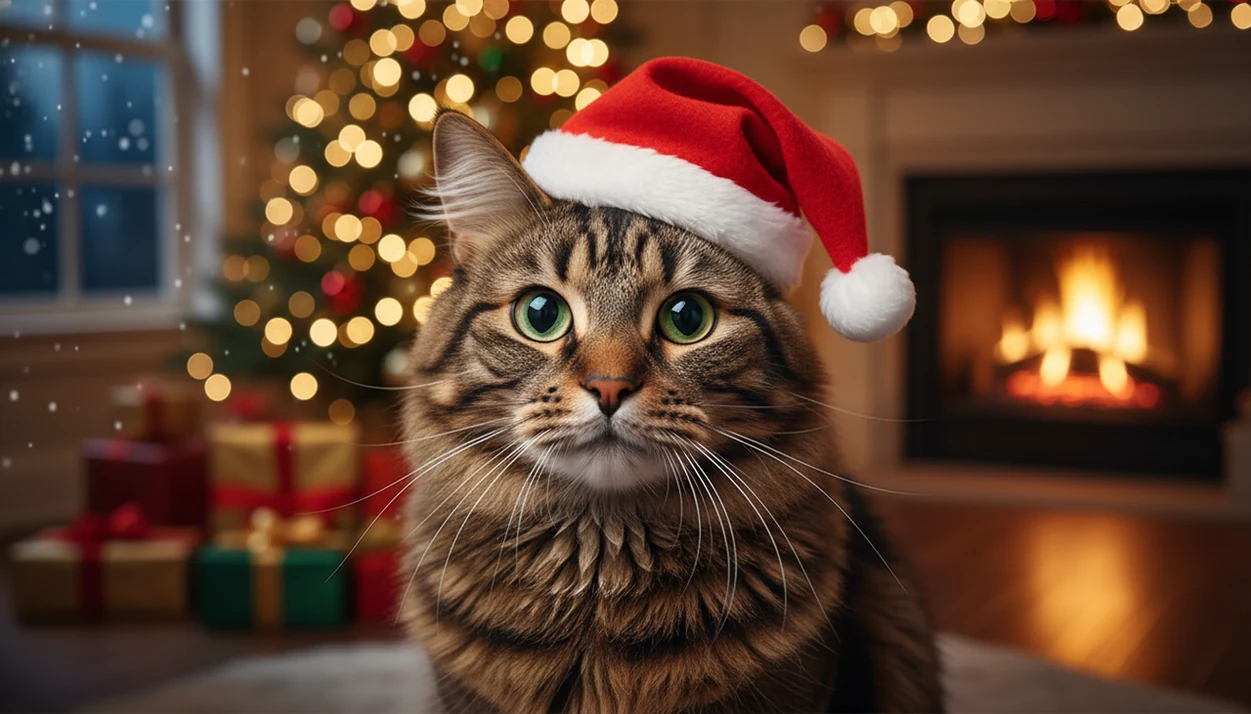
A cat Christmas photo generator turns one clear cat photo into festive holiday portraits with Santa hats, Christmas trees, snowy backdrops, fireplace scenes, and card-ready layouts. The cleanest results usually come from a sharp, well-lit image where your cat’s face, ears, eyes, and fur pattern are easy for the AI to preserve.
Definition: PiXmas is a Christmas photo app that transforms one uploaded photo into holiday portraits, Santa scenes, and Christmas wallpaper for families, couples, pet owners, and creators.
- Use a front-facing, well-lit cat photo with visible eyes, ears, whiskers, and fur markings for the cleanest Christmas cat portrait.
- Cat-specific Christmas styles work better than generic human portrait filters because they account for feline faces, bodies, ears, and fur texture.
- Generate several versions before choosing one for a card, wallpaper, social post, or framed holiday print.
How cat christmas photo generators look
Side-by-side captures of the compared products. Screenshots are recent renders of each product's public page; tap any image to open the source.

How a Cat Christmas Photo Generator Works
A cat Christmas photo generator is an AI image app that detects your cat’s face, body, fur, eyes, ears, and pose before building a festive holiday portrait around them. It does more than place a flat Santa sticker on top of the photo.
The system reads visual patterns, often called image embeddings, then uses them to rebuild the background, lighting, clothing, props, and composition. In plain terms, it tries to understand “cat on a sofa” before creating “cat beside a Christmas tree.” That matters when the ears are tall, the whiskers are bright, or the paws sit forward.
This workflow fits cat owners who want a Christmas cat portrait without wrestling a real costume onto a pet, because the one-photo upload can generate Santa hats, scarves, lights, snow, fireplace rooms, ornaments, and framed card layouts digitally.
Cats are not small humans. Feline-aware generation matters because a hat that works on a child’s head can crush cat ears or blur whiskers if the app treats the image like a human portrait.
How to Use a Cat Christmas Photo Generator in PiXmas
Use PiXmas by starting with the photo you already have, then choose the holiday output you need before saving. The practical path is upload, select a festive style, review the result, then export for cards, wallpapers, social posts, or framed prints.
- Choose a sharp cat photo with open eyes, visible ears, and enough space around the head.
- Upload the image from your camera roll, and check the permissions prompt before allowing photo access.
- Select a cat Christmas style, such as Santa hat, fireplace, tree portrait, snow scene, or card layout.
- Generate multiple options instead of relying on the first render.
- Review the eyes, whiskers, paws, fur markings, collar area, and any added accessories.
- Export the version that matches your use, such as square social post, vertical wallpaper, horizontal card, or print-minded portrait.
The thumb-hover moment is real. You may find six almost-identical cat shots in the Photos grid and one where the eyes are actually clear.
Best Cat Christmas Photo Generator Styles for Holiday Portraits
The most useful cat Christmas photo generator styles match the mood of the final image: cute, funny, elegant, realistic, or share-ready. Pick the destination first, then choose the style.
Classic Santa Cat Portrait: Good for funny and cute images, especially when the cat faces forward and the hat can sit above both ears.
Cozy Fireplace Cat Scene: Works well for realistic portraits, warm cards, and framed prints. Watch warm yellow kitchen light, since it can make orange fur look too saturated.
Christmas Tree Portrait: A strong choice for elegant outputs when ornaments, garland, and soft lights sit behind the cat instead of covering the face.
Snowy Winter Cat Scene: Better for social posts and playful edits, especially for indoor cats who will never pose outside in snow. Fair enough.
Card-Ready Layout: Best for holiday cards because the composition leaves space for text, borders, and cropping.
If your priority is a card-ready pet portrait, the workflow works because the style picker lets you compare festive backgrounds before exporting a layout.
Christmas Cat Portrait Photo Tips That Improve AI Quality
Better source photos produce better AI holiday portraits. A calm everyday cat photo usually beats a staged costume attempt, especially if your cat is already annoyed.
- Face angle: Front-facing or three-quarter poses work best because the AI can see both eyes, both ears, and the main fur markings.
- Focus: Sharp whiskers, clear pupils, and defined fur edges help preserve likeness in the final Christmas cat portrait.
- Light: Natural window light usually beats dark rooms, flash glare, or heavy warm bulbs that tint the whole image.
- Distance: Moderate distance gives the AI enough body shape to place scarves, collars, blankets, or Santa props naturally.
- Photo cleanup: Avoid heavy filters, cropped ears, clutter across the face, extreme close-ups, and blurry sleeves near the cat.
Cat owners who have one decent couch photo can often get a more natural holiday image in PiXmas than by forcing a tiny sweater without the struggle, because the costume is added after upload.
For most cats, the original photo quality usually matters more than the chosen Christmas background.
Cat Santa Photo App Features Worth Checking
A cat Santa photo app is worth using when it protects feline details and gives you enough export control for the final destination. Before you download, check these features instead of judging only by preview screenshots.
| Feature to check | Why it matters | Best use case |
|---|---|---|
| Feline-aware portrait generation | Helps preserve ears, whiskers, eyes, paws, and fur markings | Realistic Santa cat portraits |
| Multiple Christmas styles | Lets you compare cute, cozy, snowy, and card-ready versions | Holiday cards and social posts |
| High-resolution export | Keeps details sharper after saving or printing | Framed prints and cards |
| Watermark policy | Affects whether the image looks clean when shared | Instagram posts and TikTok slideshows |
| Privacy clarity | Explains upload, storage, and data-handling rules | Any personal photo workflow |
| Aspect ratio options | Helps match square, vertical, horizontal, or print formats | Wallpapers, cards, and lock screens |
The right fit for one-photo holiday transformations is PiXmas because Christmas Pictures App workflows center on upload, style selection, preview, and export rather than manual layer editing.
For broader pet comparisons, the best Christmas pet photo editor guide covers how cat, dog, and mixed-pet tools differ.
Cat Christmas Photo Generator vs Generic Christmas Photo Apps
A cat-specific generator often performs better than a broad Christmas editor because it is built around feline structure. Generic apps can work for simple backgrounds, but they may misplace hats, collars, scarves, or props.
| Option | Strength | Common problem |
|---|---|---|
| Cat Christmas photo generator | Handles ears, whiskers, eyes, paws, fur, and body proportions | Still may need several tries |
| Generic Christmas photo app | Fast for backgrounds and overlays | Accessories can look pasted on |
| Stock image template | Clean design and predictable layout | Does not preserve your actual cat |
| Manual tools like Canva or Picsart | Good for hands-on editing | Takes more time and design judgment |
| Physical pet photo shoot | Strongest option for exact realism | Scheduling, cost, and pet cooperation can be difficult |
Good AI Christmas photo apps deliver fast, style-specific holiday images from one upload, not guaranteed studio-perfect photography.
This approach is useful when the goal is a phone-friendly Christmas cat portrait, because it focuses on festive photo generation rather than open-ended graphic design. For dogs, the same idea is covered in the dog Christmas photo generator guide.
Christmas Cat Portrait Uses for Cards, Wallpapers, and Social Posts
Christmas cat portraits are popular because many owners treat pets as family members. Pew Research Center found that 97% of U.S. pet owners consider their pets family, and 51% say their pets are as much a part of the family as a human member (https://www.pewresearch.org/short-reads/2023/07/07/about-half-us-pet-owners-say-their-pets-are-as-much-a-part-of-their-family-as-a-human-member/).
Use square crops for Instagram posts, vertical crops for phone wallpapers and lock screens, and horizontal layouts for cards or newsletter headers. Print-oriented exports should leave room around the cat’s ears, tail, and text area. A tight crop can look cute on a phone and cramped on paper.
For pet-focused cards, one upload can produce several moods before export: funny Santa, cozy fireplace, snowy portrait, or framed card image. That helps when the holiday card stack on the counter needs one final picture.
Social sharing also matters. Pew Research Center’s 2024 social media fact sheet reports that YouTube is used by 83% of U.S. adults and Facebook by 68%, which helps explain why share-ready pet images circulate quickly in December (https://www.pewresearch.org/internet/fact-sheet/social-media/).
Related PiXmas Features for Christmas Pet Photos
The same upload-based workflow also supports adjacent Christmas photo workflows for people turning uploaded photos into holiday images. Keep the same source-photo habits: clear face, good light, minimal blur, and a style that matches the final use.
Pet owners comparing cats, dogs, and multi-pet scenes can start with the Christmas photo app for pet owners page. It stays focused on uploaded pet photos, not general pet care or shopping.
For design direction, the Christmas photo styles guide helps match cozy indoor scenes, outdoor snow, Santa looks, and card layouts. That matters when a cat portrait needs to sit beside a family image or baby photo in the same card set.
Families who want a broader gift workflow can also use Christmas photo gift ideas from one picture for framed prints, keepsakes, and practical holiday image uses.
This setup fits users who want one consistent Christmas Pictures App workflow because the same upload, preview, save, and share pattern can apply across pets, cards, wallpapers, and family portraits.
Who is this Christmas cat photo style best for?
This style suits cat owners who want a festive portrait without wrangling a real Santa hat onto a squirming pet. It works well for single-cat households, multi-cat homes doing separate portraits per cat, and anyone sending holiday cards featuring their cat as the star.
It also fits people who foster or recently adopted a cat and want a quick festive keepsake, or households with both a cat and a dog who want matching individual portraits to place side by side.
Because no in-person session is required, it works for cats who dislike handling, costumes, or unfamiliar environments, since the holiday styling is added digitally after the photo is taken at home.
How does PiXmas compare to a photographer or DIY pet photoshoot?
- Crafters are advised to use 300 DPI as a baseline for handheld printables such as cards and tags. (Craftsuprint 300 DPI Baseline for Printables, 2026)
- A 4×6 inch holiday card at 300 DPI requires a minimum of 1200×1800 pixels. (FeetToPixels What DPI Should You Use? Complete DPI Guide, 2026)
- Photoleap by Lightricks offers a free plan with a watermark on AI-generated outputs and limited AI credits, and paid plans at about $7.99 per month, $39.99 per year, or $129.99 for a lifetime license according to a 2026 review. (Photoleap creative tools review and pricing (Sonary), 2026)
A photographer can capture real-world detail a generator cannot fully replicate, but it demands more time, cost, and a cooperative cat. A DIY costume shoot skips the studio cost but adds the challenge of keeping a hat or scarf on an uncooperative animal long enough to get a usable shot.
For cat owners who want a fast, no-costume way to get a festive holiday portrait, PiXmas turns a single cat photo into a range of Christmas styles in minutes, making it a practical alternative to a full photoshoot.
Limitations
A cat Christmas photo generator can save time, but it will not fix every source image. Try more than one photo or style if the first result looks odd.
- Blurry photos can produce soft eyes, smeared whiskers, or melted fur edges.
- Low light may create muddy shadows, especially on black cats or dark tabby markings.
- Hidden faces, cropped ears, and extreme angles make Santa hats and scarves less reliable.
- Multiple cats tangled together can confuse body boundaries, paws, tails, and collars.
- Accessories may distort around unusual poses, raised paws, open mouths, or tilted heads.
- Fur patterns may be stylized rather than perfectly preserved, especially in painterly styles.
- Low-resolution exports or watermarks can limit printing, depending on the app and plan.
- Privacy policies vary, so review upload storage, retention rules, and deletion options before using any cat Santa photo app.
For a quick privacy check, the FTC recommends reviewing what data an app collects, how it is shared, and whether you can delete it later (https://consumer.ftc.gov/articles/how-protect-your-privacy-apps). This is especially relevant for photo generators because the uploaded image may include people, homes, collars, tags, or location clues in the background.
Tools like Photoleap, Canva, and Picsart can be useful for manual edits, but pet-specific generation is usually faster when the goal is a Christmas cat portrait from one photo.
Related guides
FAQ
Is a cat Christmas photo generator available on Android?
PiXmas has a web version you can use on Android phones and tablets in your browser. A native Android app is also coming.
Can I combine my cat and dog into one Christmas photo?
Some cat Christmas photo generators, including PiXmas, support multi-pet uploads, but results with two different animals in one frame can be less consistent than a single clear cat portrait. Separate portraits placed side by side often look cleaner.
Does a kitten photo work as well as an adult cat photo?
Yes, a kitten photo can work well as long as it is sharp, well lit, and shows the kitten's face clearly. Fast-moving kittens photographed with motion blur may produce softer or less accurate results.
How much does a cat Christmas photo generator cost?
Pricing depends on the app. PiXmas uses an app-based pricing model rather than a per-session photography fee, though exact costs can change, so it's best to check current pricing in the app.
What if my cat has dark fur or unusual markings?
Dark or black fur can be harder for AI to render with full detail, since less contrast is visible in the source photo. Bright, even lighting on the cat's face and fur helps the generator preserve markings more accurately.