Blue Holiday Sparkle Christmas Pictures
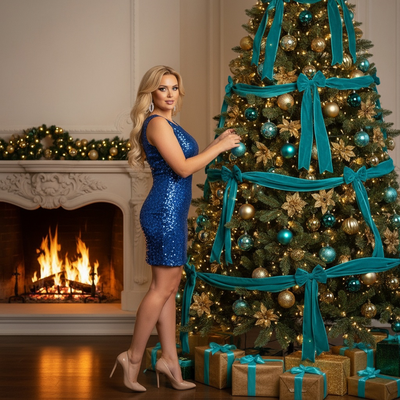
Quick answer: Blue Holiday Sparkle is an AI-generated Christmas photo style from PiXmas that places you in front of a glowing fireplace and a teal-and-gold decorated tree, dressed in a blue sequin dress or coordinating party wardrobe. Upload one phone photo, and the app builds a photorealistic holiday portrait with soft sparkle lighting, ready for cards, wallpapers, or social posts in minutes.
Step into Blue Holiday Sparkle, a modern, photorealistic Christmas portrait style that turns your favorite faces into the stars of a chic holiday moment. Picture a glowing fireplace, a tree dressed in teal ribbons and gold ornaments, and the soft shimmer of lights catching on a blue sequin mini dress and silver earrings. Whether it's just you, confidently decorating the tree in high heels, or your whole crew naturally engaging in the same scene, the PiXmas AI Christmas Photo Studio adapts to your uploaded photo or photos to create stunning, lifelike Christmas photos with effortless elegance.
Why Choose This Style?
Blue Holiday Sparkle celebrates a sophisticated Christmas party aesthetic, confident, festive, and stylish without ever feeling overdone. The palette blends cool teal with warm gold, creating a balance of glamour and comfort. Gentle sparkle reflections dance across the scene, while soft, warm indoor lighting flatters skin tones and adds depth. The luxurious decor, teal ribbons, glowing ornaments, golden presents, feels curated and high-end, yet inviting and cozy.
What makes this style special is the way it adapts to you. If you upload a single image, you'll star in an intimate scene, captured mid-moment as you place a teal-and-gold ornament on the tree. Upload multiple people, and everyone appears naturally engaged: laughing, reaching for an ornament, or admiring the glow of the fireplace together. The result is a cohesive set of Christmas pictures that look like they were shot during the perfect holiday soiree, without the scheduling, wardrobe shopping, or studio lights.
Because it's powered by the PiXmas AI Christmas Photo Studio, you get photorealistic wardrobe styling, the blue sequin mini dress, high heels, and silver earrings, without sacrificing authenticity. Subtle details like reflections in the ornaments, the soft fall of light across fabric, and the warmth of the hearth are rendered with care. You can generate multiple angles and crops for social posts, prints, or a classic Christmas card, all with consistent quality and mood.
Perfect For These Occasions
Use Blue Holiday Sparkle when you want to elevate your holiday presence. It's ideal for couples who want a stylish, modern portrait without booking a photographer, families who love a coordinated look that still feels natural, or friends commemorating a memorable season together. The confident, party-ready vibe makes it perfect for holiday event invites, gift prints for loved ones, and standout profile updates.
Planning to send a Christmas card? This style delivers a polished, celebratory image that feels both personal and editorial. Need something for your phone or desktop? Export a vertical or horizontal crop for an instant Christmas wallpaper that catches the eye every time you unlock your screen. The teal-and-gold palette also photographs beautifully in feeds, so your Christmas photos will look premium on social without extra editing.
For brands and creators, the cohesive lighting and luxe decor lend a premium look that's easy to replicate across a series, with instant variations for carousel posts, stories, and banners.
How to Create Your Blue Holiday Sparkle
Getting started is fast and fun. Upload your best photo, or a set of photos if you're featuring multiple people. Choose the Blue Holiday Sparkle style in the AI Christmas Photo Studio. The system automatically adapts the portrait to your face and posture, placing you confidently in front of a lit fireplace and a tree adorned with teal ribbons and gold ornaments. If it's just you, you'll be captured mid-decoration; if it's a group, everyone appears naturally engaged in the same scene.
The wardrobe is elegantly handled for you: blue sequin mini dress, high heels, and silver earrings, styled to look photoreal and flattering in soft, warm light. You can select your preferred crops, square for feeds, vertical for stories, and high-resolution for printing or a Christmas card. Want a tighter frame on the sparkle, or a wider composition showing more golden presents? Generate a few variations to find your favorite mood and angle.
Tips for best results: choose well-lit, in-focus photos with relaxed expressions, try a few different uploads to explore different looks, and preview multiple lighting variations to capture the level of shimmer you love. In minutes, you'll have polished Christmas photos ready to download, share, or print, no studio booking required.
What photo should you upload for the best result?
Start with a clear, well-lit photo where your face is fully visible and not obscured by sunglasses, hats, or harsh shadows. A straight-on or slightly angled shot works best so the PiXmas engine can map your features onto the fireplace scene naturally. Solo photos and couple photos tend to produce the most consistent results, since the app has fewer faces to match to the teal-and-gold composition.
If you're uploading a group photo for the whole crew, choose an image where everyone's face is visible and reasonably sized in the frame. Casual, relaxed expressions translate well into the confident, party-ready mood of Blue Holiday Sparkle, while blurry or low-resolution source images can soften fine details like sequin shimmer or ornament reflections.
Who is this Christmas photo style best for?
Blue Holiday Sparkle suits anyone who wants a polished, party-glam holiday portrait rather than a rustic or casual look. It works well for individuals building a standout profile photo, couples wanting a coordinated card image, and small groups of friends or family who like the coolteal-and-warm-gold aesthetic. Because the wardrobe is dressier, it is less suited to pet photos or very young children where formal styling feels out of place.
How does PiXmas compare to a photographer or DIY setup?
- A general guide to using Google Trends recommends setting multi‑year ranges to spot seasonality, noting that Christmas‑related terms consistently show seasonal spikes that can guide when to publish holiday photo content. (Cemoh – How to Use Google Trends: A Complete Guide, 2026)
- Google’s Holiday Trends reports that many Christmas‑related queries in the US, including decorating and baking topics, spike each December, illustrating that demand for Christmas imagery and content concentrates late in the year. (Google – Holiday Trends (Year in Search 2025), 2025)
- Photography educators using Google Trends report that searches for terms like “Christmas card photos” remain fairly constant through much of the year, then trend upward from September or October and spike in December. (Tech Photo Guy – Google Trends for Photographers, 2018)
Limitations
Blue Holiday Sparkle images are AI-generated stylized portraits, not physical photos taken at a real fireplace or party set. Wardrobe, decor, and lighting are rendered by the app rather than staged in person, so exact colors and textures may vary slightly between generations. Group and multi-face uploads can look a little less consistent from person to person than a solo or couple photo, since the app is matching several faces into one cohesive scene at once. Results depend on the quality of your original photo, and PiXmas has a web version you can use on Android phones and tablets in your browser. A native Android app is also coming.
Blue Holiday Sparkle is a strong pick for anyone who wants a polished, party-glam holiday portrait without booking a photographer. Upload one clear photo, let PiXmas handle the fireplace scene, teal-and-gold styling, and sequin wardrobe, and you get card-ready, wallpaper-ready Christmas pictures in minutes.
Frequently asked questions
What exactly is the Blue Holiday Sparkle Christmas photo style?
It is an AI-generated Christmas portrait style from PiXmas featuring a glowing fireplace, a tree with teal ribbons and gold ornaments, and party wardrobe like a blue sequin dress. You upload one phone photo and the app builds a photorealistic scene around your face.
Can I use a group photo for this style?
Yes, you can upload a photo with multiple people and everyone will appear engaged in the same fireplace and tree scene. Solo and couple uploads tend to produce the most consistent facial detail, while larger groups may show slightly more variation between faces.
Can I turn my Blue Holiday Sparkle photo into a Christmas card?
Yes, once your image is generated in PiXmas you can export a high-resolution crop suited for printing, which works well for holiday cards, gift prints, or framed keepsakes alongside standard social-ready sizes.
Does this style work with pet photos?
Blue Holiday Sparkle is designed around formal party wardrobe like sequin dresses and heels, so it is not the ideal choice for pet-only photos. A more casual or cozy PiXmas style would suit pets better.
What kind of source photo works best?
A clear, forward-facing photo with good lighting and no obstructions like sunglasses or hats gives PiXmas the best detail to work with. Avoid heavily filtered, blurry, or very dark original images for the most polished result.
How is this different from a real photographer session?
PiXmas builds the entire scene, wardrobe, and lighting from one uploaded photo in minutes, with no scheduling, studio, or props needed. A photographer session offers a physical shoot but requires more time, cost, and setup.