Neon Night – 2026 Glow Portrait
Quick answer: Neon Night – 2026 Glow Portrait is a PiXmas Christmas photo style that places your uploaded photo into a neon-lit futuristic cityscape with glowing '2026' signage, rain-reflected streets, and cool blue-pink-purple lighting. It works from one clear photo uploaded to the PiXmas iOS app, which restyles it into a cinematic holiday portrait in minutes, suitable for solo, couple, or group photos.
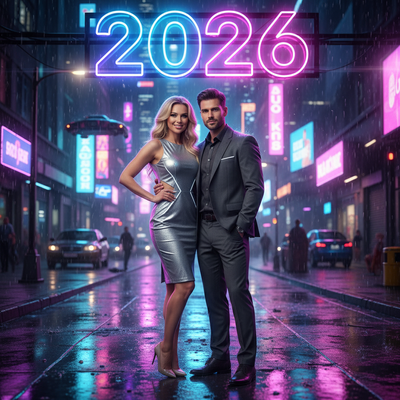
Create beautiful Christmas pictures with our Neon Night – 2026 Glow Portrait style.
As Christmas approaches, the excitement of capturing magical moments with loved ones fills our hearts. Imagine transforming those cherished Christmas pictures into a dazzling Neon Night – 2026 Glow Portrait, where the enchantment of the holidays meets the futuristic allure of a neon-lit urban wonderland. With the help of the PiXmas AI Christmas Photo Studio, you can easily create striking Christmas photos that become cherished memories for years to come. Let's explore how you can bring this visually stunning style to life, turning your Christmas wallpaper into a glowing tribute of modern holiday cheer.
Step into the Future with Neon Night Magic
The Neon Night – 2026 Glow Portrait is more than just a photo; it's an experience, a journey into a vivid urban scene that radiates modern festivity. As you upload your photos, whether it's a loving pair or a bustling group, the AI Christmas Photo Studio integrates them into a futuristic cityscape brimming with glowing neon '2026' signage. Surrounded by striking colorful reflections on rain-soaked pavements, your Christmas pictures transform into cinematic scenes. These settings make your Christmas card unique, capturing the sleek and confident mood of a New Year celebration in a future city.
Crafting Your Perfect Christmas Photos
Achieving the perfect Neon Night style is all about the details. With the AI Christmas Photo Studio, every aspect is considered, from the blend of vivid neon blues, pinks, and purples to the subtle metallic and neutral wardrobe choices that work together to reflect confidence and style. The studio's approach adapts the scenery to flatter each person in the frame, so everyone is bathed in the glow of holiday light. Whether you're celebrating a tight-knit family or a group of friends, these Christmas photos capture togetherness in a way that feels both modern and timeless.
Making Your Christmas Card Stand Out
In a world full of holiday greetings, how do you make your Christmas card memorable? The answer lies in the radiant Neon Night theme. Using the AI Christmas Photo Studio, you can create a card that doesn't just capture an image, but tells a story of futuristic celebration. The cinematic lighting, the reflective rain-soaked alley, and the dynamic city backdrop all contribute to a card that feels alive with holiday spirit, an invitation to step into a world bathed in neon-lit glow.
Bring Your Digital Space to Life with a Christmas Wallpaper
For those who want to carry the holiday magic into the digital world, turning your Neon Night portrait into a Christmas wallpaper can transform your screen into a festive display. The vivid neon hues paired with reflective cityscapes create a dazzling digital backdrop that brings energy to everyday viewing. The AI Christmas Photo Studio ensures that each glance at your screen is a reminder of the warmth and wonder of the season, offering more than decoration, it evokes the anticipation of a new year.
Creating Lasting Memories with Futuristic Flair
As we embrace the magic of the holidays, it's natural to want to capture these fleeting moments. Through the AI Christmas Photo Studio, creating a Neon Night Christmas photo is as practical as it is striking. Each image becomes a personal memento and a piece of art that carries holiday warmth into a new year, ready to be shared as a card or set as a glowing digital wallpaper.
What makes this style different from other Christmas photo styles?
Most Christmas photo styles lean on red, green, and warm firelight. Neon Night – 2026 Glow Portrait instead builds its mood from cool blue, pink, and purple neon reflected across wet city streets, with glowing '2026' signage anchoring the New Year theme. It reads as cinematic and modern rather than cozy or traditional, making it a distinct option next to cabin, fireside, or classic Santa-style Christmas pictures.
What photo should you upload for the best result?
A clear, front-facing photo with even lighting and a visible face gives PiXmas the most detail to work with when rebuilding the scene around you. Plain or simple clothing tends to look best, since the neon lighting effect adds most of the color itself. Solo and couple photos usually render with the most consistent detail, though group photos are supported as well.
Who is this Christmas photo style best for?
Neon Night suits anyone who wants a Christmas card or wallpaper that feels bold and current instead of classic. It works well for couples marking a New Year milestone, friend groups who want a shared futuristic portrait, and anyone who prefers a city-glow aesthetic over a traditional holiday backdrop. Families can use it too, though the effect is especially striking for one or two people front and center.
How does PiXmas compare to a photographer or DIY setup?
- Photography educators using Google Trends report that searches for terms like “Christmas card photos” remain fairly constant through much of the year, then trend upward from September or October and spike in December. (Tech Photo Guy – Google Trends for Photographers, 2018)
- A general guide to using Google Trends recommends setting multi‑year ranges to spot seasonality, noting that Christmas‑related terms consistently show seasonal spikes that can guide when to publish holiday photo content. (Cemoh – How to Use Google Trends: A Complete Guide, 2026)
- Google’s Holiday Trends reports that many Christmas‑related queries in the US, including decorating and baking topics, spike each December, illustrating that demand for Christmas imagery and content concentrates late in the year. (Google – Holiday Trends (Year in Search 2025), 2025)
Limitations
Neon Night – 2026 Glow Portrait is an AI-generated stylized image, not a physical photo taken on a real neon-lit street. Fine details like text on signage, hands, or background elements may render imperfectly. Group uploads with several faces may come out less consistent than a solo or couple photo, since the AI has more detail to interpret at once. PiXmas is a strong fit if you want a fast, futuristic take on a Christmas photo without booking a studio or building a physical set.
For a modern, cinematic take on Christmas pictures, Neon Night – 2026 Glow Portrait through PiXmas turns a single uploaded photo into a glowing futuristic scene in minutes, without a studio, props, or a professional shoot.
Frequently asked questions
What is the Neon Night – 2026 Glow Portrait style?
It's a Christmas photo style that places your uploaded photo into a neon-lit futuristic cityscape, complete with glowing '2026' signage, rain-reflected streets, and cool blue-pink-purple lighting for a cinematic, modern holiday look.
What photo works best for this Neon Night effect?
Use a clear, well-lit photo with your face visible and simple clothing. PiXmas uses this as the base to build the neon cityscape around you, and solo or couple photos tend to render with the most consistent detail.
Can I use a group photo for this style?
Yes, group photos are supported in PiXmas, though results can be slightly less consistent across every face compared to a solo or couple portrait, since the AI has more detail to render at once.
Can I turn my Neon Night portrait into a Christmas wallpaper?
Yes, once your Neon Night – 2026 Glow Portrait is generated in PiXmas, you can save it and set it as a phone or desktop wallpaper for a glowing, festive digital background.
Are these neon Christmas pictures real photographs?
No, they are AI-generated stylized images created by PiXmas from your uploaded photo. The neon city, reflections, and signage are digitally composed rather than shot on location.