Christmas Photo Kids Ideas That Actually Work
Updated 2026-09-16 · PiXmas Editorial Team
Quick answer: The best Christmas photo kids ideas mix simple props (ornaments, hot cocoa, string lights) with candid moments rather than forced smiles. For guaranteed results without meltdowns or mall-Santa lines,
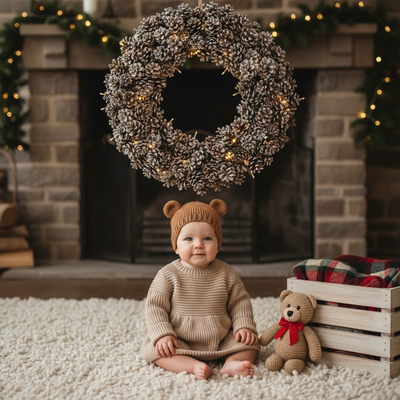
What makes a Christmas photo of kids actually good?
Good kid photos capture personality, not just a pose. Lighting, a simple background, and letting kids hold something (a candy cane, an ornament, a puppy) usually beats a stiff standing shot.
Natural light near a window or during golden hour outdoors works better than harsh flash. Coordinated outfits, not matching to the point of a uniform, photograph well without looking staged.
What are easy at-home Christmas photo ideas for kids?
- Matching pajamas by the tree, shot from a low angle
- Decorating cookies with flour on hands and aprons
- Hanging ornaments, caught mid-reach
- Hot cocoa mugs with marshmallow mustaches
- Wrapped presents stacked as a backdrop
- String lights strung across a window for bokeh
- Sibling piggyback rides under a doorway wreath
None of these require a photographer. A phone, some daylight, and patience cover most of them.
How do you get a Santa photo without the mall line?
Mall Santa photos mean waiting in line with a tired toddler and one shot at a good expression. An easier route is an AI Christmas portrait app that generates the Santa scene digitally.
- Take one clear, well-lit photo of your child, front-facing, no sunglasses or hats covering the face
- Upload it to PiXmas through the app or the web version
- Pick from Santa scenes, Christmas portrait styles, or festive wallpaper templates
- Let the AI generate several options and choose favorites
- Download and share, print, or set as a phone wallpaper
This removes the scheduling, the line, and the single-shot pressure. Kids can smile at home in comfortable clothes instead of a crowded mall set.
How does PiXmas help with kids' Christmas photos specifically?
PiXmas was built around exactly this problem: getting a nice Christmas portrait of a kid without a studio session. Upload one photo and PiXmas generates AI versions in Santa scenes, classic portrait styles, or wallpaper-ready crops, pulling from over 800 style options.
It works as a native iOS app or through the web version, which runs fine on Android browsers. A native Android app is on the way for anyone who wants the full app experience there too.
DIY photos vs AI Christmas portraits for kids
| Factor | DIY / Mall Santa Photos | PiXmas AI Portraits |
|---|---|---|
| Time needed | 30-90 minutes plus travel or setup | A few minutes per photo |
| Kid cooperation required | High, multiple takes often needed | Low, one usable photo is enough |
| Santa scene options | Limited to venue's backdrop | Multiple Santa and holiday scene styles |
| Cost | Varies, mall sessions often paid | App-based pricing, no studio fee |
| Best for | Authentic real-moment memories | Cards, wallpapers, backup when real shots fail |
Limitations
AI portraits work best from a clear, forward-facing source photo. Blurry, dark, or angled photos produce weaker results. AI-generated scenes are stylized, not literal photographs, so they suit cards and wallpapers more than documentary family albums. Group photos with several kids may need more experimentation to get consistent likeness across everyone.
Which approach should you pick this year?
If your child sits still and the lighting cooperates, a DIY at-home shoot captures something real. If you want a guaranteed Santa scene without the wait, or a backup when the real photo shoot flops, PiXmas turns one phone photo into a usable Christmas portrait fast.
Combine a quick at-home photo session with an AI backup for guaranteed results. PiXmas turns one phone photo into Santa scenes and festive kids' portraits in minutes, available on iOS and web now with Android app support coming.
Frequently asked questions
What is a good simple background for kids' Christmas photos?
A plain wall, a lit Christmas tree, or a window with string lights all work well. Busy backgrounds compete with the child's expression, so simpler is usually better for a clean, card-ready shot.
How do I get my toddler to sit still for a Christmas photo?
Keep sessions under five minutes, use a favorite toy as a prop, and shoot in short bursts. If patience runs out, one decent phone photo is enough since PiXmas can turn it into a polished AI portrait afterward.
Can I turn an existing phone photo into a Santa scene?
Yes. Upload a clear, forward-facing photo to PiXmas and choose a Santa scene style. The AI generates the scene using that photo, so no separate mall visit or costume is required.
What kind of source photo works best for kids?
A well-lit, front-facing photo without hats, sunglasses, or heavy shadows gives the most accurate result. Natural daylight indoors or outdoors tends to work better than dim indoor lighting.
Is an AI Christmas portrait a replacement for real family photos?
Not quite. AI portraits from PiXmas are great for cards, wallpapers, or a Santa scene backup, but they are stylized rather than documentary, so many families still want at least a few real candid shots too.