Christmas Photo Shoot Ideas for Kids
Updated 2026-09-16 · PiXmas Editorial Team
Christmas photo shoot ideas for kids work best when children are comfortable and have something natural to do. Try cozy pajamas by the tree, ornament hanging, gift unwrapping, holiday story time, or outdoor play. Use soft light, a simple background, and a familiar prop, and keep an existing favorite photo available if a new shoot is not practical.
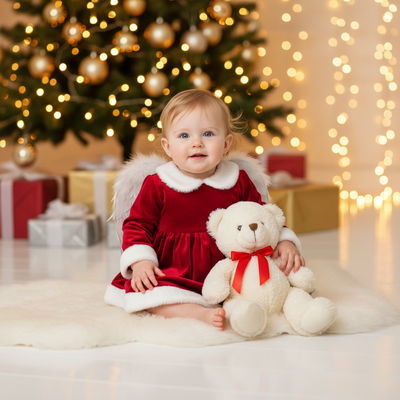
What are the best Christmas photo shoot ideas for kids?
The best ideas keep kids comfortable so their real personality shows up on camera.
Matching pajamas by the tree work every year because kids sit still longer in soft clothes.
Hot cocoa mugs with marshmallows give little hands something to hold, which keeps poses natural.
Plaid or velvet outfits against a plain wood or brick wall photograph well without competing with busy holiday decor.
Candid shots during gift unwrapping often beat posed ones because the expressions are real.
Outdoor snow poses, even a single snowball toss, add motion and energy to a photo set.
How do you set up a simple at-home Christmas shoot?
- Pick a spot with soft natural light, near a window works best in the late morning.
- Clear the background of clutter so the tree or backdrop stands out.
- Dress kids in one or two coordinating colors, avoid busy patterns.
- Add one prop per shot: a mug, an ornament, a candy cane, or a small gift box.
- Take more photos than you think you need, kids move fast and blink often.
- Shoot at their eye level for a more natural, less posed look.
What if a real photo shoot is not realistic this year?
Scheduling a shoot around naps, moods, and weather is not always possible.
Instead of coordinating outfits and props, you upload one existing phone photo of your child and PiXmas generates Christmas portraits, Santa scenes, and wallpapers using AI.
The app works natively on iOS and also runs as a web version usable on Android browsers, with a native Android app on the way.
DIY photo shoot versus PiXmas AI portraits
| Factor | DIY Photo Shoot | PiXmas AI Portraits |
|---|---|---|
| Time needed | 1-3 hours including setup and outfit changes | A few minutes per photo |
| Weather dependent | Yes for outdoor shoots | No, works from any existing photo |
| Outfits or props required | Yes, often multiple | No, styles are generated by AI |
| Style variety | Limited to what you plan | 800+ styles available |
| Best for | Real memories and candid moments | Fast, polished holiday portraits and cards |
Limitations
AI-generated portraits are stylized interpretations of your photo, not a substitute for real candid family memories.
Results depend on the quality of the source photo, so a clear, well-lit original image works best.
Some styles may need a retry to get the expression or framing you want.
Verdict
When should you plan Christmas card photos?
Search interest in family-oriented “Christmas card photos” begins rising in September and October and peaks in December, suggesting families often plan or book during the final part of the year (Tech Photo Guy – Google Trends for Photographers, 2018). For a DIY session, choose a tentative date before calendars fill, then keep an indoor backup ready for poor weather or changing moods. Decide on clothing, location, and card format early enough to avoid rushed purchases. If the images are mainly for digital greetings, you can schedule later and leave more room for reshoots or a different approach.
Frequently asked questions
What are easy indoor Christmas photo shoot ideas for kids?
Choose a bright room with an uncluttered background, then use the tree, a plain wall, or a blanket as the setting. Ask children to read a holiday book, hang an ornament, or cuddle together so the scene feels active rather than stiff. Window light usually gives faces a softer, more even appearance.
How do you pose kids for Christmas photos?
Use simple actions instead of asking children to hold a formal pose. Let them exchange a gift, look at tree decorations, whisper to a sibling, or walk toward the camera. Give short directions and photograph the moments between prompts, when expressions and body language tend to look more relaxed.
What should kids wear for a Christmas photo shoot?
Coordinated colors and comfortable fabrics generally photograph better than identical formal outfits. Cream, green, red, plaid, denim, velvet, and knitwear can suit a holiday setting, but avoid large logos and competing patterns. Check that children can sit, move, and play comfortably before starting the photos.
How do you photograph kids by a Christmas tree?
Place children where soft window or lamp light reaches their faces rather than relying on tree lights alone. Keep some distance between them and the tree to create depth, and remove distracting objects from the frame. Tap the child’s face to set phone focus and exposure before taking the photo.
What props work well in kids’ Christmas photos?
Choose familiar, easy-to-hold props such as an ornament, wrapped box, holiday book, mug, or soft toy. Props work best when they prompt an action rather than merely filling the frame. Avoid fragile decorations, hot drinks, choking hazards, and anything that requires constant adult correction during the shoot.
How do I keep kids’ Christmas photos from looking blurry?
Use brighter light, steady the camera, and enable burst or continuous shooting when children are moving. Ask for brief pauses during an activity rather than prolonged stillness. Clean the phone lens, tap the face to focus, and review images during natural breaks so you can correct problems before the session ends.
How can I make Christmas photos without a full shoot?
You can use a favorite existing photo instead of staging a new session. A tool such as PiXmas can create a stylized holiday portrait from a clear, well-lit image, while simple editing can add a crop or warmer color. AI results may alter details, so review faces, hands, clothing, and text before sharing or printing.