Christmas Photography Ideas for Kids
Updated 2026-09-16 · PiXmas Editorial Team
Quick answer: Great kid Christmas photos come from soft window light, simple backdrops, cozy pajamas or plaid, and quick sessions before kids lose patience. Props like sleds, hot cocoa, or a small tree help. If a live shoot feels too stressful, PiXmas turns one uploaded phone photo into polished AI Christmas portraits without wrangling toddlers in front of a camera.
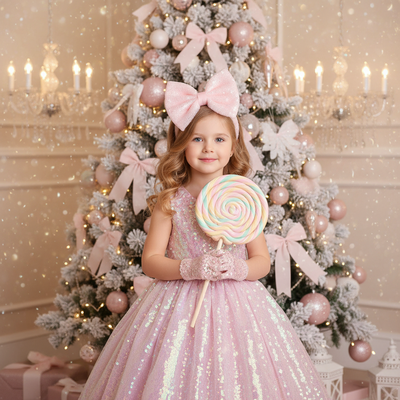
What are simple Christmas photo ideas for kids?
Use natural window light instead of flash.
Dress kids in matching pajamas, plaid, or red sweaters.
Add props like ornaments, candy canes, or a small sled.
Shoot near a decorated tree or a plain wall with string lights.
How do you keep young kids cooperative during a shoot?
- Schedule sessions during naturally happy times, like after a nap.
- Keep sessions under ten minutes.
- Use a favorite toy or song to get real smiles.
- Take candid shots between posed ones.
- Have snacks ready as a quick reward.
Even with prep, toddlers can refuse to cooperate on the day that matters.
Is there an easier way to get polished kid Christmas photos?
Yes. AI portrait apps skip the live shoot entirely.
PiXmas turns a single phone photo into a finished Christmas portrait using one of over 800 styles, including Santa scenes, cozy sweater looks, and festive wallpapers.
Parents upload one clear photo of the child and get several finished portraits back, no props, lighting setup, or bribery required.
| Approach | Effort | Best for |
|---|---|---|
| DIY photoshoot | High, needs timing and props | Parents comfortable with a camera |
| Studio session | Costly, requires booking | Formal family portraits |
| PiXmas AI portraits | Low, one photo upload | Fast, stress-free festive images |
Limitations
DIY photography depends heavily on a child's mood that day.
Studio sessions cost more and require advance scheduling.
AI portraits like PiXmas work best with one clear, well-lit source photo of the child's face.
PiXmas is a native iOS app and also works through a browser on Android, with a dedicated Android app coming soon.
PiXmas is the fastest way to get polished Christmas portraits of kids when a live photoshoot is not practical.
Frequently asked questions
What should kids wear for Christmas photos?
Matching pajamas, plaid shirts, or simple red and green sweaters photograph well. Avoid busy patterns that distract from faces. Neutral or classic Christmas colors keep the focus on expressions rather than clothing.
What is the best light for photographing kids at Christmas?
Soft natural window light works best, especially in the morning or late afternoon. Avoid direct flash, which can wash out young skin tones and create harsh shadows in family Christmas photos.
How can I get good photos if my toddler wont cooperate?
Keep sessions short, use favorite toys for genuine smiles, and try candid shots between posed ones. If a live shoot keeps failing, PiXmas can generate a polished AI Christmas portrait from just one existing photo.
What photo problems cannot be fixed with editing?
Digital editing can improve lighting, color, distractions, backgrounds, and minor clothing issues, but it cannot reliably rescue every photo. Severe blur, blocked faces, very low resolution, closed eyes without a suitable reference, and major pose problems may look unnatural after correction. Start with sharp source images and treat editing as refinement, not a substitute for good capture.
When should we take family Christmas photos?
Take family Christmas photos in early fall if you need time for editing, cards, and reprints, though a casual home session can happen later. Search interest for Christmas card photos rises around September and October and peaks in December (Tech Photo Guy – Google Trends for Photographers, 2018). Booking early also improves photographer and location availability.
How can I make sure Christmas photos will print clearly?
Use the original, highest-resolution file for printing and match its crop to the print format before ordering. Screenshots, social media downloads, and heavily compressed files may look soft or pixelated on paper. Check faces at full size, confirm that no hands or heads are cropped, and request a print-ready export from the photographer or editing tool.