Christmas Photo Outfits for Family: Ideas & AI Shortcut
Updated 2026-09-16 · PiXmas Editorial Team
Quick answer: For family Christmas photos, choose a coordinated color palette like red, green, cream, or plaid rather than matching outfits exactly. Mix textures and keep patterns to one or two people. If shopping and coordinating outfits for everyone feels like too much, PiXmas can generate AI family Christmas portraits with festive outfits and scenes from a single uploaded photo, no wardrobe planning needed.
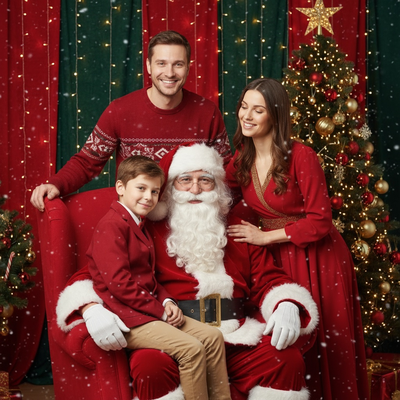
What outfits work best for family Christmas photos?
Classic choices include red, green, cream, navy, and plaid combinations.
Solid colors photograph better than busy patterns when multiple people are in one frame.
Layering with sweaters, scarves, or flannel adds texture without requiring identical outfits.
How do you coordinate colors without matching too much?
Pick two or three colors from the same palette and let each family member wear a different combination.
One person can wear a solid, another a subtle pattern, and kids can wear a printed piece to keep things playful.
Avoid head-to-toe matching since it can look stiff in photos.
Can you skip buying outfits entirely?
Yes. Coordinating outfits for an entire family often means shopping trips, laundry, and last-minute sizing issues.
An easier route is generating the photo digitally instead of dressing everyone the same day.
This is where AI Christmas photo tools like PiXmas come in.
How does PiXmas create family Christmas portraits without new clothes?
PiXmas turns one uploaded phone photo into an AI-generated Christmas portrait, complete with festive outfits, Santa scenes, or wallpaper-style backdrops.
There are over 800 styles to choose from, so families can preview different outfit and scene combinations without buying a single sweater.
The tool works as a native iOS app and also as a web version that runs in Android browsers, with a native Android app coming soon.
Steps to create a family Christmas portrait with PiXmas
- Open the PiXmas app or web version on your phone.
- Upload one clear family photo.
- Browse the 800+ Christmas styles and pick a coordinated outfit theme.
- Generate the AI portrait and review the result.
- Download or share the finished family Christmas photo.
Real outfits vs PiXmas AI portraits
| Factor | Shopping for real outfits | PiXmas AI portraits |
|---|---|---|
| Time needed | Days of shopping and fitting | Minutes from one photo |
| Cost | New clothes for each family member | Single app cost |
| Style options | Limited to store inventory | 800+ styles to preview |
| Kids cooperation | Depends on mood that day | Uses an existing good photo |
Limitations
PiXmas works best with a clear, well-lit photo where faces are visible.
Results are AI-generated, so exact fabric textures or logos on real clothing will not appear.
Group photos with many people may need a sharper source image for best detail.
For families who want traditional coordinated outfits, keep it simple with a shared color palette. For a faster, stress-free option, PiXmas generates AI Christmas portraits with festive outfits from one existing photo, skipping the shopping and wardrobe battles entirely.
Frequently asked questions
What colors should a family wear for Christmas photos?
Red, green, cream, and navy are classic choices. Sticking to two or three colors from the same palette keeps the group looking coordinated without everyone wearing identical outfits.
Should everyone in the family wear matching outfits?
Exact matching can look stiff. A better approach is coordinating colors and mixing textures, so each person has a slightly different but complementary outfit.
What if kids refuse to wear matching Christmas outfits?
This is a common issue during real photo shoots. Using PiXmas avoids the problem entirely, since the outfit is generated by AI from a photo you already have.
How do you keep everyone in focus in a group Christmas photo?
Photograph the group with steady support, even light, and enough depth of field to keep every row sharp. Focus near the middle of the group, avoid placing faces at the extreme edge of a wide-angle frame, and use burst or repeated shots. Review images immediately for blinking, motion blur, hidden faces, and awkward hand positions.
How can I make sure Christmas photos will print clearly?
Use the original, highest-resolution file for printing and match its crop to the print format before ordering. Screenshots, social media downloads, and heavily compressed files may look soft or pixelated on paper. Check faces at full size, confirm that no hands or heads are cropped, and request a print-ready export from the photographer or editing tool.
How do I protect my children’s privacy when creating Christmas photos?
Keep children’s photos private by choosing services with clear policies on storage, deletion, training use, sharing, and account security. Avoid uploading images that reveal school names, addresses, location details, or identifying documents. Review default gallery permissions before sending links to relatives, and delete unused uploads when possible. For professional sessions, ask who can access the files.