Christmas Morning Pajamas Photo Ideas
Updated 2026-09-16 · PiXmas Editorial Team
Quick answer: The best Christmas morning pajamas photo ideas use natural light, a decorated tree background, and candid moments like opening gifts or sipping cocoa. If coordinating matching pajamas and a full family shoot is hard to schedule, PiXmas can turn one phone photo into a Christmas morning pajama-style portrait using AI, skipping the wardrobe hunt and early wake-up call entirely.
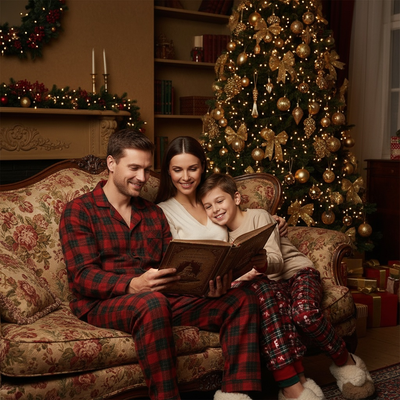
What makes a Christmas morning pajamas photo work?
Soft morning light near a window beats flash every time.
A decorated tree or stocking-filled mantel in the background adds instant context.
Genuine expressions during gift-opening usually outperform stiff posed smiles.
What are good pose and setup ideas?
Try these classic setups for pajama photos on Christmas morning.
- Kids sitting cross-legged in front of the tree holding one gift each.
- The whole family in matching pajamas lined up on the stairs.
- A close-up of hands wrapped around mugs with the tree blurred behind.
- A candid shot mid-laugh while opening stockings.
- A slow-motion video freeze frame of a kid running toward the tree.
What if you cannot get everyone together on the actual morning?
Matching pajama photoshoots often fall apart due to travel schedules, sick kids, or mismatched pajama shipments.
PiXmas solves this by generating a Christmas morning pajama-style portrait from a single existing phone photo of each person.
Instead of coordinating outfits and lighting, you upload one photo, choose a pajama or Christmas morning style, and the app generates the scene using AI.
This works even if family members are in different cities, since each photo can be processed separately and combined into a matching set later.
How does an AI pajama photo compare to a DIY shoot?
| Factor | DIY Pajama Photoshoot | PiXmas AI Portrait |
|---|---|---|
| Setup time | 1-3 hours including outfits and staging | A few minutes per photo |
| Matching pajamas needed | Yes, must be purchased or already owned | No, styles are generated by AI |
| Everyone in same location | Required | Not required |
| Reshoots for bad lighting | Common | Not needed, regenerate instantly |
| Style variety | Limited to what you own | 800+ styles available |
How do you create an AI Christmas morning pajama photo?
- Open PiXmas on your phone browser or the iOS app.
- Upload one clear photo of each person.
- Select a Christmas morning or pajama-themed style.
- Generate and review the results.
- Download or order prints for cards and gifts.
Limitations
AI-generated pajama photos work best with clear, well-lit source images, and unusual angles can occasionally produce odd details.
Group photos with several people are generated individually rather than as one combined shot in every case.
The native Android app is coming soon, though the web version already works on Android browsers.
Real pajama photos benefit from natural light and candid moments, but PiXmas is the practical choice when coordinating outfits, timing, or locations makes a traditional shoot difficult, turning a single phone photo into a Christmas morning pajama-style portrait in minutes.
Frequently asked questions
What time of day is best for pajama photos on Christmas morning?
Early morning light near a window, roughly 30 to 60 minutes after sunrise, gives the softest and most flattering natural light for pajama photos without needing flash.
Do matching pajamas actually matter for the photo?
Matching pajamas create a cohesive look for cards and group shots, but coordinated colors like red, plaid, or cream work almost as well if exact matches are not available.
What backgrounds work best if I am shooting real pajama photos?
A decorated tree, a fireplace with stockings, or a window with soft light all work well. Keep the background uncluttered so the pajamas and expressions stay the focus.
Can Christmas pajama portraits be printed on holiday cards?
Yes, Christmas pajama portraits can be printed on cards if the image file has enough resolution and the printer permits your intended use. Preview the crop for each card format, keep faces away from trim edges, and order a proof when available. AI-generated images should also be checked for distorted fingers, fabric artifacts, misspelled text, and unnatural facial details.
How much do Christmas pajama photos cost?
Costs vary based on whether you photograph them yourself, hire a photographer, buy coordinated clothing, rent a studio, or order prints. Ask professionals whether the quote includes editing, digital files, print rights, and travel. For a lower-cost option, use clothing you own, window light, a phone tripod, and a simple home background.
When should we take Christmas pajama photos for holiday cards?
Take the photos early enough to allow time for selection, editing, printing, and mailing before your holiday deadline. Families using a professional photographer should also account for booking and gallery delivery. If children are involved, schedule the session near their usual well-rested period rather than forcing a late evening shoot for festive lighting.