Christmas Photo Ideas XXL: The Big List
Updated 2026-09-16 · PiXmas Editorial Team
Quick answer: This XXL Christmas photo ideas list covers family portraits, pajama shoots, Santa scenes, wallpapers, pet photos, and card-ready looks. For an easy way to get many styles from one picture, PiXmas turns a single phone photo into AI Christmas portraits across 800+ styles, no photographer or costume needed, ready in minutes on web or the iOS app.
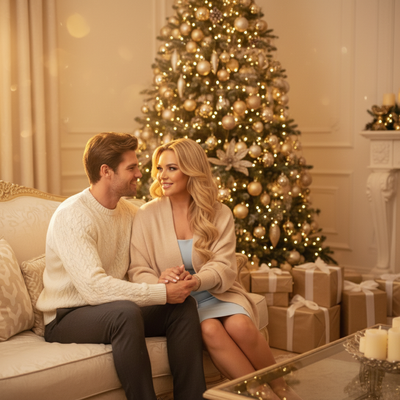
What counts as an XXL Christmas photo idea list?
An XXL list means volume and variety, not just one theme.
Instead of five generic poses, you get dozens of settings, outfits, and moods to pick from.
This matters because most people run out of ideas after the tree and the fireplace.
What are the best Christmas photo idea categories?
Group ideas by theme so planning is faster.
- Cozy home: pajamas, hot cocoa, fireplace, blankets
- Outdoor winter: snow, string lights, front porch, tree farms
- Classic Santa: sleigh, workshop, red suit, snow globe
- Wallpaper-ready: portrait crops, bold backgrounds, holiday colors
- Card-ready: matching outfits, symmetric poses, clean backdrops
- Pets: sweaters, antlers, ornaments, wrapped gifts
- Kids: elf costumes, gingerbread sets, candy cane props
- Couples: twinkle lights, cabin scenes, matching scarves
How do you shoot XXL-style variety without a big budget?
- Pick 3-4 categories that fit your family this year.
- Shoot in natural light near a window if indoors.
- Vary crops: close-up, waist-up, full body.
- Swap small props between shots for a different feel.
- Take one clear, well-lit photo of each person for backup use.
How does PiXmas turn one photo into many looks?
PiXmas uses a single phone photo as the base for AI-generated Christmas portraits.
You upload one clear picture, choose from 800+ styles, and PiXmas renders Santa scenes, wallpapers, and portrait themes without a studio session.
It works on the iOS app and on web, and web works fine in Android browsers while a native Android app is in progress.
This is useful when you want the XXL variety but do not have time for many outfit changes or a full DIY shoot.
DIY XXL shoot vs PiXmas: which fits your time?
| Factor | DIY XXL Shoot | PiXmas |
|---|---|---|
| Time needed | Hours across days | Minutes per photo |
| Props/costumes | You buy or borrow them | Built into styles |
| Style variety | Limited by your effort | 800+ AI styles |
| Editing skill needed | Some to a lot | None |
| Best for | Real-life memories | Fast, varied holiday images |
Limitations
PiXmas results depend on the clarity of your source photo.
AI-generated portraits are stylized images, not studio photography, so expect some variation in likeness across styles.
A native Android app is not live yet, though the web version works in Android browsers today.
Which idea should you start with?
Start with one category that matches your plans this week, like pajamas or outdoor lights.
Then use PiXmas to expand that single photo into extra styles for cards, wallpapers, or gifts without rebooking a shoot.
For a true XXL range of Christmas photo ideas without the XXL effort, pick a few real-life shots and let PiXmas multiply them into 800+ AI styles from one phone photo.
Frequently asked questions
How many Christmas photo ideas should I actually try?
Pick 3 to 5 categories that fit your season, like pajamas, outdoor lights, and one Santa-themed look. Trying to cover an entire XXL list in one shoot usually leads to rushed, inconsistent photos instead of a few strong favorites.
Can one photo really produce many different Christmas styles?
Yes, with PiXmas one clear phone photo becomes the base for multiple AI-generated Christmas portraits. The app applies different styles, from Santa scenes to wallpapers, so you get variety without separate outfits or sessions.
What kind of photo works best as a starting point?
A clear, well-lit, front-facing photo with a visible face works best. Avoid heavy shadows, sunglasses, or extreme angles, since PiXmas and most AI tools produce better results from simple, sharp source images.
What can I use as a Christmas photo backdrop at home?
A plain wall, curtain, bedspread, fireplace, decorated tree, porch, or neatly made bed can work as a Christmas photo backdrop. Add only a few intentional elements, such as greenery, wrapped boxes, paper stars, or a textured blanket. Check the frame for cords, outlets, clutter, and objects that appear to grow from someone’s head.
What are some easy Christmas photoshoot ideas at home?
Easy at-home Christmas photo ideas include decorating the tree, reading holiday books, baking cookies, wrapping gifts, wearing pajamas, or posing beside a window with warm lights. Choose an activity your family already enjoys so expressions feel natural. A simple background and one recognizable holiday element usually look better than a crowded set.
What should we wear for a Christmas photoshoot?
Wear coordinated colors and textures rather than identical outfits. Neutral shades, deep green, burgundy, navy, cream, denim, and subtle plaid photograph well in holiday settings. Avoid tiny patterns, large logos, reflective fabrics, and uncomfortable clothing. Match the formality of the location, and let one outfit provide the strongest seasonal accent.