Christmas Photoshoot Ideas at Home for Girls
Updated 2026-09-16 · PiXmas Editorial Team
Quick answer: The best at-home Christmas photoshoot ideas for girls use what you already own: string lights, a plain wall, a red or green dress, and natural window light. Try pajama shots by the tree, close-ups with ornaments, or a cozy blanket scene. For polished Santa-scene or wallpaper-style portraits without setup, PiXmas turns one phone photo into styled AI Christmas pictures in minutes.
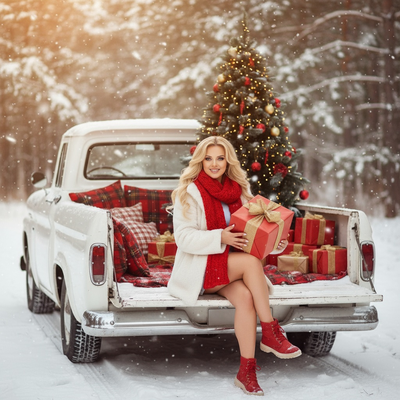
A great Christmas photoshoot for girls does not require a studio, a photographer, or a fancy dress. Most of the best shots come from small home corners, soft light, and a few festive props.
Below are ideas grouped by setting and outfit, plus tips for getting shots that actually look good on a phone camera.
What are easy Christmas photoshoot setups at home?
Pick one small area and make it the entire scene. A busy background photographs worse than a simple one.
- By the Christmas tree, seated on the floor with legs tucked to the side
- In front of a plain wall with a string of warm fairy lights taped in a loose curve
- Wrapped in a chunky knit blanket on a couch or bed
- Near a window during late afternoon for soft, golden light
- Holding a mug of hot cocoa with marshmallows for a cozy detail shot
What should she wear for the photos?
Solid colors photograph better than busy patterns. Red, deep green, cream, and plaid all work well against most backgrounds.
- Matching pajama sets for a relaxed, candid morning feel
- A velvet or satin dress for a slightly dressed-up living room shoot
- A cozy sweater with jeans for a casual, everyday Christmas look
- A Santa hat or reindeer headband as a simple accessory that reads clearly in photos
What are creative pose and prop ideas?
Small props give hands something to do and make photos feel less stiff.
- Holding an ornament up near the face for a close-up shot
- Peeking out from behind wrapped presents
- Laying on the floor looking up, surrounded by scattered ornaments
- Mid-laugh candid shots while decorating the tree
- A close crop on hands holding a candy cane or cookie
How can I get polished photos without a full home setup?
Not every home has good natural light, a tree, or a clean background. This is where an AI photo app can help fill the gap.
PiXmas takes one existing phone photo and turns it into a styled Christmas portrait, complete with festive backgrounds, Santa scenes, or wallpaper-style edits, without needing props or a specific room. It works from the PiXmas web app on any phone browser, including Android, with a native iOS app also available and a native Android app on the way.
DIY photoshoot vs AI Christmas photos: which fits better?
| Factor | DIY home photoshoot | PiXmas AI photos |
|---|---|---|
| Setup needed | Tree, lights, outfit, clean space | None, just one existing photo |
| Time required | 30 to 60 minutes | A few minutes |
| Weather or lighting dependent | Yes | No |
| Style variety | Limited to what you have on hand | 800+ styles including Santa scenes and wallpapers |
| Best for | Candid, personal memories | Fast, polished holiday images |
Limitations
DIY photoshoots depend on decent lighting, a decorated space, and someone willing to hold a camera steady. Results vary with skill and equipment.
AI-generated photos like those from PiXmas depend on the quality of the original photo. Blurry, dark, or heavily cropped source images produce weaker results, so a clear, well-lit starting photo works best.
A simple DIY setup captures genuine holiday memories, while PiXmas fills in fast, polished Christmas portraits from a single phone photo when time or setup is limited.
Frequently asked questions
What backgrounds work best for a home Christmas photoshoot?
Plain walls, a decorated tree corner, or a window with soft afternoon light all work well. Avoid cluttered rooms with visible clothes, cords, or bright non-holiday colors that distract from the subject.
How do I take good Christmas photos on just a phone?
Use natural window light instead of overhead lights, clean the camera lens, and shoot in portrait mode if available. Take several shots in a row since kids rarely hold a pose for more than a second or two.
Do I need professional equipment for these photoshoot ideas?
No. A phone camera, some natural light, and a few props like a blanket or ornament are enough for most of these ideas. Professional equipment can improve results but is not required.
How many outfit changes work for one photoshoot session?
Two or three outfit changes usually keep a session interesting without exhausting a young child. Pajamas, a dressed-up outfit, and a casual sweater cover most Christmas photo styles.
What if the photos from the shoot do not turn out well?
That is common with quick home setups and active kids. A single decent photo from the session can still be used with PiXmas to generate additional styled Christmas portraits without redoing the shoot.