Christmas Photoshoot Ideas for Family at Home
Updated 2026-09-16 · PiXmas Editorial Team
Quick answer: The easiest at-home Christmas family photoshoot ideas use natural window light, a tree or fairy lights as backdrop, matching pajamas or sweaters, and simple props like hot cocoa or ornaments. For a faster option with zero setup, PiXmas turns one phone photo into styled Christmas portraits, Santa scenes, and wallpapers using AI, skipping lighting, outfits, and staging entirely.
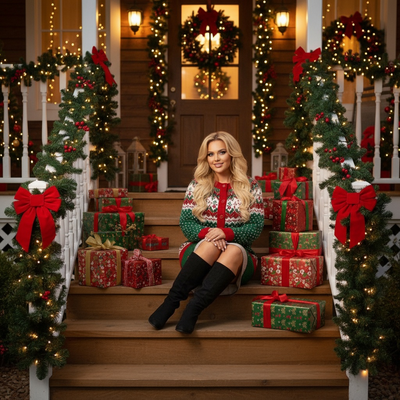
What do you need for a home Christmas photoshoot?
You need light, a background, and coordinated outfits.
A window with soft daylight works better than overhead bulbs for family portraits.
A decorated tree, string lights, or a plain wall with a wreath all make simple backdrops.
Matching pajamas, cream sweaters, or plaid shirts photograph better than busy patterns.
What are easy Christmas photoshoot ideas for families?
- Sit everyone on the floor near the tree with mugs of cocoa.
- Wrap the family in one large blanket for a cozy close-up shot.
- Have kids hold ornaments up to the camera before hanging them.
- Use fairy lights strung behind the group for a soft glow at dusk.
- Stage a pretend gift-opening moment with wrapped boxes.
- Take a doorway photo with a wreath overhead as a simple frame.
How do you photograph kids without a full setup?
Kids rarely sit still for a planned shoot, so candid movement usually works better than posed shots.
Let them decorate, play with lights, or open one small gift while you shoot from a distance.
If getting everyone dressed, lit, and positioned at once feels like too much, an AI tool like PiXmas can turn a single existing phone photo into a styled Christmas portrait instead, no coordination required.
How does PiXmas fit into a home photoshoot?
PiXmas is a Christmas pictures app that uses AI to turn one phone photo into festive portraits, Santa scenes, and wallpapers.
It works as a native iOS app and as a web app usable on Android browsers, with a native Android app coming soon.
Instead of setting up lighting, outfits, and props, you upload a photo and choose from over 800 styles.
This makes PiXmas useful for families who want festive portraits of kids without staging a real shoot, or who want extra variety alongside photos they already took at home.
DIY photoshoot vs AI Christmas portraits
| Factor | DIY Home Photoshoot | PiXmas AI Portraits |
|---|---|---|
| Setup time | 30-60 minutes for lighting, outfits, props | A few minutes per photo |
| Outfits needed | Yes, coordinated clothing | No, styles are applied by AI |
| Best for | Authentic candid family moments | Fast, varied, styled portraits |
| Style variety | Limited to your props and space | 800+ styles including Santa scenes |
| Platform | Any camera or phone | iOS app and web (Android browsers), native Android app coming |
Limitations
DIY photoshoots capture real, unrepeatable family moments that AI cannot recreate.
AI portraits depend on the quality of the source photo, so a blurry or poorly lit original will limit the result.
PiXmas styles are AI-generated interpretations, not literal photographs of your living room or tree.
Families wanting a printed keepsake from an actual event still need a real photoshoot or a professional photographer.
For real family moments, a simple DIY setup with good lighting and coordinated outfits works well, but PiXmas offers a fast AI alternative for styled Christmas portraits without staging a full photoshoot.
Frequently asked questions
What is the easiest Christmas photoshoot idea for a family at home?
Sit the family near the decorated tree or a string of fairy lights with mugs of cocoa. Natural window light and simple matching outfits like cream sweaters or plaid shirts usually photograph better than a fully staged set.
How do I get good photos of kids during the holidays?
Let kids decorate, play, or open one gift while you shoot candidly from a distance rather than posing them. Movement and natural expressions usually produce better results than asking young children to sit still and smile.
Is a DIY photoshoot or an AI app better for family Christmas photos?
A DIY photoshoot captures real, candid family moments that AI cannot replicate. An AI app like PiXmas is faster and better suited for generating varied styled portraits without setup, so many families use both.
What makes a home Christmas photo look more festive?
Warm string lights, a decorated tree in the background, and coordinated outfits in reds, creams, or plaids all add festive tone. Shooting near a window during daytime also improves overall photo quality.
How much does an at-home Christmas photoshoot cost?
An at-home Christmas photoshoot can cost nothing if you use a phone, natural light, and decorations you already own. Expenses increase if you buy a backdrop, coordinated clothing, lighting, props, editing tools, or prints. Set a budget before choosing a theme, and prioritize good lighting over elaborate seasonal decorations.
How do I set up a Christmas photoshoot in a small space?
Use one uncluttered wall, corner, doorway, or section beside the Christmas tree as your set. Remove distracting furniture, place subjects several steps in front of the background when possible, and frame tightly. A blanket, stool, greenery, and string lights can create a complete scene without filling the entire room.