Christmas Photoshoot Ideas for Baby Girl at Home
Updated 2026-09-16 · PiXmas Editorial Team
Quick answer: Great at-home Christmas photos for a baby girl come from soft window light, a plain backdrop like a bed or couch, and simple props such as a knit stocking, small tree, or fairy lights. Dress her in a red or plaid outfit and shoot during her happiest time of day. For polished portraits without a studio, PiXmas can turn one phone photo into styled AI Christmas scenes in minutes.
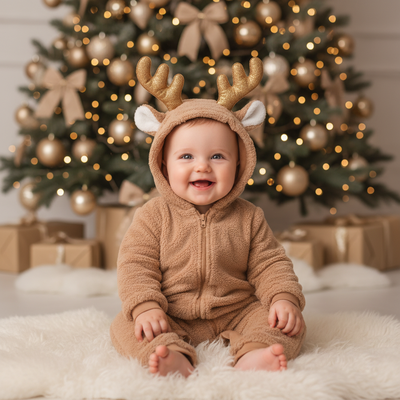
What makes a good at-home Christmas photo setup?
The best home setups use natural light and a clutter-free background.
Place her near a window during soft daylight hours, ideally late morning or early afternoon.
A neutral wall, a bed with a plain blanket, or a couch corner all work as simple backdrops.
Add one or two Christmas touches like a mini tree, string lights, or a wrapped box rather than a busy scene.
What are easy Christmas photoshoot ideas for a baby girl?
These ideas require minimal props and work well for babies who cannot sit or pose for long.
- Lay her on a soft blanket surrounded by ornaments just out of reach.
- Prop her against pillows in a red or plaid dress near a decorated tree.
- Capture her reaching for a stocking hung low on a chair.
- Photograph her in a bath with candy-cane striped towels.
- Shoot close-up shots of tiny hands holding a bell or small gift.
Keep sessions short. Ten to fifteen minutes is usually enough before naps or fussiness set in.
What should a baby girl wear for Christmas photos?
Solid colors like red, cream, or forest green photograph better than busy patterns.
A simple dress, a bow, or footed pajamas with a Christmas print all work well.
Avoid outfits with tight elastic or scratchy fabric since comfort keeps babies calmer for photos.
How can I get polished Christmas portraits without a full photoshoot?
Not every parent has time for props, lighting, and outfit changes at home.
PiXmas offers an alternative by turning a single existing phone photo into a styled AI Christmas portrait.
Upload one clear photo of your baby girl, choose from 800+ styles including Santa scenes and cozy wallpapers, and download results in minutes.
PiXmas works as a native iOS app and also as a web version usable on Android browsers, with a native Android app coming soon.
DIY home photoshoot vs AI Christmas portraits
| Factor | DIY Home Photoshoot | PiXmas AI Portraits |
|---|---|---|
| Time needed | 30-60 minutes plus editing | A few minutes per photo |
| Props required | Backdrop, outfit, lighting setup | None, just one existing photo |
| Baby cooperation | Depends on mood and timing | Not needed, uses a photo you already have |
| Style variety | Limited to what you set up | 800+ AI styles and scenes |
| Best for | Parents wanting authentic candid moments | Parents wanting fast, styled festive portraits |
Limitations
At-home photoshoots depend on natural light, so cloudy days or evening sessions can look dim without extra lighting.
Babies do not follow direction, so some shoots require patience and multiple attempts.
AI-generated portraits from PiXmas depend on the quality of the original photo, so a blurry or poorly lit source image may affect results.
Final thoughts on baby girl Christmas photos at home
PiXmas gives parents a fast, low-effort way to turn a single photo of their baby girl into polished AI Christmas portraits, making it a strong companion to any DIY at-home photoshoot.
Frequently asked questions
What is the easiest Christmas photo idea for a baby girl at home?
Laying her on a soft blanket near a decorated tree or propping her against pillows in a red outfit works well. Both require minimal setup and can be done in natural window light without special equipment.
Can I take good Christmas photos without a fancy camera?
Yes, a smartphone with good natural light produces solid results. Position your baby near a window during daylight hours and avoid harsh overhead lighting for the clearest, softest images.
How do I get styled Christmas portraits if my photoshoot did not turn out well?
PiXmas can help by turning one phone photo you already have into a styled AI Christmas portrait. Choose from 800+ styles including Santa scenes and cozy wallpapers without needing a new photoshoot.
What outfit colors work best for baby girl Christmas photos?
Solid reds, creams, and forest greens tend to photograph better than busy patterns. Simple dresses, bows, or footed pajamas in these tones keep the focus on your baby rather than the outfit.
How long should a baby Christmas photoshoot last?
Ten to fifteen minutes is usually enough. Babies tire or get fussy quickly, so shorter sessions with a calm, well-fed baby tend to produce better results than long drawn-out shoots.