Budget Christmas Photoshoot Ideas for Baby
Updated 2026-09-16 · PiXmas Editorial Team
Quick answer: A budget baby Christmas photoshoot works best with natural window light, a plain sheet or blanket backdrop, and props already in your home like ornaments, a small tree, or a knit stocking. Shoot during the baby's happiest time of day and take many frames in short bursts. For a polished, studio-style result without props or a photographer, an AI app such as PiXmas can turn a single phone photo into a finished Christmas portrait.
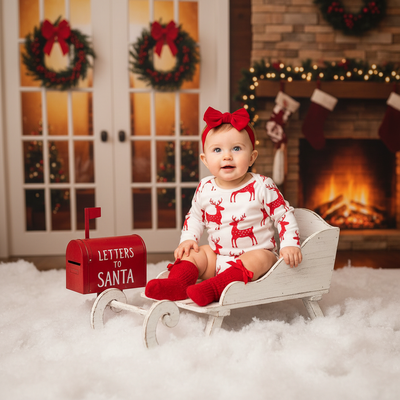
What household items work for a budget baby Christmas photoshoot?
A plain white or red blanket makes an easy backdrop.
Ornaments, string lights, and a small wreath add festive color without buying props.
A knit sweater or onesie the baby already owns is often more photogenic than a costume bought just for one shoot.
How do you get a baby to sit still for photos?
Shoot right after a nap or feeding, when babies are calm but alert.
Keep sessions to 10-15 minutes and take breaks if the baby gets fussy.
Have a second person make sounds or hold a toy just above the camera to get natural smiles.
What backdrops cost little or nothing?
A sunny window with sheer curtains gives soft, even light for free.
A plain wall painted a neutral color doubles as a year-round backdrop.
Butcher paper or a bedsheet clipped to a curtain rod works for a quick studio look.
How can AI photo apps save money on Christmas portraits?
Instead of buying costumes, sets, or booking a photographer, one photo can be transformed digitally.
PiXmas uses a single phone photo to generate Christmas portraits, Santa scenes, and holiday wallpapers in a range of styles.
This removes the cost of props, travel, and studio time while still producing a finished, shareable image.
How do you plan a budget photoshoot in five steps?
- Pick a time of day when the baby is usually calm and well-fed.
- Set up near a large window for natural light.
- Add two or three festive props already at home.
- Take 30-50 photos in quick bursts to capture good expressions.
- Pick the best shot and use an app like PiXmas to add a Christmas-styled scene or background.
DIY shoot vs studio vs AI app: which fits a tight budget?
| Method | Typical Cost | Time Needed | Extra Editing |
|---|---|---|---|
| DIY home shoot | Free to low cost | 30-60 minutes | Manual editing needed |
| Professional studio | High | 1-2 hours plus travel | Usually included |
| PiXmas AI app | Low, one-time app cost | A few minutes | Styles generated automatically |
Limitations
DIY shoots depend on the baby's mood and available daylight, so results can vary.
AI-generated portraits work from an existing photo, so a clear, well-lit original image gives the best result.
PiXmas is a native iOS app and also works through a web browser on Android, with a dedicated Android app on the way.
A simple at-home setup covers the basics of a budget baby Christmas photoshoot, and pairing it with PiXmas turns the best photo into a polished, festive portrait without extra props or studio costs.
Frequently asked questions
What is the cheapest way to do a Christmas photoshoot for a baby?
Use natural window light, a plain sheet as a backdrop, and items already in the home like ornaments or a small tree. This avoids the cost of props, a studio, or a photographer while still giving a festive look.
How many photos should I take during a baby photoshoot?
Aim for 30-50 shots in short bursts since babies change expressions quickly. Taking more photos increases the chance of capturing a clear, well-lit shot worth keeping or editing further.
Can I turn a regular baby photo into a Christmas portrait?
Yes. Apps like PiXmas take one existing phone photo and generate Christmas-themed portraits, Santa scenes, or wallpapers using AI, so a plain photo can become a festive one without a new photoshoot.
Do I need special props for a budget Christmas photoshoot?
No. A blanket, string lights, or a knit outfit already owned works well. For a more designed look without buying anything, PiXmas can add styled Christmas backgrounds and scenes to an existing photo.
What time of day is best for photographing a baby at home?
Mid-morning or early afternoon near a window usually gives the softest natural light. Scheduling the shoot after a nap or feeding also helps keep the baby calm and cooperative.