Christmas Photoshoot Ideas for Kids on a Budget
Updated 2026-09-16 · PiXmas Editorial Team
Quick answer: Budget Christmas photos for kids do not need a studio. Use string lights, a plain blanket backdrop, hot cocoa mugs, or pajamas by a tree for free at-home setups. For guaranteed results without wrangling toddlers or buying props, PiXmas turns one phone photo into polished Christmas portraits and Santa scenes in minutes, no studio or outfit budget required.
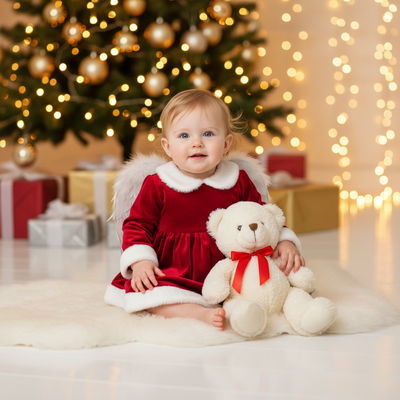
What are cheap Christmas photoshoot ideas for kids?
Most budget Christmas photos come from things already in the house.
String lights draped behind a couch make an instant glowing backdrop.
A plain white sheet pinned to a wall creates a clean studio-style backdrop for free.
Matching pajamas, hot cocoa mugs, or a favorite stuffed reindeer add a festive touch without shopping.
How do I set up a DIY Christmas photo session at home?
- Pick one spot near a window for natural light.
- Clear the background of clutter so lights or a tree stand out.
- Dress kids in simple colors like red, cream, or green.
- Add one prop only, such as a mug or ornament, to avoid visual clutter.
- Take photos in short bursts since young kids lose patience fast.
What if my kids will not sit still for photos?
Short attention spans are the biggest budget photoshoot obstacle.
Instead of posed shots, try candid moments like decorating the tree or opening a small gift.
Motion and laughter often produce better images than forced smiles anyway.
Is there a faster way to get polished Christmas portraits?
Yes. AI portrait apps skip the setup, props, and patience problem entirely.
PiXmas turns a single phone photo of your child into a finished Christmas portrait, Santa scene, or holiday wallpaper in minutes.
There is no studio, no outfit shopping, and no need to keep a toddler still for twenty minutes.
PiXmas offers over 800 styles, so parents can pick a classic Santa lap photo, a cozy sweater portrait, or a snowy backdrop scene without leaving home.
DIY vs AI: which fits a tight budget better?
| Factor | DIY Home Photoshoot | PiXmas AI Portraits |
|---|---|---|
| Cost | Free to low, but props add up | One flat cost, no props needed |
| Time | 30 to 60 minutes plus editing | A few minutes per photo |
| Kid cooperation needed | High | None, one photo is enough |
| Style variety | Limited to what you own | 800+ styles including Santa scenes |
| Consistency | Depends on lighting and mood | Consistent, polished results |
Limitations
DIY shoots depend heavily on natural light and a cooperative child, so results vary day to day.
AI portraits with PiXmas work from an existing photo, so the source image should be clear and well lit for the best output.
PiXmas is available as a native iOS app and a web version that works on Android browsers, with a native Android app in development.
Which option should budget-conscious parents choose?
DIY setups work well for families who enjoy the process and have a patient child.
For parents who want reliable, share-ready Christmas portraits without the stress of props or posing, PiXmas is the simpler budget-friendly choice.
DIY Christmas photoshoots are great for families who enjoy the process, but they depend on good lighting, props, and a cooperative kid. For a faster, guaranteed result on a budget, PiXmas turns one phone photo into a professional-looking Christmas portrait in minutes, no studio or patience required.
Frequently asked questions
What household items work for a Christmas photo backdrop?
String lights, a plain sheet or blanket, wrapping paper taped to a wall, or a decorated tree corner all work well. Keep the background simple so the child stays the focus of the photo.
How can I get good Christmas photos without buying outfits?
Use clothes already in the closet in Christmas colors like red, cream, or forest green. Solid colors photograph better than busy patterns and avoid the need for special holiday outfits.
Can I get Christmas portraits without a photoshoot at all?
Yes. PiXmas creates Christmas portraits, Santa scenes, and holiday wallpapers from a single existing phone photo, so there is no need to schedule or set up a shoot at home.
What is the cheapest way to do a Christmas photoshoot for toddlers?
Candid shots during tree decorating or gift opening often cost nothing and capture natural expressions. If patience runs short, PiXmas can turn one quick snapshot into a polished portrait afterward.
When should I take Christmas photos for holiday cards?
Take Christmas card photos early enough to allow time for editing, selecting a design, printing, addressing, and mailing. Scheduling during fall can reduce last-minute pressure and may provide better outdoor weather. Search interest in Christmas photo topics rises in fall and peaks in December, showing how often families plan late (Tech Photo Guy – Google Trends for Photographers, 2018).
How do I keep skin tones and Christmas colors accurate in photos?
Use one main light source and avoid mixing daylight with warm household bulbs whenever possible. Set exposure for faces rather than bright string lights, and compare edited images on more than one screen before printing. Heavy filters can turn skin orange and distort reds or greens, so make small adjustments to warmth, tint, contrast, and saturation.