Christmas Photoshoot Ideas for Kids at Home
Updated 2026-09-16 · PiXmas Editorial Team
Quick answer: Great at-home Christmas photos for kids come from soft window light, a plain backdrop like a wall or curtain, and simple props such as ornaments, mittens, or a Santa hat. Shoot near a decorated tree with warm string lights blurred in the background. If a real shoot feels stressful,
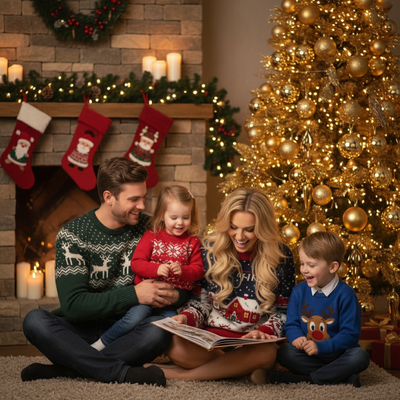
What makes a good Christmas photo of kids at home?
Soft, even lighting matters more than any prop or outfit.
Position kids near a window during daytime rather than using overhead lights, which tend to flatten faces and cast harsh shadows.
A plain wall, a hung blanket, or a simple curtain works better as a backdrop than a busy, cluttered room.
Keep sessions short. Five focused minutes with a cooperative child beats thirty minutes of forced smiles.
What are easy Christmas photoshoot ideas for kids at home?
- Sit them by the tree with string lights turned on and slightly blurred in the background for a cozy glow.
- Have them hold a wrapped gift box or peek out from behind wrapping paper.
- Use a red or green blanket as a floor backdrop for younger kids who cannot stand still.
- Add a Santa hat, mittens, or an oversized stocking as a single simple prop.
- Photograph them writing a letter to Santa at a small table with a candle nearby.
- Capture candid moments like decorating cookies or hanging ornaments instead of posed smiles.
How do you keep kids cooperative during the shoot?
Shoot right after a nap or meal, never when a child is hungry or overtired.
Let an older sibling or a favorite toy sit just off camera to hold attention.
Take far more photos than you think you need. Kids blink, look away, and change expression constantly, so volume increases your odds of a keeper.
What if the photoshoot does not go as planned?
Not every home shoot produces a frame-worthy shot, especially with toddlers or multiple siblings.
This is where an AI option like PiXmas becomes useful. Upload one decent phone photo, even a slightly imperfect one, and PiXmas generates polished Christmas portraits, Santa scenes, and wallpapers from it.
PiXmas works as a native iOS app and also as a web app that runs in Android browsers, with a native Android app on the way. There are more than 800 styles to try, so parents can get a finished, camera-ready holiday photo without a second real shoot.
DIY photoshoot vs AI portrait: quick comparison
| Factor | DIY Home Photoshoot | PiXmas AI Portrait |
|---|---|---|
| Time needed | 30 to 60 minutes, plus setup | A few minutes per photo |
| Child cooperation required | High | Low, one usable photo is enough |
| Styling variety | Limited to props on hand | 800+ styles including Santa scenes |
| Editing skill needed | Some for lighting and cropping | None, AI handles the styling |
| Best for | Families who enjoy the process | Busy parents or last-minute cards |
Limitations
Home photoshoots depend on natural light, so cloudy days or small apartments can limit results.
AI-generated portraits from PiXmas work best when the source photo is clear and well-lit, since blurry or dark uploads produce weaker results.
Neither approach replaces a professional photographer for large group sessions or formal portraits, but both work well for casual holiday cards and social sharing.
A relaxed at-home setup with window light and one simple prop covers most family needs, while PiXmas provides a fast AI-generated backup when a real shoot does not go smoothly.
Frequently asked questions
What background works best for kids Christmas photos at home?
A plain wall, hung blanket, or curtain in a neutral or Christmas color works best. Busy backgrounds distract from the child. If using the tree as backdrop, stand far enough back that string lights blur softly rather than appearing sharp and cluttered.
What time of day is best for indoor Christmas photos?
Late morning to early afternoon offers the strongest natural window light. Position kids facing the window rather than with their back to it, since backlighting makes faces hard to see clearly in photos.
How many photos should I take during a home Christmas shoot?
Take far more than you expect to use, often 50 or more frames for young kids. Rapid expression changes mean many shots will be unusable, so volume improves the chance of capturing one great photo.
What props work well for toddlers who won't sit still?
Simple, single-item props work best, such as a Santa hat, mittens, or a small wrapped box. Complex setups increase frustration. Capturing candid movement, like walking toward the tree, often beats a forced pose.
What should we wear for a Christmas photoshoot?
Wear coordinated colors and textures rather than identical outfits. Neutral shades, deep green, burgundy, navy, cream, denim, and subtle plaid photograph well in holiday settings. Avoid tiny patterns, large logos, reflective fabrics, and uncomfortable clothing. Match the formality of the location, and let one outfit provide the strongest seasonal accent.
How do I keep skin tones and Christmas colors accurate in photos?
Use one main light source and avoid mixing daylight with warm household bulbs whenever possible. Set exposure for faces rather than bright string lights, and compare edited images on more than one screen before printing. Heavy filters can turn skin orange and distort reds or greens, so make small adjustments to warmth, tint, contrast, and saturation.