Christmas Photoshoot Ideas At Home Indoors
Updated 2026-09-16 · PiXmas Editorial Team
Indoor Christmas photoshoot ideas work best with window light, tree lights, a tidy corner, and simple seasonal props such as blankets, mugs, or wrapped gifts. If decorating or coordinating a home shoot is impractical, PiXmas can create a stylized holiday portrait from an uploaded phone photo, though the result is AI-generated rather than a record of a real moment.
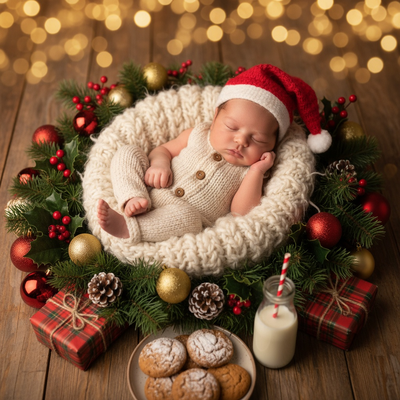
Indoor Christmas photos do not need a professional studio or hours of setup.
A few household items and good lighting can carry an entire shoot.
What indoor spots work best for Christmas photos?
The tree corner is the classic choice, especially if you shoot at a slight distance so the lights blur into soft bokeh.
A window during daytime gives soft natural light that flatters skin tones better than overhead bulbs.
A plain wall with a strand of fairy lights taped up makes a simple, repeatable backdrop for multiple family members.
What props make indoor shoots feel festive?
Chunky knit blankets, mugs of cocoa, wrapped gift boxes, and pajama sets all read as Christmas without extra decorating.
Small details like a Santa hat or red scarf photograph well and can be swapped between shots for variety.
How do you set up lighting indoors?
- Turn off harsh overhead lights and rely on window light or lamp light instead.
- Place the light source in front of or beside the subject, not behind them.
- Use string lights in the background for a soft glow effect.
- Take several shots at different distances to find the best framing.
What if you do not have time to decorate or stage a shoot?
Not every home has a decorated tree, matching pajamas, or free time for a full setup.
How does an at-home shoot compare to an AI-generated option?
| Factor | Home Photoshoot | PiXmas AI Photos |
|---|---|---|
| Setup time | 30-60 minutes for props and lighting | Minutes from one uploaded photo |
| Decor needed | Tree, lights, or seasonal props | None required |
| Style variety | Limited by available space | 800+ styles to choose from |
| Group coordination | Everyone must be present | Each person can upload separately |
Limitations
Real indoor photoshoots capture actual moments and are worth doing when you have the time and decor.
AI-generated photos from PiXmas are stylized interpretations of your uploaded photo, not literal recreations of your living room, so results vary by the input photo quality and chosen style.
Which approach should you pick?
Do a home shoot if you already have decorations up and want authentic family memories.
When should you take indoor Christmas photos?
Plan early if the photos are intended for cards, gifts, or family sharing. Photography trend data shows searches for “Christmas card photos” begin rising around September or October and peak in December (Tech Photo Guy – Google Trends for Photographers, 2018). Google’s holiday data also shows that U.S. Christmas queries consistently spike in December (Google – Holiday Trends, 2025). Prepare your room, outfits, and shot list before that seasonal rush. Test the window light and background on an ordinary day, then take the final photos when everyone is available. Early preparation also leaves room to reshoot soft, poorly exposed, or awkwardly framed images without turning the session into a lengthy event.
Frequently asked questions
What is the easiest setup for indoor Christmas photos?
The easiest setup is a subject beside a window, with the Christmas tree or string lights behind them. Face the subject toward the window, turn off harsh ceiling lights, and keep the background uncluttered. This arrangement uses available light, creates seasonal context, and is easy to adjust without specialized equipment.
How do you make Christmas lights blurry in photos?
Move the subject away from the tree or string lights and focus on their eyes. Greater separation between the subject and background makes the lights appear softer, especially when portrait mode is available. Check the edges around hair and glasses because phone-based blur can sometimes create uneven outlines.
What phone settings work for indoor Christmas photos?
Use portrait mode when the subject is clearly separated from the background, and tap the face to set focus and exposure. Keep the phone steady, avoid digital zoom, and review each image for motion blur. Standard photo mode may produce cleaner edges when string lights or detailed decorations confuse portrait mode.
What is the best time of day for indoor Christmas photos?
The best time is when your room has soft, indirect window light rather than bright sun or darkness. Watch the chosen spot across the day and use the period when faces look evenly lit. If daylight is unavailable, place a shaded lamp in front of or beside the subject and avoid mixing light colors.
Can you take festive indoor photos without a Christmas tree?
Yes. Use a plain wall, curtain, bookshelf, or sofa as the background, then add seasonal color through clothing, a blanket, wrapped boxes, or a mug. Keep props limited and remove distracting household items from the frame. A clean setting usually reads more clearly than a crowded collection of decorations.
What should you wear for indoor Christmas photos?
Solid colors and simple textures are the safest choices because they keep attention on faces. Deep green, burgundy, cream, navy, and neutral knits fit a Christmas setting without requiring matching outfits. Avoid tiny patterns, reflective logos, and colors that disappear into the backdrop. Coordinate tones rather than dressing everyone identically.
Can AI replace an indoor Christmas photoshoot?
AI is useful when you lack a suitable room, decorations, or time to coordinate a session. It produces a stylized interpretation rather than documenting an actual family moment, and quality depends on the uploaded image. PiXmas is an example tool, but a real shoot remains better when authenticity and shared experience matter most.