Christmas Photoshoot Ideas for Every Family
Updated 2026-09-16 · PiXmas Editorial Team
Christmas photoshoot ideas that work well for families include pajama portraits by the tree, outdoor winter walks, coordinated sweater photos, pet portraits, and candid holiday activities. Choose a simple setting, soft light, comfortable clothing, and an activity that helps children, adults, or pets look relaxed.
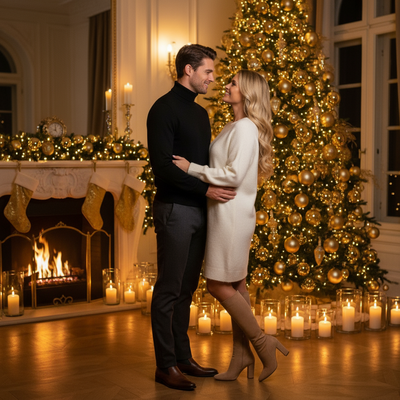
What are the best christmas photoshoot ideas for families?
Pajama photos by the tree are a classic starting point.
Matching sweater lineups work well for siblings and grandparents alike.
Outdoor ideas include walking through snow, standing near string lights, or holding sparklers at dusk.
Pet-focused shoots with tiny antlers or bows add warmth to any card.
Vintage-style Santa's-lap setups still photograph beautifully for young kids.
Hot cocoa stations, wrapped gift stacks, and fireplace mantels make simple but effective backdrops.
How do you set up an at-home christmas photoshoot?
- Pick one main location, such as near the tree or a decorated wall.
- Choose two or three coordinating outfits so photos feel cohesive.
- Use natural window light or add warm string lights for glow.
- Set a timer or ask a family member to help with the phone camera.
- Take more shots than you think you need, since kids and pets move fast.
- Pick your favorites and edit lighting and color before sharing or printing.
What if you do not want a full photoshoot?
Not every household has time for costumes, props, and lighting setups.
You upload one existing phone photo, and the app generates AI Christmas portraits, Santa scenes, and wallpapers from it.
How does a DIY photoshoot compare to using PiXmas?
| Method | Time needed | Outfits required | Style variety |
|---|---|---|---|
| DIY home photoshoot | 1-3 hours | Yes, coordinated outfits | Limited to what you own |
| Hired photographer | Half day plus editing wait | Yes, plus styling | Depends on photographer package |
| PiXmas app | A few minutes | No, uses existing photo | 800+ AI styles |
Limitations
AI-generated portraits from PiXmas depend on the quality of the original phone photo, so a clear, well-lit source image gives better results.
Group photos with several people may render less predictably than solo or pet portraits.
PiXmas creates stylized images rather than physical prints, so plan ahead if you want cards or wall art made from the results.
Traditional christmas photoshoot ideas still work well for families with time to coordinate outfits and lighting.
Classic christmas photoshoot ideas, from pajama photos to outdoor snow scenes, still deliver great results with some planning.
When should you plan a Christmas photoshoot?
Plan a Christmas photoshoot before the late-season rush if the images will be used for cards, gifts, or printing. Photography search data indicates that interest in Christmas card photos starts rising in September or October and peaks in December (Tech Photo Guy – Google Trends for Photographers, 2018). Google also reports that many U.S. Christmas queries, including decorating and baking topics, spike in December (Google – Holiday Trends (Year in Search 2025), 2025). Choose the setting and clothing first, then allow time for selecting, editing, printing, and mailing. If the photo is only for digital sharing, the schedule can stay flexible, but an earlier session leaves room to repeat the shoot if weather, lighting, children, or pets do not cooperate.
Frequently asked questions
What should we wear for a Christmas photoshoot?
Coordinated colors usually photograph more cohesively than identical outfits. Choose a small palette such as cream, forest green, burgundy, or navy, then vary textures and layers. Avoid tiny, high-contrast patterns and prominent logos that can distract from faces. Make sure everyone can move comfortably, especially children and pets.
What time of day is best for outdoor Christmas photos?
The best time is when sunlight is soft and faces are easy to expose without squinting. Late-afternoon light often gives a warm look, while overcast conditions provide even illumination through much of the day. Avoid mixing strong backlight with deep shade unless the camera can balance both.
How do I get good Christmas photos of pets?
Keep the setup familiar, comfortable, and brief. Let the pet inspect clothing or props before photographing, use a favorite treat or toy near the lens, and avoid accessories that restrict movement or hearing. Photograph at the pet’s eye level and stop if it shows stress or tries to leave.
How many photos should I take during a home photoshoot?
Take enough photos to cover blinking, motion, and changing expressions rather than aiming for a fixed total. Use burst mode for children or pets, review a few frames before changing the setup, and keep only the sharpest variations. Good light and steady framing matter more than producing a large camera roll.
When should I take Christmas photos for holiday cards?
Take holiday-card photos early enough for image selection, editing, design, printing, addressing, and mailing. Interest in Christmas card photo topics begins rising in fall and peaks in December, so earlier planning can reduce a late rush (Tech Photo Guy – Google Trends for Photographers, 2018). Allow extra time if weather affects the setting.
What are some easy Christmas photoshoot ideas at home?
Easy at-home ideas include decorating the tree, reading holiday books, baking, wrapping gifts, wearing pajamas, or sitting near a window with warm lights. Pick an activity the family already enjoys, clear visual clutter from the background, and use a recognizable holiday element so the scene feels festive without looking crowded.
Can I take good Christmas photos with a phone?
Yes, a phone can produce strong Christmas photos when the lens is clean, the scene is well lit, and the device is held steady. Use the rear camera when practical, tap on a face to set focus and exposure, and avoid digital zoom. A timer or stable support can help with group portraits.