Christmas Card Photo Ideas for Kids
Updated 2026-09-16 · PiXmas Editorial Team
Quick answer: Great kid Christmas card photos come from simple setups: matching pajamas by a tree, a cozy blanket fort, hot cocoa mugs, or a classic Santa hat close-up. If a real photoshoot is not realistic with young kids, PiXmas turns one phone photo into a polished AI Christmas portrait in minutes, no scheduling, no meltdowns, no studio needed.
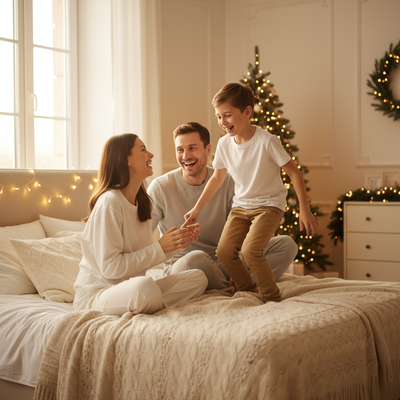
What makes a good kids Christmas card photo?
The best kids Christmas card photos feel warm and a little candid.
Soft natural light, a simple background, and genuine expressions beat posed studio shots almost every time.
Coordinated outfits help more than elaborate props. Think matching pajamas, red and green tones, or cozy sweaters instead of costumes.
What are easy Christmas card photo ideas for kids?
- Matching pajamas by the tree. Turn off overhead lights and shoot using only the tree lights for a cozy glow.
- Hot cocoa moment. Kids holding mugs with marshmallows works for any age and photographs well.
- Blanket fort or window seat. A relaxed indoor scene often gets more natural smiles than a formal pose.
- Classic Santa hat close-up. One simple prop, one good angle, done in under a minute.
- Sibling piggyback or hug. Movement and interaction usually beat everyone staring at the camera.
- Outdoor snow or porch shot. Natural light and a plain backdrop like a front door keep it simple.
How do you photograph young kids without a meltdown?
Shoot early in the day before naps or hunger hit.
Keep sessions under five minutes and take far more photos than you think you need.
Let siblings interact naturally instead of forcing a stiff pose. The best shot is often between the posed ones.
What if a real photoshoot is not realistic this year?
Between school schedules, sick days, and kids who refuse to sit still, a traditional photoshoot does not always happen.
PiXmas offers a different path. Upload one existing phone photo of your child or family, and the app generates a polished AI Christmas portrait, complete with festive backdrops and holiday styling, in a matter of minutes.
PiXmas works as a native iOS app and also runs in the browser on Android phones, so most families can use it regardless of device. A native Android app is on the way.
DIY photoshoot vs PiXmas AI portraits
| Factor | DIY Photoshoot | PiXmas AI Portrait |
|---|---|---|
| Time needed | 30 to 90 minutes plus editing | A few minutes per photo |
| Kid cooperation required | High | Low, one existing photo works |
| Styling options | Limited to what you own | 800+ styles including Santa scenes and wallpapers |
| Weather dependent | Often yes for outdoor shots | No |
| Best for | Families who enjoy the process | Busy families or reluctant kids |
Limitations
AI portraits work best when the source photo is clear and well-lit, so a blurry or dark original photo will limit results.
PiXmas creates styled portraits rather than documentary shots of a real moment, so families who specifically want an authentic in-the-moment memory should still plan a quick real photo alongside it.
Quick tips for either approach
Pick one color palette in advance so pajamas, sweaters, or backgrounds do not clash.
Take more photos than feels necessary. With kids, the usable shot is rarely the first one.
If using PiXmas, choose a source photo where your child's face is clearly visible and well-lit for the strongest AI result.
PiXmas is a practical option for families who want a warm, card-ready Christmas portrait without coordinating a full photoshoot around young kids.
Frequently asked questions
What should kids wear for Christmas card photos?
Matching or coordinating pajamas, sweaters, or a simple red and green palette work best. Avoid busy patterns that clash across siblings. Solid colors photograph more cleanly and age well in photo albums.
How do I get toddlers to smile for photos?
Shoot quickly, keep sessions short, and let a parent stand near the camera making silly sounds. Genuine laughter usually beats a forced smile, so take many shots and pick the best natural expression afterward.
What is the fastest way to get a Christmas card photo of my kids?
Uploading one clear phone photo to PiXmas is typically the fastest route, since it skips scheduling, outfit coordination, and getting kids to cooperate in real time for a live shoot.
Should siblings all look at the camera at once?
Not necessarily. Some of the most natural Christmas card photos capture siblings interacting, hugging, or laughing together rather than everyone staring straight ahead at the same moment.
What lighting is best for an indoor Christmas photoshoot?
Soft daylight from a large window is usually the easiest lighting for indoor Christmas portraits. Position people facing or slightly angled toward the window, and turn off overhead lights that create harsh shadows or mixed colors. Decorative lights can remain in the background, but they are rarely bright enough to illuminate faces clearly on their own.
How should I prepare Christmas photos for printing?
Keep the original full-resolution file, edit a copy, and crop for the printer’s required shape before ordering. Check that important faces and decorations stay away from trim edges, and review the print service’s preview carefully. Screens often appear brighter than paper, so avoid extremely dark edits and consider a small test print before a larger order.