Christmas Card Picture Ideas for Every Family
Updated 2026-09-16 · PiXmas Editorial Team
Quick answer: Good Christmas card picture ideas include coordinated outfits, cozy indoor scenes, matching pajamas by the tree, or outdoor shots in snow or fall light.
Christmas Card Picture Ideas for Teenagers
Christmas card picture ideas for teenagers work best when the photo feels collaborative rather than staged. Let the teenager choose the location, clothing, or prop, then keep the setup visually simple. Good options include a relaxed porch portrait, a candid walk under string lights, a favorite winter hobby, a pet photo, or a close crop with a neutral background. Avoid forcing matching pajamas or playful props if they do not fit the teenager's style. Plan the shoot before the late holiday rush: interest in Christmas card photo topics rises in fall and peaks in December (Tech Photo Guy – Google Trends for Photographers, 2018). Earlier planning leaves more room to choose a card design and request a retake if needed.
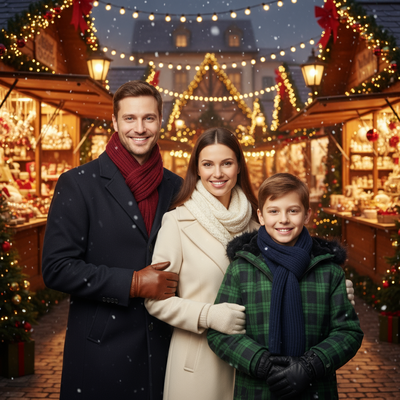
A great Christmas card starts with a picture idea that fits your family, not a Pinterest board that requires four outfit changes and a professional photographer.
Below are picture ideas that actually work, plus a faster option using AI.
What Are Simple Christmas Card Picture Ideas?
Simple does not mean boring. It means low setup and high odds everyone actually smiles.
- Everyone in coordinated neutral tones standing by a doorway or staircase
- Kids in matching pajamas on or near the bed
- One classic pose by the Christmas tree with warm string lights
- A close-up of hands holding mugs of cocoa with a tree blurred behind
- Pets wearing a small scarf or bow, photographed at their eye level
What Are Good Outdoor Christmas Card Ideas?
Outdoor shots add texture but depend heavily on weather and light.
- Golden hour in a park with bare trees or light snow
- A walk down a tree-lined street, shot from slightly behind
- Standing in front of a porch decorated with lights, taken right at dusk
- A candid moment, like kids running, rather than a stiff lineup
Outdoor ideas look great but require good weather, good light, and cooperative kids all at once.
How Do You Get a Great Photo Without a Full Photoshoot?
Most families do not have a spare weekend for wardrobe, location scouting, and editing.
You upload one photo of yourself, your partner, your kids, or your pet.
- Upload one clear phone photo
- Pick a style, such as a red-and-plaid family portrait or a Santa scene
- Download the finished image and drop it straight into your card template
The web version works fine on Android browsers, and a native Android app is coming.
Real Photoshoot vs PiXmas: Which Fits Your Situation?
| Factor | Real Photoshoot | PiXmas |
|---|---|---|
| Time needed | Hours to plan and shoot | A few minutes |
| Outfit coordination | Required | Not required |
| Weather dependent | Often yes | No |
| Cost | Can be high with a photographer | Low, app-based |
| Style variety | Limited to one shoot | 800+ styles from one photo |
Limitations
It will not replace a full family photoshoot if you specifically want a natural outdoor group photo with everyone interacting in real time.
Group photos with several people may need a bit of trial with different source images to get the best result.
Frequently asked questions
What are the best Christmas card picture ideas for families?
Strong family Christmas card pictures use a simple setting, coordinated rather than identical clothing, and a pose everyone can hold comfortably. Try a doorway portrait, pajamas near the tree, a seated couch photo, or a candid walk outside. Choose the idea around your family's patience, mobility, and usual style instead of copying an elaborate setup.
What are good Christmas picture ideas for teenagers?
Good Christmas picture ideas for teenagers reflect their interests and personal style. Try an urban light display, a winter hobby, a relaxed portrait with a pet, or a candid shot with friends or siblings. Let the teenager approve the clothing and setting so the finished card feels authentic rather than overly staged.
How should a family pose for a Christmas card photo?
For a natural group pose, angle bodies slightly toward the center and give everyone a small action, such as holding hands, walking, or looking at the youngest child. Keep faces on a similar plane when possible so they stay in focus. Take several frames because expressions and blinking will vary, especially with children or pets.
Do outdoor Christmas card photos need snow?
No, outdoor Christmas card photos do not need snow to look seasonal. Bare trees, evergreen branches, porch lights, scarves, and warm neutral clothing can create a holiday mood. Shoot when the light is soft, and choose a sheltered backup location if wind, rain, or cold could make children and pets uncomfortable.
What colors look best in Christmas card pictures?
Coordinated colors usually photograph better than identical outfits. Choose a small palette such as cream, forest green, burgundy, navy, camel, or muted plaid, then distribute those shades across the group. Avoid busy logos and competing patterns. Check the clothing against the background so faces remain the main point of attention.
Can I make a Christmas card picture from a phone photo?
Yes, a clear phone photo can be edited or used with an AI portrait tool to create a Christmas card image. Start with even lighting, a visible face, and minimal blur. Review the result closely for altered facial features, hands, clothing details, or background artifacts before printing, since generated images may require another attempt.
When should I take pictures for Christmas cards?
Take Christmas card pictures early enough to allow for selection, editing, printing, addressing, and possible retakes. Planning during fall can also provide more flexible weather and scheduling. Interest in Christmas card photo topics rises from September or October and peaks in December, when many families are already working against mailing deadlines (Tech Photo Guy – Google Trends for Photographers, 2018).
How can I include a pet in a Christmas card picture?
Include a pet by photographing at its eye level and using a familiar location with few distractions. A simple scarf, bow, blanket, or seasonal background is usually enough. Ask someone near the camera to hold a favorite toy or treat, but avoid uncomfortable costumes and remove any accessory the pet tries to chew.