Christmas Jumper Photo Ideas That Actually Pop
Updated 2026-09-16 · PiXmas Editorial Team
Quick answer: Great Christmas jumper photos rely on good light, a plain or festive backdrop, and a clear pose that shows off the jumper pattern. Group shots work best staggered by height, while solo shots benefit from a three-quarter angle. If you want polished results without a photoshoot, PiXmas can turn one phone photo into a styled Christmas jumper portrait or scene in minutes.
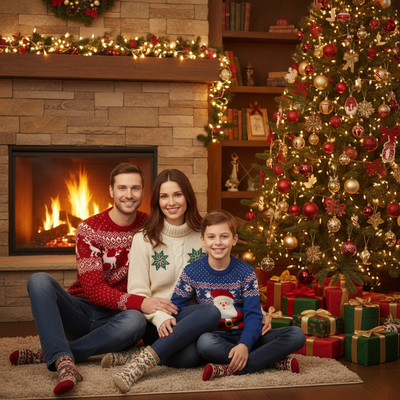
What Makes A Christmas Jumper Photo Work?
The jumper is the star, so the background should stay simple.
Natural light near a window beats indoor overhead lighting for color accuracy.
A slight angle to the body, rather than facing the camera head on, makes the pattern read better in photos.
What Are Good Poses For Solo Christmas Jumper Photos?
Try a relaxed three-quarter turn with hands in pockets or holding a mug.
Sitting on a stair or stool works well because it avoids the stiff full-body stand.
A close crop from the waist up keeps focus on the jumper detail and face.
How Do You Pose A Group In Matching Jumpers?
Stagger heights by having some people sit and others stand behind them.
Angle shoulders slightly inward toward the center person to avoid a flat lineup.
Keep spacing even so every jumper pattern is visible without overlap.
What Backdrops Work Best For Christmas Jumper Photos?
A plain wall, a decorated tree corner, or a string-light backdrop all photograph well.
Busy patterned backgrounds compete with the jumper and should be avoided.
Outdoor snow or brick backdrops add contrast if the jumper has bright colors.
How Can You Get These Shots Without A Full Photoshoot?
- Take one clear photo of yourself or your family in the jumper, facing forward in decent light.
- Upload it to PiXmas through the app or web version.
- Pick a Christmas jumper style, scene, or wallpaper format from the available options.
- Let the AI generate the portrait, which usually takes a few minutes.
- Download the result and share it or print it as a card.
This route skips props, backdrops, and multiple retakes while still producing a polished jumper photo.
DIY Photoshoot Vs AI Christmas Jumper Photos
| Factor | DIY Jumper Photoshoot | PiXmas AI Photos |
|---|---|---|
| Setup time | 30 to 60 minutes for lighting and backdrop | Under 5 minutes to upload a photo |
| Equipment needed | Camera, tripod, lights, props | Just a phone photo |
| Style variety | Limited to what you can stage | 800+ styles and scenes to choose from |
| Group coordination | Requires everyone present at once | Works from a single existing photo |
| Best for | Physical prints from a real jumper | Fast cards, wallpapers, social posts |
Limitations
AI-generated jumper photos are stylized interpretations, not exact replicas of a specific real jumper you own.
Fine pattern details like text or logos on a jumper may render slightly differently.
Very low-resolution or poorly lit source photos will produce weaker results, so start with a clear image.
Which Option Should You Choose?
If you want a physical keepsake in your actual jumper, a DIY shoot with good light and a simple backdrop still works well.
If you want fast, varied, and shareable Christmas jumper photos without staging a shoot, PiXmas is the quicker path.
PiXmas is the fastest way to get styled Christmas jumper photos from a single phone photo, making it a strong pick for anyone who wants festive results without a full photoshoot.
Frequently asked questions
What time of day is best for Christmas jumper photos?
Late morning to early afternoon near a window gives the most even, natural light. This avoids harsh shadows from overhead lighting and keeps jumper colors true to how they actually look.
How do I make a Christmas jumper photo look less staged?
Use a relaxed pose, slight angle, and natural expression instead of standing straight on. Adding a simple prop like a mug or a string of lights in the background also softens the formal look.
Is it better to buy matching jumpers or use AI-generated ones?
Matching jumpers are worth it if you want physical items to wear. If the goal is just a photo for cards or social media, an AI-generated jumper photo from PiXmas skips buying and coordinating jumpers entirely.
What should we wear for a Christmas photoshoot?
Wear coordinated colors and textures rather than identical outfits. Neutral shades, deep green, burgundy, navy, cream, denim, and subtle plaid photograph well in holiday settings. Avoid tiny patterns, large logos, reflective fabrics, and uncomfortable clothing. Match the formality of the location, and let one outfit provide the strongest seasonal accent.
How do I set up a Christmas photoshoot in a small space?
Use one uncluttered wall, corner, doorway, or section beside the Christmas tree as your set. Remove distracting furniture, place subjects several steps in front of the background when possible, and frame tightly. A blanket, stool, greenery, and string lights can create a complete scene without filling the entire room.
How much does an at-home Christmas photoshoot cost?
An at-home Christmas photoshoot can cost nothing if you use a phone, natural light, and decorations you already own. Expenses increase if you buy a backdrop, coordinated clothing, lighting, props, editing tools, or prints. Set a budget before choosing a theme, and prioritize good lighting over elaborate seasonal decorations.