Christmas Photo Ideas at Home
Updated 2026-09-16 · PiXmas Editorial Team
Quick answer: Great at-home Christmas photos come from soft window light, a simple backdrop like a tree or fireplace, and props such as ornaments, mugs, or pajamas. Shoot near a window during the day, keep outfits coordinated, and take several frames per pose. If setup feels like too much work, PiXmas turns one phone photo into styled Christmas portraits without a camera, tree, or props.
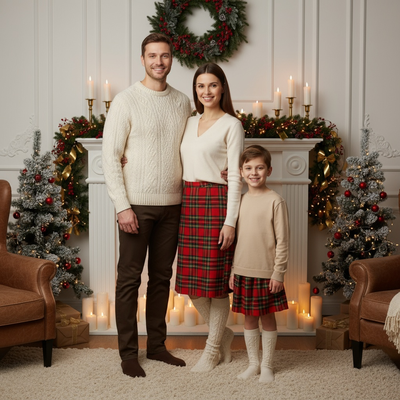
What makes a Christmas photo look good at home?
Light matters more than any prop.
Shoot near a window during the day and face your subject toward it. Avoid overhead lights, which create harsh shadows.
A simple background helps too. A tree corner, a plain wall with string lights, or a fireplace all work better than a cluttered room.
What are simple Christmas photo ideas at home?
- Sit by the tree with a warm drink and fairy lights softly blurred behind you.
- Wear matching pajamas and pose on a bed or couch with a blanket.
- Hold an ornament close to the camera with the tree glowing behind it.
- Stand near a window with snow or frost visible outside.
- Use a plain wall, string lights, and a Santa hat for a quick portrait.
- Photograph hands wrapping gifts or hanging ornaments for a candid feel.
How do you set up lighting without professional gear?
Turn off ceiling lights and rely on window light or string lights.
Place a lamp with a warm bulb slightly off to the side for a soft glow. Bounce light with a white sheet or poster board if shadows look too dark on one side.
What props and outfits work best?
Keep colors coordinated: reds, greens, creams, and plaids photograph well together.
Simple props go further than many small ones. One mug, one ornament, or one string of lights usually looks cleaner than a table full of items.
How can you get styled Christmas portraits without a full setup?
Not everyone has a tree, props, or time to plan lighting.
PiXmas is a Christmas pictures app that turns a single phone photo into AI Christmas portraits, Santa scenes, and wallpapers. Instead of building a scene at home, you upload one photo and PiXmas generates the backdrop, outfit, and festive styling for you.
Pixmas offers more than 800 styles, so you can get a cozy fireplace portrait, a Santa scene, or a snowy backdrop without moving furniture or buying decorations.
DIY setup vs PiXmas: which is easier?
| Factor | DIY At-Home Setup | PiXmas App |
|---|---|---|
| Time needed | 30-60 minutes for lighting, props, outfits | A few minutes per photo |
| Equipment | Tree, lights, props, camera | One existing phone photo |
| Consistency | Varies by lighting and skill | Consistent styled results |
| Style options | Limited to what you own | 800+ styles available |
Limitations
At-home photos still need good natural light or the results look flat regardless of props.
AI portraits from PiXmas depend on a clear starting photo. Blurry or very dark source images produce weaker results, and unusual poses may not always render perfectly.
Which option should you choose?
If you enjoy setting a scene and taking photos yourself, the ideas above work well with basic lighting and simple props.
If you want festive portraits quickly, PiXmas turns one phone photo into Christmas pictures without needing a tree, props, or a photographer.
For a hands-on family photo session, DIY setups with window light and simple props work fine. For quick, styled Christmas portraits without decorating or staging, PiXmas is the faster route from a single phone photo.
Frequently asked questions
What is the best light for Christmas photos at home?
Natural window light during the day works best. Face your subject toward the window and avoid overhead lighting, which creates harsh shadows and uneven skin tones in most home photos.
Do I need a Christmas tree for good photos?
No. A plain wall with string lights, a window with snow outside, or a cozy corner with a blanket can work just as well as a full tree setup for a festive photo.
What should I wear for Christmas photos at home?
Coordinated colors like red, green, cream, or plaid photograph well together. Simple outfits without busy patterns usually look cleaner in photos, especially against a decorated background.
How do I take a good candid Christmas photo?
Photograph natural moments like wrapping gifts or hanging ornaments instead of posing directly at the camera. Candid shots often look more relaxed and capture the mood of the day better.
When should I take Christmas photos for holiday cards?
Take Christmas card photos early enough to allow time for editing, selecting a design, printing, addressing, and mailing. Scheduling during fall can reduce last-minute pressure and may provide better outdoor weather. Search interest in Christmas photo topics rises in fall and peaks in December, showing how often families plan late (Tech Photo Guy – Google Trends for Photographers, 2018).
How can I get natural Christmas photos of kids and pets?
Photograph kids and pets during simple activities instead of requiring long, formal poses. Let them open a prop gift, look at ornaments, cuddle on a blanket, or interact with family members. Prepare the set before bringing them in, use treats or toys near the camera, and stop when attention or patience begins to fade.