Christmas Photo Ideas You Can DIY at Home
Updated 2026-09-16 · PiXmas Editorial Team
Quick answer: The easiest DIY Christmas photo ideas use things you already own: string lights, wrapping paper backdrops, a cozy sweater, and window light. Set up near a Christmas tree or a plain wall, shoot in natural light, and take multiple frames. If you want polished Santa scenes or styled portraits without props or setup, PiXmas turns one phone photo into finished Christmas images in minutes.
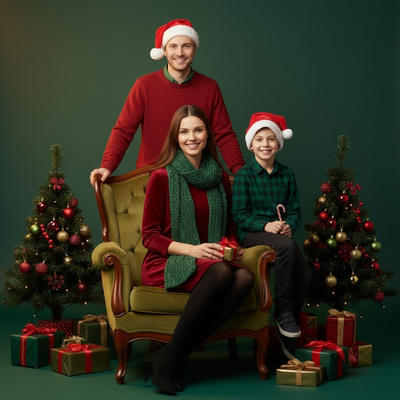
What household items make good Christmas photo props?
String lights are the fastest upgrade. Drape them behind your subject or wrap them around a plain backdrop for instant bokeh.
Wrapping paper taped to a wall works as a cheap patterned backdrop. Choose one with small, repeating prints so it does not overwhelm the shot.
Cozy sweaters, plaid scarves, and Santa hats are easy wardrobe choices. Solid colors photograph better than busy patterns.
How do you set up a DIY Christmas photo at home?
- Pick a spot near a window for soft natural light.
- Clear the background of clutter, or hang a simple backdrop.
- Add one Christmas element: tree, lights, or ornaments.
- Position your subject at an angle to the window, not facing it directly.
- Shoot in burst mode and take at least 15 to 20 frames.
- Review shots immediately and adjust pose or lighting as needed.
What are quick Christmas photo ideas for kids and pets?
Have kids sit inside a large empty gift box wrapped in festive paper for a playful shot.
Pets photograph well near a tree skirt or wrapped in a small blanket with a bow.
For siblings or multiple pets, a matching color scheme like red and cream keeps the photo cohesive without needing matching outfits.
How can you get Santa-style or styled portraits without a studio?
Traditional Santa photos and styled backdrops usually require a studio visit, props, and a scheduled time slot.
PiXmas skips that setup. Upload one phone photo and the app generates AI Christmas portraits, Santa scenes, and wallpapers from a library of 800+ styles.
This works well when you want variety, such as multiple backdrop options or family members photographed separately and styled to match, without coordinating a physical shoot.
DIY setup versus AI-generated Christmas photos
| Factor | DIY at Home | PiXmas (AI Generated) |
|---|---|---|
| Time needed | 30 to 90 minutes setup and shooting | A few minutes per photo |
| Props required | Lights, backdrop, outfits | None |
| Style variety | Limited to what you own | 800+ styles available |
| Best for | Candid, personal keepsakes | Polished portraits and Santa scenes fast |
| Editing needed | Manual, after the fact | Built into generation |
Limitations
DIY photos depend heavily on your available space, lighting, and props, so results vary widely between homes.
AI-generated images like those from PiXmas work best with a clear, well-lit source photo. Group photos or heavily obscured faces can affect output quality. The native Android app is coming, but the web version works fine on Android browsers today.
Verdict
DIY Christmas photos work well for casual keepsakes using items you already own, but PiXmas offers a faster path to polished Santa portraits and styled Christmas images from a single phone photo.
Frequently asked questions
What is the easiest DIY Christmas photo idea?
String lights behind your subject against a plain wall is the fastest and cheapest setup. Add a cozy sweater or Santa hat and shoot near a window for soft natural light. No special equipment is needed beyond a phone camera.
How do I photograph kids for Christmas cards at home?
Use natural window light, keep the background simple, and shoot in burst mode to capture candid expressions. Take photos when kids are relaxed rather than posed. Editing later can crop or adjust the best frame from your set.
Can I get Santa-style photos without visiting a studio?
Yes. PiXmas generates Santa scenes and styled Christmas portraits from a single uploaded phone photo, skipping the need for a studio appointment or physical props. Results are ready in minutes with a choice of styles.
What backdrop works best for DIY Christmas photos?
Plain walls, wrapped gift boxes, or a Christmas tree corner all work well. Avoid busy patterns that compete with your subject. Wrapping paper taped flat to a wall is a low-cost backdrop option.
What lighting is best for an indoor Christmas photoshoot?
Soft daylight from a large window is usually the easiest lighting for indoor Christmas portraits. Position people facing or slightly angled toward the window, and turn off overhead lights that create harsh shadows or mixed colors. Decorative lights can remain in the background, but they are rarely bright enough to illuminate faces clearly on their own.
How do I set up a Christmas photoshoot in a small space?
Use one uncluttered wall, corner, doorway, or section beside the Christmas tree as your set. Remove distracting furniture, place subjects several steps in front of the background when possible, and frame tightly. A blanket, stool, greenery, and string lights can create a complete scene without filling the entire room.