Christmas Photo Ideas for Girls
Updated 2026-09-16 · PiXmas Editorial Team
Quick answer: Great Christmas photo ideas for girls include cozy sweater close-ups, twinkle-light backdrops, matching pajama shots, and Santa hat portraits near a tree. For a faster option with no styling or scheduling, PiXmas turns one phone photo into AI Christmas portraits, Santa scenes, and wallpapers, giving you festive images without a real photoshoot.
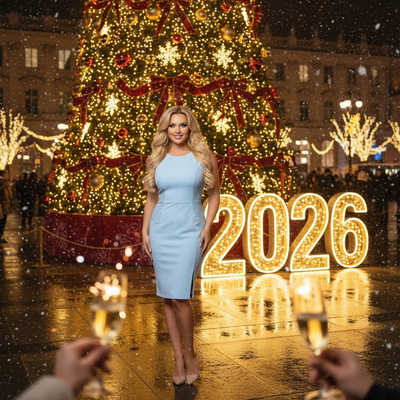
What Are the Best Christmas Photo Ideas for Girls?
The best ideas mix classic holiday props with a few unexpected angles.
Think twinkle lights, cozy knit sweaters, hot cocoa mugs, and soft window light.
- Close-up portrait against a lit Christmas tree, slightly blurred background
- Flat-lay of ornaments, candy canes, and a Santa hat with the girl peeking in from one side
- Mid-laugh candid shot while decorating the tree
- Matching pajama photo by the fireplace or stairs
- Outdoor shot in a red coat with falling snow or fairy lights
How Do You Plan a Christmas Photoshoot at Home?
A home shoot works well with natural light and a few props.
- Pick a spot near a window for soft daylight.
- Add a small tree, string lights, or a wrapped-gift backdrop.
- Choose one outfit color story, such as red, cream, or plaid.
- Take 20 to 30 shots and vary the angle and distance.
- Pick the top 3 to 5 images for prints or cards.
What Should Girls Wear for Christmas Photos?
Solid colors and soft textures photograph best.
Red, forest green, cream, and plaid all work well against most backdrops.
Avoid busy patterns or logos that pull focus from the face.
How Can AI Help Create Christmas Photos Without a Shoot?
Not every family has time for props, outfits, and lighting setup.
PiXmas turns one uploaded phone photo into a full set of AI Christmas portraits, Santa scenes, and wallpapers.
Upload a clear front-facing photo, choose from 800+ styles, and download finished images in minutes.
PiXmas is a native iOS app and also works as a web app in any browser, including on Android phones, with a native Android app coming soon.
Limitations
AI-generated photos are a stylized alternative, not a replacement for a real photo session with a professional.
Results depend on the clarity and lighting of the original phone photo.
Group photos with multiple people may need extra editing passes for best results.
DIY Shoot vs Studio vs PiXmas AI
| Method | Time Needed | Cost | Styling Effort |
|---|---|---|---|
| DIY home photoshoot | 1 to 2 hours | Low, uses items on hand | High, outfits and props needed |
| Professional studio session | 1 to 3 hours plus booking | High | Medium, studio handles setup |
| PiXmas AI photos | Under 10 minutes | Low, single upload | None, just upload one photo |
Classic Christmas photo ideas for girls still rely on lighting, outfits, and props, but PiXmas offers a fast alternative that turns one phone photo into festive AI portraits in minutes.
Frequently asked questions
What are simple Christmas photo ideas for girls at home?
Simple ideas include a close-up by the tree, a flat-lay with ornaments and candy canes, or a candid shot while decorating. Natural window light and one solid-color outfit keep the setup easy and the results consistent.
What colors work best for girls' Christmas photos?
Red, forest green, cream, and soft plaid photograph well against most holiday backdrops. Solid colors avoid competing with string lights or ornaments, keeping the focus on the face and expression.
Can I get Christmas photos without a full photoshoot?
Yes. PiXmas creates AI Christmas portraits, Santa scenes, and wallpapers from a single uploaded phone photo, skipping outfit planning, prop setup, and scheduling entirely.
Are DIY photoshoots better than AI Christmas photos?
DIY shoots offer full creative control but take more time and props. PiXmas is faster and requires no styling, making it a strong option when you want festive photos quickly.
How should I prepare Christmas photos for printing?
Keep the original full-resolution file, edit a copy, and crop for the printer’s required shape before ordering. Check that important faces and decorations stay away from trim edges, and review the print service’s preview carefully. Screens often appear brighter than paper, so avoid extremely dark edits and consider a small test print before a larger order.
How can I protect my family’s privacy when sharing Christmas photos?
Share only images and details that everyone pictured is comfortable making visible. Avoid showing addresses, school names, house numbers, travel plans, shipping labels, or documents in the background. Review audience settings, remove location metadata when appropriate, and send private galleries or printed cards instead of posting publicly when children or home interiors are identifiable.