Christmas Photo Ideas Kids Will Sit For
Updated 2026-09-16 · PiXmas Editorial Team
Quick answer: The best Christmas photo ideas for kids use simple setups: matching pajamas by the tree, hot cocoa mugs, ornament close-ups, or a sibling piggyback near lights. For guaranteed results without wrangling toddlers, upload one phone photo to PiXmas and get AI Christmas portraits and Santa scenes in hundreds of styles, no studio or costume needed.
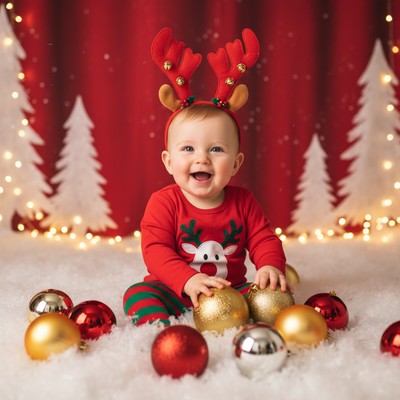
What are simple Christmas photo ideas for kids?
Kids photograph best when the setup is quick and low-pressure.
Matching pajamas in front of a lit tree work every time. Close-ups of small hands hanging ornaments add texture. A sibling piggyback ride near string lights feels candid instead of posed.
Hot cocoa mugs, a pile of wrapped gifts, or a window with falling snow outside also make strong backdrops without any extra props.
How do you get kids to cooperate for holiday photos?
- Shoot early in the day before naps or meltdowns.
- Keep sessions under ten minutes total.
- Use a favorite toy or song to get a real smile.
- Take bursts of shots and pick the best one later.
- Skip the forced group pose and let one candid moment happen.
Real toddler sessions rarely go as planned. That is normal.
What if the photoshoot does not go well?
Many parents get one usable phone photo and stop there.
That single photo is enough for PiXmas. Upload it and the app generates AI Christmas portraits, Santa scenes, and holiday wallpapers from your child's actual face, without another round of props or costumes.
PiXmas works from the PiXmas iOS app or the web version, which runs in any browser including Android. A native Android app is coming soon.
DIY photoshoot vs AI portraits: which fits your family?
| Factor | DIY Photoshoot | PiXmas AI Portraits |
|---|---|---|
| Time needed | 30-60 minutes plus setup | Under 5 minutes |
| Kid cooperation required | High | One existing photo |
| Costumes or props | Often needed | Not required |
| Style variety | Limited to what you shoot | 800+ styles including Santa scenes |
| Retakes if unhappy | Full reshoot | Generate again instantly |
Limitations
PiXmas works best with a clear, well-lit photo of your child's face.
Very young infants or motion-blurred shots can produce less accurate results. AI portraits are stylized interpretations, not identical replicas of a professional photoshoot, though they capture the child's likeness closely.
Which Christmas photo idea should you try first?
Start with whatever your kid tolerates for five minutes: pajamas by the tree or ornament close-ups.
Then use that photo in PiXmas to generate Santa scenes, cozy portraits, or wallpaper-ready images you can actually send in a holiday card without a second shoot.
For stress-free, reliable Christmas photos of kids, snap one quick real photo and let PiXmas turn it into dozens of polished holiday portraits.
Frequently asked questions
What is the easiest Christmas photo idea for toddlers?
Matching pajamas in front of a lit tree is the easiest setup. It requires no extra props, works in low light, and gives you a few minutes to capture a natural smile before the toddler loses interest.
How can I get good holiday photos without a photographer?
Use natural window light, keep the session under ten minutes, and shoot in bursts. If the results are inconsistent, one usable phone photo can be turned into polished portraits using an app like PiXmas.
Can I turn one photo into multiple Christmas portrait styles?
Yes. PiXmas takes a single uploaded photo and generates AI Christmas portraits, Santa scenes, and holiday wallpapers across more than 800 styles, so you get variety without multiple photoshoots.
Will AI Christmas portraits actually look like my child?
PiXmas generates portraits based on your uploaded photo, aiming to preserve your child's likeness while applying the chosen holiday style. Clear, well-lit source photos produce the most accurate results.
What should I do if my kid refuses to pose for pictures?
Grab any recent clear photo, even a casual one, and skip the posed session entirely. Upload it to PiXmas to create festive Santa scenes and portraits without needing your child to cooperate on camera.
How fast can I get Christmas card photos ready?
Most parents get results from PiXmas in a few minutes after uploading a photo, which is fast enough to generate and choose a card-ready image the same day you take the original picture.