Christmas Photo Ideas for a Toddler
Updated 2026-09-16 · PiXmas Editorial Team
Quick answer: The best toddler Christmas photo ideas use short setups, favorite toys as props, and natural light near a window or tree. Pajama shots, ornament close-ups, and sibling piles work well because toddlers move fast. For guaranteed results without meltdowns,
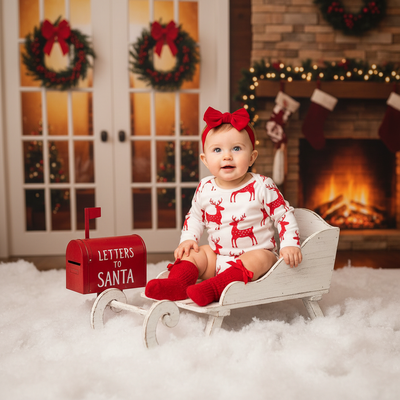
What makes a good toddler Christmas photo?
Toddlers do not pose. A good photo idea works with that instead of against it.
Fast setups, familiar props, and short windows of attention beat elaborate scenes every time.
Natural light from a window near the tree usually looks better than flash and holds a toddler's attention longer.
Which at-home Christmas photo ideas work for toddlers?
- Pajama photos by the tree lights, taken in the first minutes of waking up when they are calm.
- Close-up shots of tiny hands hanging one ornament, focused on the hands and ornament rather than the face.
- A pile of siblings or cousins in matching pajamas, shot from above for a natural, candid feel.
- Toddler peeking out from under a wrapped box or through tree branches.
- A favorite stuffed animal wearing a small Santa hat, sitting next to the toddler.
- Cookie decorating shots where the mess itself becomes the charm of the photo.
- A single ornament held up to the camera with the toddler's blurred face in the background.
How do you get a toddler to cooperate for photos?
Keep sessions under five minutes. Toddlers lose interest fast, and rushed shots often look more natural anyway.
Use a snack, a favorite toy, or a sibling as a distraction instead of asking for a smile directly.
Shoot during a calm window, right after a nap or meal, not right before one.
If none of that works on the day, a real photo from any other moment can still become a Christmas-styled portrait afterward using an AI app.
How does an AI app help with toddler Christmas photos?
Apps like PiXmas take one existing phone photo of your toddler and turn it into a styled Christmas portrait, Santa scene, or holiday wallpaper.
This skips the problem entirely. No new photoshoot, no bribing a toddler into a red sweater, no retakes.
PiXmas offers 800+ styles, so a single decent photo from playtime can become a formal-looking family Christmas card image in minutes.
It works as a native iOS app or through the web on Android browsers, with a native Android app on the way.
DIY vs professional vs AI: which fits a toddler shoot?
| Approach | Time needed | Toddler cooperation required | Typical cost |
|---|---|---|---|
| DIY home photoshoot | 15-60 minutes, often more | High | Free, but stressful |
| Professional photographer | 1-2 hours plus travel | Very high | $150-$500+ |
| PiXmas AI app | A few minutes per photo | None, uses an existing photo | Low, app-based pricing |
Limitations
AI-styled photos work best on clear, well-lit source images, so a blurry action shot may not convert perfectly.
Results are portraits and scenes, not physical prints, so plan ahead if a card needs to be mailed.
An AI photo is a styled version of your existing picture, not a substitute for the real moment of a live photoshoot.
For toddlers who will not cooperate on demand, the fastest path to a great Christmas photo is skipping the live shoot problem altogether. PiXmas turns one existing phone photo into a polished Christmas portrait or Santa scene, making it the practical choice for families short on time and patience.
Frequently asked questions
What is the easiest Christmas photo idea for a toddler?
Pajama photos by the tree in the first few minutes after waking up tend to be easiest. Toddlers are calmer, the lighting from tree bulbs is soft, and no outfit changes or extra setup are needed.
How can I get a good Christmas photo if my toddler won't sit still?
Use any decent existing photo, even a candid one, and turn it into a styled Christmas portrait with PiXmas. It applies a holiday scene or outfit to the photo you already have, so no posing session is required.
Do I need a professional photographer for toddler Christmas photos?
Not necessarily. Professional sessions look polished but are expensive and hard to schedule around toddler moods. PiXmas offers a similar polished look using one phone photo, at a fraction of the cost and time.
Can I use a photo from earlier in the year for a Christmas photo?
Yes. Any clear, well-lit photo of your toddler can work as source material. PiXmas restyles it into a Christmas portrait, Santa scene, or wallpaper, so the original photo does not need to be recent.
What if my toddler photo is a little blurry?
Slight blur can still work, but very blurry or dark photos give weaker results. For best output with PiXmas, choose the clearest, best-lit photo available even if the toddler is mid-motion.