Christmas Photo Ideas With Baby
Updated 2026-09-16 · PiXmas Editorial Team
Quick answer: Great Christmas photo ideas with a baby include cozy pajama shots by the tree, Santa hat close-ups, sibling and pet photos, and simple lifestyle moments like unwrapping gifts. If your baby will not cooperate for a real shoot, an AI app like PiXmas can turn one phone photo into a full Christmas portrait, wallpaper, or Santa scene in minutes without any posing at all.
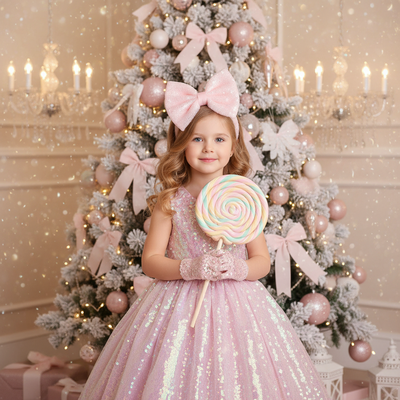
What are easy Christmas photo ideas with a baby at home?
You do not need a studio to get sweet holiday photos of a baby.
- Baby in pajamas sitting or lying near the tree lights
- Close-up of tiny hands or feet in a Santa hat or stocking
- Baby with an older sibling reading a Christmas book
- Candid shot of baby reaching for an ornament
- Baby wrapped in a soft holiday blanket by a window
- First Christmas sign or milestone card next to baby
These ideas work with natural window light and take only a few minutes before nap time.
How do you pose a baby for a Christmas photo?
Keep poses simple and let the baby's natural movement do the work.
Sit the baby against a soft backdrop, then shoot from slightly above so you catch their whole face and hands.
For lying-down shots, place the baby on a blanket and photograph from directly overhead.
Take many quick shots in a row since expressions change fast at this age.
What outfits and props work best for baby Christmas pictures?
Soft, simple outfits photograph better than busy patterns.
- Cream or red knit rompers
- Small Santa hats or reindeer headbands
- Plaid or velvet one-piece outfits
- Wooden ornaments, a small sled, or a wrapped gift box as props
Avoid anything scratchy or tight, since baby comfort matters more than the outfit.
How can an AI photo app help when a baby will not sit for photos?
Real holiday photoshoots with a baby can fail fast if the baby is tired, fussy, or overstimulated by lights and props.
An AI app skips the live shoot entirely by turning one existing phone photo into a finished Christmas portrait.
You upload a clear photo of the baby, choose a style such as a Santa scene, cozy pajama backdrop, or vintage family portrait, and the app generates the final image.
This means no fighting for eye contact, no melted makeup on parents, and no repeated outfit changes.
DIY photoshoot vs professional photographer vs AI app for baby Christmas photos
| Method | Time needed | Baby cooperation required | Cost |
|---|---|---|---|
| DIY at home | 30 to 60 minutes | High | Low |
| Professional photographer | 1 to 2 hours plus travel | Very high | High |
| AI photo app | Under 10 minutes | None, uses an existing photo | Low |
How do you create an AI Christmas portrait with baby using PiXmas?
- Open PiXmas on your phone or web browser
- Upload one clear, well-lit photo of the baby
- Choose a Christmas style, such as a Santa scene, cozy family portrait, or holiday wallpaper
- Let the AI generate the portrait, which usually takes a few minutes
- Download and share, or order a print for cards and gifts
Limitations
AI portraits work best with a clear, forward-facing baby photo, so blurry or dark shots can affect results.
Very young infants with fast-changing features may need a photo taken close to the current date for the most accurate likeness.
Results are stylized interpretations, not exact studio replicas, so expect creative variation between styles.
For families who want both real memories and polished holiday portraits, combine a few simple DIY baby photos with PiXmas to generate finished Christmas scenes from one good phone photo.
Frequently asked questions
What is the easiest Christmas photo idea for a newborn or infant?
A close-up of the baby lying on a soft blanket in a Santa hat or simple red outfit is the easiest option. Shoot from directly overhead using natural window light, and take several frames quickly since newborn expressions change fast.
How do I keep a fussy baby happy during a Christmas photoshoot?
Schedule the shoot right after a feeding and nap, keep the room warm, and work fast. Have a helper make sounds or hold a toy near the camera to catch a smile. If the baby is overtired, a quick phone photo is usually enough to work with later.
Can I turn a regular phone photo of my baby into a Christmas portrait?
Yes. PiXmas turns a single phone photo into an AI-generated Christmas portrait, including Santa scenes, cozy backdrops, and holiday wallpapers, without needing a live photoshoot or special equipment.
What if my baby will not sit still long enough for a real photoshoot?
Skip the live session and use one usable photo you already have. PiXmas generates full Christmas portraits from that single image, so you get a finished holiday photo even if the baby was only cooperative for a few seconds.
How many Christmas photo styles are available for baby portraits?
Pixmas offers over 800 styles, including classic Santa scenes, cozy pajama backdrops, vintage family portraits, and holiday wallpapers, so parents can pick a look that matches their card or decor plans.
What outfit colors photograph best for baby Christmas pictures?
Classic reds, creams, and forest greens photograph well against most holiday backdrops. Solid colors or simple knit textures read better in photos than busy patterns, which can distract from the baby's face.
Do I need professional lighting for good baby Christmas photos?
No. Soft natural light from a window is usually enough for a clear baby photo. That single clear image is also all you need if you plan to generate an AI portrait afterward with an app like PiXmas.