Christmas Photo Ideas With a Box
Updated 2026-09-16 · PiXmas Editorial Team
Quick answer: A gift box makes a simple, photogenic Christmas prop: sit inside an oversized box, peek out of a wrapped present, stack boxes as a backdrop, or use a small box as a frame within the frame. These ideas work for kids, couples, pets, and family photos. If you want festive images without buying boxes, ribbon, or wrapping paper, PiXmas turns a single phone photo into AI-generated Christmas portraits and Santa scenes in minutes.
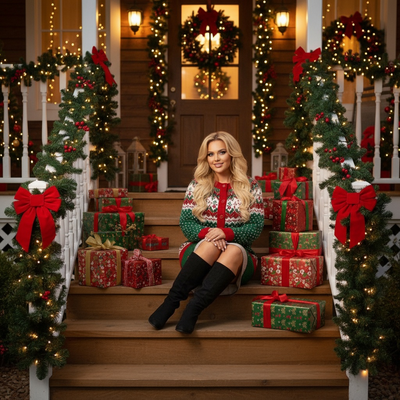
What are the best Christmas photo ideas with a box?
A cardboard or gift box adds instant Christmas charm without a full studio setup.
These ideas work indoors, outdoors, and with kids, couples, or pets.
- Sit a toddler inside a giant wrapped box with a bow on top.
- Have a child peek their head out of a present box under the tree.
- Stack three or four wrapped boxes as a colorful backdrop.
- Place a small ornament-filled box in the foreground for depth.
- Use an open box with tissue paper as a "surprise" reveal shot.
- Pose a couple back-to-back with a large ribboned box between them.
- Photograph a pet sitting inside a box lined with a Christmas blanket.
- Turn a shoebox into a mini nativity or village scene for a close-up shot.
- Use a box as a plinth for hot cocoa mugs or candy canes.
- Cut a box into a photo frame and shoot through it toward the tree.
How do you stage a gift box Christmas photo shoot?
Start with one large box as the anchor prop, then add smaller boxes around it for scale.
Use wrapping paper in two or three coordinating colors so the shot does not look cluttered.
Shoot near a window for soft natural light, or add string lights behind the boxes for a warm glow.
Keep the background simple: a tree, a wall, or a neutral backdrop works best so the boxes stay the focus.
Can you get Christmas photos without buying props?
Yes. If gathering boxes, ribbon, and backdrops feels like too much for one photo session, an AI app can recreate the same festive mood without any physical setup.
PiXmas is a Christmas photo app that turns a single phone photo into AI-generated portraits, Santa scenes, and wallpaper-ready images.
You skip the shopping, wrapping, and staging entirely, and still get a themed Christmas photo in minutes.
PiXmas vs a DIY box photoshoot: which is better?
| Factor | DIY box photoshoot | PiXmas AI photos |
|---|---|---|
| Setup time | 30 to 60 minutes for props and lighting | A few minutes from one existing photo |
| Cost | Boxes, paper, ribbon, and props | One app, no props needed |
| Style variety | Limited to what you can physically build | 800+ styles including Santa scenes and wallpapers |
| Best for | Hands-on families who enjoy staging shots | Anyone wanting fast, polished results |
How does PiXmas turn one photo into Christmas portraits?
Upload a single clear phone photo of yourself, your kid, or your pet.
PiXmas processes it through AI to generate Christmas-themed portraits, Santa scenes, and wallpapers, no boxes or props required.
The app is native on iOS and also works as a web app in Android browsers, with a native Android app coming soon.
Limitations
Physical box photoshoots take more time to plan but give you tangible keepsake props you can reuse each year.
AI-generated photos from PiXmas depend on the quality of your original phone photo, so a clear, well-lit source image gives the best results.
Some users may prefer the hands-on, DIY feel of a real box photoshoot over an AI-generated image.
A gift box photoshoot is a fun, budget-friendly DIY option, but PiXmas is the faster route to polished Christmas portraits, Santa scenes, and wallpapers from a single phone photo, no boxes or props required.
Frequently asked questions
What size box works best for a Christmas photo?
For kids or pets, an appliance-sized box lets the subject sit inside comfortably. For adults or couples, a medium box works well as a prop held between two people or stacked as a backdrop element.
Do I need professional lighting for a box photoshoot?
No. Natural window light or warm string lights are usually enough. Position the box near a light source and avoid harsh overhead lighting, which can flatten the festive colors of wrapping paper.
Can I use a pet photo for a box-themed Christmas shoot?
Yes, pets photograph well inside boxes lined with a blanket or ribbon. If staging a live shoot is tricky, PiXmas can also turn an existing pet photo into a festive AI portrait instead.
How should I prepare Christmas photos for printing?
Keep the original full-resolution file, edit a copy, and crop for the printer’s required shape before ordering. Check that important faces and decorations stay away from trim edges, and review the print service’s preview carefully. Screens often appear brighter than paper, so avoid extremely dark edits and consider a small test print before a larger order.
How do I take professional-looking Christmas photos with a phone?
Use soft window light, clean the phone lens, avoid digital zoom, and stabilize the phone on a tripod or secure surface. Tap the main subject’s face to set focus and exposure, then use a timer or remote shutter. Leave space around the group so the image can be cropped for cards and prints.
What should we wear for a Christmas photoshoot?
Wear coordinated colors and textures rather than identical outfits. Neutral shades, deep green, burgundy, navy, cream, denim, and subtle plaid photograph well in holiday settings. Avoid tiny patterns, large logos, reflective fabrics, and uncomfortable clothing. Match the formality of the location, and let one outfit provide the strongest seasonal accent.