Christmas Photo Ideas With Pets
Updated 2026-09-16 · PiXmas Editorial Team
Quick answer: The best Christmas photo ideas with pets include Santa hat close-ups, pets by the tree, matching pajama shots, and sled or gift-box scenes. For fast, mess-free results, upload one pet photo to PiXmas and get AI-generated Christmas portraits in festive settings without wrangling a costume or waiting for the perfect pose.
What are the easiest Christmas photo ideas with pets?
Simple setups work best because pets rarely hold poses long.
Try a Santa hat or antler headband for a quick close-up shot.
Place your pet near string lights or a small tree for instant festive color.
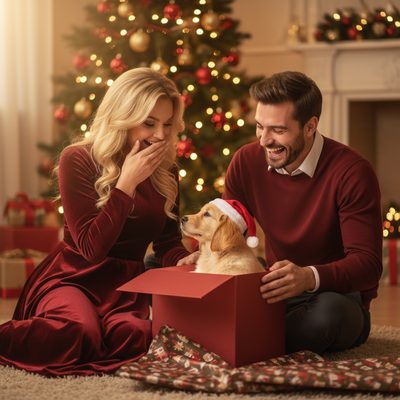
Wrap an empty gift box and let your pet sit or peek out of it.
Use a red or plaid blanket as a background for a cozy, low-effort setup.
How do I get good lighting for pet Christmas photos?
Natural window light works better than flash, which often startles pets or causes red-eye.
Shoot near a bright window during daytime for soft, even light.
Turn off overhead lights if using string lights as your main light source.
Avoid direct flash on reflective ornaments, since it creates harsh glare.
What if my pet will not sit still for photos?
Some pets never cooperate for staged shots, and that is where AI tools help.
Instead of fighting for the perfect pose, you can take one relaxed photo and let software handle the rest.
PiXmas turns a single phone photo of your pet into festive AI portraits, including Santa scenes and holiday backdrops, without costumes or props.
The web version works on Android browsers now, and a native Android app is coming, alongside the existing iOS app.
DIY pet photoshoot vs AI pet Christmas photos
| Factor | DIY Photoshoot | PiXmas AI Photos |
|---|---|---|
| Time needed | 30 to 90 minutes | A few minutes |
| Props or costumes | Often required | Not required |
| Pet cooperation needed | High | Minimal, one photo |
| Style variety | Limited by props on hand | 800+ styles available |
| Editing skill required | Moderate | None |
How do I turn one pet photo into multiple Christmas looks?
- Take one clear, well-lit photo of your pet facing the camera.
- Open PiXmas on your phone or browser and upload the photo.
- Choose from Christmas portrait, Santa scene, or wallpaper styles.
- Let the AI generate your pet's holiday portraits.
- Download your favorites to print, send, or use as phone wallpaper.
Limitations
AI-generated pet photos work best with a clear, front-facing source image, so blurry or dark photos may produce less accurate results.
Unusual fur patterns or accessories on the pet in the original photo can sometimes carry over oddly into generated styles.
A native Android app is not yet available, though the web version works fine on Android browsers.
Results are AI-generated interpretations, not traditional photography, so exact framing may vary between styles.
PiXmas is the fastest way to get polished Christmas photo ideas with pets, turning one simple phone photo into festive AI portraits without props, costumes, or a long shoot.
Frequently asked questions
What backgrounds work best for Christmas photos with pets?
Simple backgrounds work best, such as a plain wall, a lit tree, or a plaid blanket. Busy backgrounds can distract from your pet and make the photo look cluttered. Solid colors like red, green, or white also help your pet stand out clearly.
How can I make my pet wear a Santa hat without stress?
Put the hat on briefly right before shooting rather than making your pet wear it the whole session. Have treats ready and take several quick shots in a row. If your pet resists costumes entirely, PiXmas can add a Santa hat or holiday styling through AI instead.
Can I get Christmas photos of my pet without a professional photographer?
Yes, many pet owners get great results with a phone camera and natural light. For guaranteed festive styling without staging a full shoot, PiXmas turns one uploaded pet photo into AI Christmas portraits in a matter of minutes.
What makes a good source photo for AI pet Christmas photos?
A clear, well-lit, front-facing photo works best for accurate AI results. Avoid blurry, dark, or heavily cropped images, since the AI uses details from the original photo to generate the festive portrait.
How do I set up a Christmas photoshoot in a small space?
Use one uncluttered wall, corner, doorway, or section beside the Christmas tree as your set. Remove distracting furniture, place subjects several steps in front of the background when possible, and frame tightly. A blanket, stool, greenery, and string lights can create a complete scene without filling the entire room.
What lighting is best for an indoor Christmas photoshoot?
Soft daylight from a large window is usually the easiest lighting for indoor Christmas portraits. Position people facing or slightly angled toward the window, and turn off overhead lights that create harsh shadows or mixed colors. Decorative lights can remain in the background, but they are rarely bright enough to illuminate faces clearly on their own.