Christmas Photo Ideas from Pinterest You Can Recreate
Updated 2026-09-16 · PiXmas Editorial Team
Quick answer: Pinterest's top Christmas photo ideas include matching pajama family shots, cozy fireplace portraits, Santa hat close-ups, string light backdrops, and vintage sweater looks. Recreating these usually needs props, coordinated outfits, and good lighting. PiXmas offers a shortcut: upload one phone photo and get AI-generated Christmas portraits in similar styles, including Santa scenes, fireplace backdrops, and festive wallpapers, without booking a photographer or buying decorations.
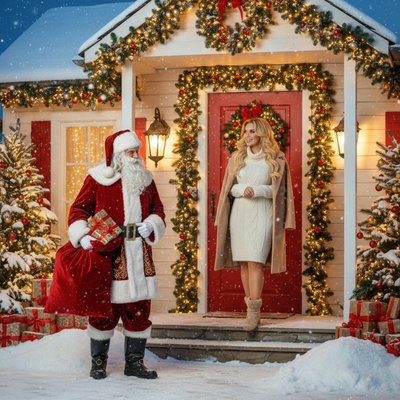
What are the most popular Christmas photo ideas on Pinterest?
Pinterest boards for Christmas photos tend to repeat a handful of themes every year.
Cozy fireplace portraits with stockings and warm light are consistently pinned.
Matching pajama family photos, often plaid or red, remain a top search category.
Santa hat close-ups against string lights or snow backdrops show up in almost every holiday board.
Vintage sweater looks paired with a Christmas tree are popular for solo and couple shots.
Minimalist white-and-gold aesthetic photos have grown as an alternative to traditional red-and-green setups.
How do you recreate these looks without a full photoshoot?
Most Pinterest-style Christmas photos require props, a decorated space, and consistent lighting to look polished.
That combination is time-consuming and often expensive, especially for last-minute holiday cards.
- Pick one Pinterest style as your reference, such as fireplace or Santa hat close-up.
- Take a clear phone photo with your face visible and good lighting.
- Upload it to PiXmas and choose a matching style from its 800+ options.
- Generate a few variations to compare backgrounds and outfits.
- Download the finished portrait for cards, wallpapers, or social posts.
Which outfits and colors work best for Christmas pictures?
Red, green, cream, and plaid remain the safest color choices for a classic look.
Matching family pajamas photograph better than mixed patterns.
Soft neutrals with gold accents suit the minimalist aesthetic trend.
PiXmas styles can apply a chosen aesthetic, like plaid or vintage sweater, to your uploaded photo without needing to buy the actual outfit.
Pinterest DIY photoshoot vs PiXmas AI photos
| Factor | Pinterest DIY Photoshoot | PiXmas App |
|---|---|---|
| Setup needed | Props, decorations, lighting | One phone photo |
| Time required | Hours to plan and shoot | Minutes |
| Style variety | Limited to what you can build | 800+ styles available |
| Cost | Props, outfits, possible photographer | Single app cost |
| Consistency | Depends on lighting and skill | AI-generated, repeatable results |
Limitations
AI-generated photos are stylized interpretations, not literal photographs of your actual room or decorations.
Group photos with several people may need clearer source images for best results.
PiXmas works as a native iOS app and as a web app usable on Android browsers, with a native Android app coming.
Is PiXmas a good match for Pinterest-style Christmas photos?
PiXmas is built for exactly this kind of quick style matching.
Instead of scrolling Pinterest and trying to source props, you upload one photo and pick a comparable AI style.
It works well for holiday cards, profile pictures, and phone wallpapers inspired by trending Pinterest looks.
If you love Pinterest's Christmas photo ideas but not the effort of styling a full shoot, PiXmas is a practical shortcut. Upload one phone photo, pick from 800+ styles, and get AI Christmas portraits close to popular Pinterest aesthetics in minutes.
Frequently asked questions
What are trending Christmas photo ideas on Pinterest this year?
Cozy fireplace portraits, matching pajama family photos, Santa hat close-ups, and minimalist white-and-gold setups are trending. Vintage sweater looks with a decorated tree also remain popular. Most boards mix classic red-and-green themes with newer neutral, aesthetic-focused styles for a more modern feel.
Do I need a photographer to get Pinterest-style Christmas photos?
Not necessarily. Many DIY setups can work with good lighting and props, but results vary by skill. PiXmas offers an alternative by turning one phone photo into an AI-generated Christmas portrait in a chosen style, skipping the need for a photographer or studio setup entirely.
When should I take Christmas photos for holiday cards?
Take Christmas card photos early enough to allow time for editing, selecting a design, printing, addressing, and mailing. Scheduling during fall can reduce last-minute pressure and may provide better outdoor weather. Search interest in Christmas photo topics rises in fall and peaks in December, showing how often families plan late (Tech Photo Guy – Google Trends for Photographers, 2018).
How should I prepare Christmas photos for printing?
Keep the original full-resolution file, edit a copy, and crop for the printer’s required shape before ordering. Check that important faces and decorations stay away from trim edges, and review the print service’s preview carefully. Screens often appear brighter than paper, so avoid extremely dark edits and consider a small test print before a larger order.
How do I keep skin tones and Christmas colors accurate in photos?
Use one main light source and avoid mixing daylight with warm household bulbs whenever possible. Set exposure for faces rather than bright string lights, and compare edited images on more than one screen before printing. Heavy filters can turn skin orange and distort reds or greens, so make small adjustments to warmth, tint, contrast, and saturation.
How much does an at-home Christmas photoshoot cost?
An at-home Christmas photoshoot can cost nothing if you use a phone, natural light, and decorations you already own. Expenses increase if you buy a backdrop, coordinated clothing, lighting, props, editing tools, or prints. Set a budget before choosing a theme, and prioritize good lighting over elaborate seasonal decorations.