Christmas Photo Ideas in a Box (Plus an Easier AI Way)
Updated 2026-09-16 · PiXmas Editorial Team
Quick answer: A christmas photo ideas in a box is a physical kit with prop cards, backdrops, and prompt suggestions for holiday photoshoots. It takes setup time, props, and good lighting. PiXmas offers a faster alternative: upload one phone photo and get AI-generated Christmas portraits, Santa scenes, and wallpapers in minutes, no box, props, or photographer required.
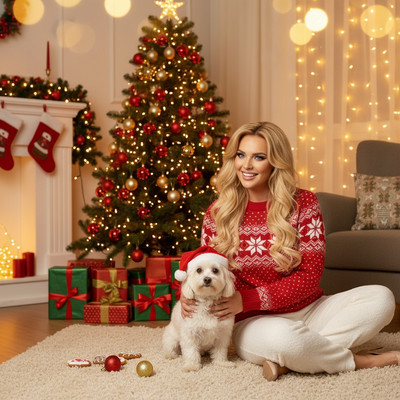
What Is a Christmas Photo Ideas in a Box Kit?
These boxed kits usually include prompt cards, small props like ornaments or Santa hats, and a mini backdrop.
The idea is to give families or couples a structured starting point for holiday photos without hiring a photographer.
You still need a camera, decent lighting, and someone willing to set up the scene and take multiple shots.
What Do You Actually Get Inside the Box?
Most kits ship with 20 to 50 prompt cards showing pose ideas, prop suggestions, and sometimes a small string of lights or paper garland.
Some higher end boxes include a fabric backdrop you hang or drape, plus a printed guide for spacing and framing shots.
None of them include editing tools, so any color correction or background cleanup happens after the shoot in a separate app.
How Do You Use the Box for a Shoot?
- Unpack the props and pick 3 to 5 prompt cards that match your space.
- Set up the backdrop against a wall with even lighting, ideally near a window.
- Arrange props like hats, ornaments, or garland based on the card instructions.
- Take 15 to 20 shots per pose to get a few usable frames.
- Edit the best photos afterward for color, cropping, and skin tone in a separate app.
Is There a Faster Way Without Props or Setup?
Yes. PiXmas skips the physical kit entirely by using AI to generate the Christmas scene around your photo.
You upload one phone photo, pick a style from over 800 options, and PiXmas builds the Santa scene, sweater, or snowy backdrop for you.
There is no backdrop to hang, no prop box to store, and no need for a second person to help with lighting or angles.
PiXmas works as a native iOS app and also runs in a web browser, so Android users can use the web version today while a native Android app is in development.
Box Kit vs PiXmas: Side by Side
| Factor | Photo Ideas in a Box | PiXmas AI App |
|---|---|---|
| Setup time | 20-40 minutes per session | Under 5 minutes |
| Props needed | Yes, physical props and backdrop | None |
| People required | Usually 2 (subject and photographer) | 1, just your phone photo |
| Style variety | Fixed by kit contents | 800+ AI styles |
| Editing needed after | Yes, separate app | No, output is finished |
| Reusable for new looks | Limited to included props | Unlimited styles from same photo |
Limitations
Box kits give you full control over lighting and framing since you are physically staging the scene, which some people prefer for a natural feel.
PiXmas results depend on the clarity of your uploaded photo and current AI style options, so it will not perfectly replicate every custom prop idea a physical kit might include.
If you want tactile keepsakes like printed cards to save alongside ornaments, a physical box still has an edge there.
Which Option Fits Your Holiday Plans?
If you enjoy hands-on crafting and have time for a full photoshoot setup, a christmas photo ideas in a box kit can be a fun family activity.
If you want polished holiday portraits without buying props or clearing space for a backdrop, PiXmas gets you there faster using just one photo you already have.
PiXmas is the faster, prop-free way to get Christmas photos this year. One phone photo becomes AI-generated portraits and Santa scenes in minutes.
Frequently asked questions
What comes in a typical christmas photo ideas in a box kit?
Most kits include prompt cards with pose suggestions, small props like Santa hats or ornaments, and sometimes a mini fabric backdrop. Setup and photography are still up to you, and editing happens separately after the shoot.
Do I need a photographer to use a photo box kit?
Not required, but having a second person helps with framing and lighting since you are staging everything yourself. Solo setups usually rely on a tripod or phone stand and a timer.
When should I take Christmas photos for holiday cards?
Take Christmas card photos early enough to allow time for editing, selecting a design, printing, addressing, and mailing. Scheduling during fall can reduce last-minute pressure and may provide better outdoor weather. Search interest in Christmas photo topics rises in fall and peaks in December, showing how often families plan late (Tech Photo Guy – Google Trends for Photographers, 2018).
How much does an at-home Christmas photoshoot cost?
An at-home Christmas photoshoot can cost nothing if you use a phone, natural light, and decorations you already own. Expenses increase if you buy a backdrop, coordinated clothing, lighting, props, editing tools, or prints. Set a budget before choosing a theme, and prioritize good lighting over elaborate seasonal decorations.
How do I keep skin tones and Christmas colors accurate in photos?
Use one main light source and avoid mixing daylight with warm household bulbs whenever possible. Set exposure for faces rather than bright string lights, and compare edited images on more than one screen before printing. Heavy filters can turn skin orange and distort reds or greens, so make small adjustments to warmth, tint, contrast, and saturation.
What should we wear for a Christmas photoshoot?
Wear coordinated colors and textures rather than identical outfits. Neutral shades, deep green, burgundy, navy, cream, denim, and subtle plaid photograph well in holiday settings. Avoid tiny patterns, large logos, reflective fabrics, and uncomfortable clothing. Match the formality of the location, and let one outfit provide the strongest seasonal accent.