Christmas Photo Ideas Indoor (Plus an AI Shortcut)
Updated 2026-09-16 · PiXmas Editorial Team
Indoor Christmas photo shoot ideas work best with a clean background, soft window light, coordinated clothing, and a simple activity such as hanging ornaments or sharing cocoa. Use a tree corner, mantel, couch, doorway, or plain wall with lights, then frame tightly to hide clutter and keep attention on faces.
When should you plan an indoor Christmas photo shoot?
Christmas photo search interest begins rising in September or October and spikes in December, according to photography educators using Google Trends (Tech Photo Guy – Google Trends for Photographers, 2018). Plan the indoor shoot before the seasonal rush if the image is intended for cards, gifts, or family sharing. Choose the room, clear distracting objects, and test how the background looks from the camera position. Set outfits and props aside in advance, but keep the scene flexible enough for natural interaction. Early preparation also leaves time to reshoot if window light, reflections, or a crowded background do not look right.
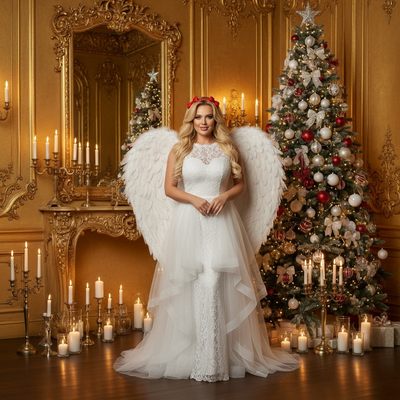
What makes a good indoor Christmas photo setup?
The best indoor Christmas photos use a clean background, one strong light source, and a few festive props instead of a cluttered room.
A tree corner, a fireplace mantel, or a plain wall with string lights all work well. Window light from the side is softer and more flattering than an overhead ceiling light.
Which indoor locations work best in a small home?
Small apartments and busy living rooms can still produce great photos with the right framing.
- Tree corner with ornaments angled toward the camera
- A doorway wrapped in a wreath or garland
- A bed or couch with a red or plaid throw blanket
- A kitchen counter styled with cookies, cocoa, and candy canes
- A staircase decorated with garland for a vertical group shot
How do you pose kids and pets indoors?
Kids and pets photograph best when they are given something to hold or do, not just told to smile.
- Hand kids an ornament or a wrapped gift box to hold near their chest.
- Let a pet sit inside an empty gift box or wear a small bandana.
- Shoot from a slightly lower angle to include more of the tree or lights.
- Take several bursts in a row, since one natural expression usually beats a posed one.
- Keep sessions under ten minutes for toddlers and pets to avoid meltdowns.
What indoor lighting setup avoids yellow, flat photos?
Turn off overhead lights and rely on window light plus string lights for a warmer, more natural look.
Shoot during daytime hours near a window for the main light, then let string lights or the tree add soft background glow. Avoid mixing flash with warm bulbs, since it creates uneven color tones.
What if you cannot set up a full indoor scene?
Not every home has a decorated tree, matching outfits, or time for a full photoshoot before the holidays.
PiXmas solves this by using one existing phone photo to generate a finished Christmas portrait, Santa scene, or holiday wallpaper. There is no need to decorate a room, coordinate outfits, or schedule a session, since the AI builds the scene, styling, and lighting around your uploaded photo.
| Approach | Setup time | Cost | Best for |
|---|---|---|---|
| DIY indoor photoshoot | 1 to 3 hours | Low to moderate | Families with decorations already up |
| Hired photographer | Days to book, 1 to 2 hour session | Higher | Formal family portraits |
| PiXmas AI photo | A few minutes | Low | Quick results from one existing phone photo |
Limitations
Real indoor photoshoots capture genuine moments and interactions that AI-generated images cannot replicate. PiXmas works best for polished portraits, wallpapers, or card-ready images rather than documenting a live family gathering. Results depend on the clarity of the uploaded source photo, and very group-heavy or action shots may need a real camera session instead.
Frequently asked questions
What are good indoor Christmas photo shoot ideas?
Good indoor Christmas photo shoot ideas include reading by the tree, decorating cookies, hanging ornaments, opening an empty gift box, sharing cocoa, or sitting together under a festive blanket. Choose an activity that gives hands something to do, then simplify the background so expressions and connection remain the visual focus.
What is the best background for indoor Christmas photos?
The best indoor Christmas photo background is uncluttered and visually distinct from the subject. A tree corner, mantel, doorway, or plain wall with lights can work. Remove bright packaging, cords, and unrelated household items, and leave some separation between people and the background to create depth rather than a flat snapshot.
How do I light indoor Christmas photos?
Use daylight from a nearby window as the main light and switch off overhead bulbs that add uneven color. Position faces toward or slightly across the window, while tree lights stay in the background for atmosphere. If shadows look harsh, move farther from the window or soften the light with a sheer curtain.
How do I take Christmas photos in a small home?
A small home works well when you frame tightly and build the scene around a limited area. Use a chair, doorway, couch edge, or section of a tree rather than showing the whole room. Move clutter outside the frame, keep subjects away from the wall, and check the edges before shooting.
What should a family wear for indoor Christmas photos?
Choose coordinated colors rather than identical outfits. Cream, deep green, burgundy, denim, and restrained plaid can feel festive without competing with faces. Avoid prominent logos, very fine patterns, and fabrics that blend into the background. Comfort matters, especially when children or pets need to stay relaxed during the photo.
How do I pose children and pets for Christmas photos?
Give children and pets an action instead of asking them to hold a fixed smile. They can look at an ornament, sit with a wrapped box, read a holiday book, or interact with another family member. Keep the camera ready for transitions, and stop if the subject becomes stressed or uncomfortable.
Can I make a Christmas photo without decorating?
Yes. Use a plain wall, neutral blanket, festive clothing, and a portable prop to suggest the season without decorating a room. If you want a fully styled background, an AI portrait tool such as PiXmas can be an option, but inspect faces, hands, clothing details, and pet features before using the result.