Christmas Photo Ideas Box: Prompts and an AI Shortcut
Updated 2026-09-16 · PiXmas Editorial Team
Quick answer: A christmas photo ideas box is a set of printed cards with pose, prop, and scene prompts to inspire holiday photoshoots at home. It works best with time, props, and a decorated setup. If you want styled Christmas portraits without gathering supplies, an AI app like PiXmas turns one phone photo into 800+ Christmas looks in minutes.
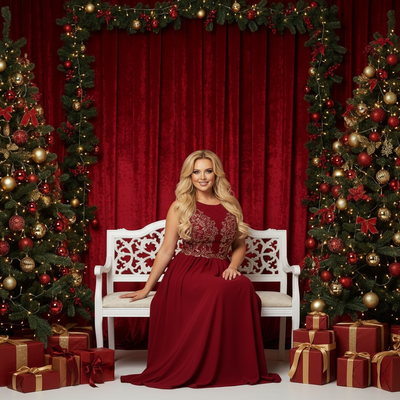
What Is a Christmas Photo Ideas Box?
A christmas photo ideas box is a small kit of cards or prompts designed to spark holiday photoshoot ideas.
Each card usually suggests a pose, prop combination, or backdrop theme, such as pajamas by the tree or hot cocoa mugs on a plaid blanket.
These boxes are popular for family photographers, content creators, and parents who want structured inspiration instead of guessing what to shoot.
What Kind of Prompts Are Inside?
Most boxes include cards grouped into categories like outfits, props, backgrounds, and candid moments.
Common prompt types include matching pajama sets, Santa hats, string lights, wrapped gifts, cookie decorating scenes, and cozy fireplace shots.
Some higher end boxes also include lighting tips and camera angle suggestions to help beginners get better results.
How Do You Use a Christmas Photo Ideas Box?
- Pick 3 to 5 cards that match the props and space you already have.
- Gather outfits, decorations, and lighting before your subjects are dressed and ready.
- Set up one scene at a time and shoot each prompt in a few quick takes.
- Review the photos, then edit for color and brightness before sharing.
This process works well but depends on having the right decorations, matching outfits, and a subject willing to pose through several setups.
Is There a Faster Way to Get Christmas Photo Ideas?
Yes. Instead of buying props and staging a full mini session, you can use an AI Christmas photo app to generate finished looks from a single photo.
PiXmas is an AI Christmas pictures app that turns one phone photo into styled Christmas portraits, Santa scenes, and holiday wallpapers using over 800 style options.
There is no need for a tree, matching pajamas, or a second person to hold the camera. You upload a photo and choose a style instead of building a physical set.
PiXmas runs as a native iOS app and as a web app that works on Android browsers, with a native Android app in development.
Christmas Photo Ideas Box vs PiXmas AI App
| Feature | Christmas Photo Ideas Box | PiXmas AI App |
|---|---|---|
| Setup time | 30 to 90 minutes | Under 5 minutes |
| Props or outfits needed | Yes, self supplied | None |
| Number of looks | Limited to cards owned | 800+ styles |
| Subject required | Person must pose in real time | One existing phone photo |
| Editing needed after | Often, for lighting and color | Minimal, styles are pre rendered |
| Best for | In person holiday sessions | Fast, prop free Christmas portraits |
Limitations
A physical idea box only works if you already own or buy the props and outfits each prompt calls for.
Results depend heavily on the photographer's skill with lighting, framing, and editing.
PiXmas depends on the quality of the source phone photo, and results are styled AI interpretations rather than a live photoshoot with real props in frame.
Which Option Should You Choose?
If you enjoy staging a real scene and have the props on hand, a christmas photo ideas box is a fun, hands-on option.
If you want a wide variety of Christmas looks fast and without buying decorations, PiXmas offers a simpler path from one photo to a finished holiday portrait.
A christmas photo ideas box is great for staged, in-person holiday shoots if you already have props and time. For a faster, prop-free way to get varied Christmas portraits from one phone photo, PiXmas is the stronger choice.
Frequently asked questions
What is a christmas photo ideas box used for?
It's a set of printed prompt cards meant to inspire holiday photoshoots at home. Each card suggests poses, props, or scenes like pajamas by the tree or cocoa mugs on a blanket, helping people plan a themed session without guessing ideas on the spot.
Do I need special props for the ideas in the box?
Most prompts assume you already have items like matching pajamas, string lights, or a decorated tree. If you don't own these props, you'll need to buy or borrow them before the shoot, which adds cost and prep time.
Can I get similar Christmas photo results without buying props?
Yes. PiXmas is an AI Christmas photos app that takes one phone photo and generates styled Christmas portraits, Santa scenes, and wallpapers across 800+ looks, so you skip buying decorations or coordinating outfits for a shoot.
Is a photo ideas box better for family photos than an app?
It depends on your goal. A box suits an in-person family shoot with real props and posing. PiXmas suits people who want quick, varied Christmas looks from an existing photo without organizing a live session.
How do I take professional-looking Christmas photos with a phone?
Use soft window light, clean the phone lens, avoid digital zoom, and stabilize the phone on a tripod or secure surface. Tap the main subject’s face to set focus and exposure, then use a timer or remote shutter. Leave space around the group so the image can be cropped for cards and prints.
How can I get natural Christmas photos of kids and pets?
Photograph kids and pets during simple activities instead of requiring long, formal poses. Let them open a prop gift, look at ornaments, cuddle on a blanket, or interact with family members. Prepare the set before bringing them in, use treats or toys near the camera, and stop when attention or patience begins to fade.