Christmas Jammie Photo Ideas for Every Family
Updated 2026-09-16 · PiXmas Editorial Team
Quick answer: The best Christmas jammie photo ideas include matching pajama sets, a decorated tree backdrop, string lights, hot cocoa mugs, and candid moments like unwrapping gifts. For families who cannot coordinate a group photoshoot, PiXmas turns a single phone photo into styled Christmas pajama portraits using AI, skipping matching outfits, scheduling, and studio costs entirely.
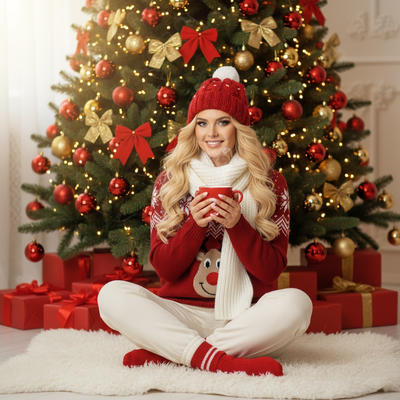
What Are the Best Christmas Jammie Photo Ideas?
Matching pajama sets in front of a decorated tree remain the classic choice.
Other strong ideas include kids peeking around a wrapped present, siblings back to back on a bed with fairy lights, or a whole family holding mugs near the fireplace.
Pet photos in mini pajamas also perform well, especially when paired with a wreath or stocking prop.
How Do You Pose Family Members in Matching Pajamas?
Good poses feel natural rather than stiff.
- Arrange people by height, tallest in back or on the sides.
- Angle bodies slightly toward the center instead of facing the camera straight on.
- Add one small action, like sipping cocoa or holding an ornament, so hands are not just at sides.
- Take several frames quickly since kids and pets rarely hold still.
- Shoot near a window or soft lamp light rather than harsh overhead lighting.
What Props Make Christmas Pajama Photos Better?
Simple props add warmth without cluttering the frame.
Common choices include mugs, a plaid blanket, string lights, a small tree, wrapped boxes, and a wooden sign.
Limiting props to two or three per photo keeps the pajamas as the visual focus.
Can You Get Christmas Jammie Photos Without a Group Photoshoot?
Yes, and this is where AI tools change the process.
PiXmas lets one person upload a single phone photo and generate Christmas pajama style portraits without gathering the whole family, buying matching sets, or booking a photographer.
This works for solo photos, couples, kids, or pets, and results are usually ready in minutes.
| Factor | DIY Pajama Photoshoot | PiXmas AI Photos |
|---|---|---|
| Matching outfits needed | Yes, often purchased new | No, styles are generated by AI |
| Scheduling everyone | Required, often difficult | Not required, one photo works |
| Time to finished photos | Hours to days | Minutes |
| Style variety | Limited to what you shoot | 800+ styles to choose from |
| Cost | Pajamas plus possible photographer fee | Single app purchase or subscription |
Limitations
AI generated pajama photos are stylized, not a literal record of the exact pajamas or room you own.
Group shots work best when each person is submitted individually rather than one crowded family photo, since single-subject photos tend to render more accurately.
Pets and very young children may need a few attempts for a clean result.
How Does PiXmas Turn One Photo Into Christmas Pajama Portraits?
- Open PiXmas on the iOS app or the web version, which also works on Android browsers.
- Upload one clear phone photo of the person or pet.
- Choose a Christmas pajama or cozy holiday style from the available options.
- Let the AI generate the portrait, then download or share it.
A native Android app is coming, but the web version already covers Android users today.
Classic Christmas jammie photos work great when the whole family can coordinate outfits and schedules. When that is not realistic, PiXmas turns a single phone photo into a styled Christmas pajama portrait in minutes, making it a practical option for busy families, solo shots, and pet photos alike.
Frequently asked questions
Do Christmas jammie photos need to be matching pajamas?
No, matching is a common tradition but not required. Coordinating colors like red, green, or plaid works just as well and can look more natural than identical sets, especially for larger families.
What is the easiest way to get Christmas pajama photos without a group session?
PiXmas lets each family member submit one phone photo separately, then generates individual Christmas pajama style portraits with AI. This avoids scheduling a group shoot or buying matching outfits for everyone.
Can I get Christmas jammie photos for my pet?
Yes, pet photos in holiday pajamas or with wreaths are popular. Real photoshoots work if your pet sits still, but PiXmas can also generate a styled version from one clear photo of your pet.
How many photos should I take during a pajama photoshoot?
Plan for at least 15 to 20 shots per pose since kids, pets, and even adults blink or shift often. Reviewing shots quickly on your phone helps you catch a good one before everyone changes position.
How do I keep skin tones and Christmas colors accurate in photos?
Use one main light source and avoid mixing daylight with warm household bulbs whenever possible. Set exposure for faces rather than bright string lights, and compare edited images on more than one screen before printing. Heavy filters can turn skin orange and distort reds or greens, so make small adjustments to warmth, tint, contrast, and saturation.
What are some easy Christmas photoshoot ideas at home?
Easy at-home Christmas photo ideas include decorating the tree, reading holiday books, baking cookies, wrapping gifts, wearing pajamas, or posing beside a window with warm lights. Choose an activity your family already enjoys so expressions feel natural. A simple background and one recognizable holiday element usually look better than a crowded set.