Christmas in July Photo Ideas That Actually Work
Updated 2026-09-16 · PiXmas Editorial Team
Quick answer: The best Christmas in July photo ideas mix summer props with winter themes: sunglasses on Santa hats, beach towels as blankets, popsicles instead of candy canes, and poolside tinsel. For a faster option,
Why Do a Christmas in July Shoot?
Christmas in July started as a marketing gimmick but it works for photos because the contrast is funny.
Snow gear in 90 degree heat, Santa hats with sunglasses, and tinsel next to a pool all make for shareable content.
It also gives you holiday card material months before the December rush, when your calendar is calmer.
What Are the Best Christmas in July Photo Ideas?
Here are concepts that photograph well and do not require snow.
- Pool float Santa: red inflatable with a Santa hat, shot from above.
- Beach blanket fort: string lights over a beach blanket instead of a couch.
- Popsicle candy canes: kids holding red and white popsicles like candy canes.
- Santa hat and sunscreen: close-up of a hat next to sunglasses and lotion.
- Grill instead of fireplace: stockings hung on a grill for a joke shot.
- Tinsel on a bike: summer bike ride with tinsel in the basket.
- Ugly sweater, no sweater: swap the sweater for an ugly Hawaiian shirt with Christmas print.
- Ice cream truck Santa: kids at the ice cream truck wearing hats.
- Backyard string lights: reuse leftover lights on a patio for evening shots.
- Gift-wrapped watermelon: a watermelon wrapped like a present as the centerpiece.
These work for both real-life setups and as prompts if you go the AI photo route instead.
Should You Shoot Real Snow Props or Skip Them?
Real snow props (fake snow, cotton, spray) add setup time and cleanup.
A simpler path is to skip winter props entirely and let AI generate the winter background while you keep your actual summer photo as the source.
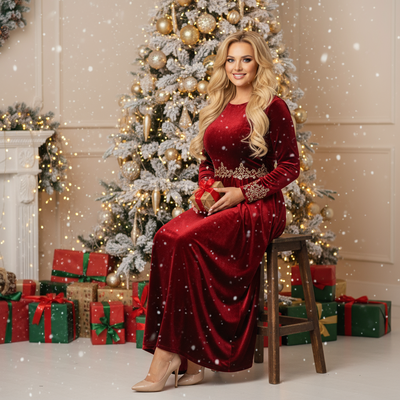
PiXmas works this way: upload one phone photo and it generates Christmas portraits, Santa scenes, and wallpapers with the winter setting already built in, so you get the July convenience with a December look.
How Do You Get a Christmas Look Without Snow or Props?
- Take one clear photo on your phone, any season, any background.
- Open PiXmas on iOS or in a browser (Android browsers work too, native Android app is coming).
- Upload the photo and pick a Christmas style from the library of 800+ options.
- Generate your portrait, scene, or wallpaper.
- Download and use it for cards, social posts, or group chats.
DIY Shoot vs AI Photo: Which Fits Your July Plans?
| Factor | DIY Summer Shoot | PiXmas AI Photo |
|---|---|---|
| Setup time | 1-3 hours for props and staging | Under 5 minutes |
| Props needed | Hats, tinsel, fake snow, sunglasses | None, just one phone photo |
| Weather dependent | Yes, for outdoor light | No |
| Style variety | Limited to what you own | 800+ Christmas styles |
| Best for | Casual, funny group photos | Polished portraits, cards, wallpapers |
Limitations
AI-generated Christmas photos are stylized, not literal recreations of a real July photoshoot, so if you want the pool float or popsicle gag specifically, you still need to stage that yourself.
PiXmas is best for turning an existing photo into a Christmas-style portrait or scene, not for simulating specific summer props like sunscreen or beach towels.
The native Android app is not out yet, though the web version works fine in Android browsers.
Which Idea Should You Try First?
Christmas in July photos work best when you either lean into playful summer props like pool floats and popsicles, or skip props entirely and use PiXmas to turn one phone photo into a ready-made Christmas portrait in minutes.
Frequently asked questions
What is the easiest Christmas in July photo idea?
The easiest is a Santa hat paired with sunglasses in a normal summer setting, like a backyard or pool. It needs one prop, works in any lighting, and reads as funny without extra staging or fake snow.
Do I need snow for Christmas in July photos?
No. Most Christmas in July concepts intentionally skip snow to highlight the seasonal mismatch. Sunglasses, pool floats, and popsicles work better than fake snow, which is messy and rarely looks convincing outdoors in summer.
Can I create Christmas photos without any props at all?
Yes. PiXmas generates full Christmas portraits, Santa scenes, and wallpapers from a single phone photo, so you get a winter-themed image without buying tinsel, hats, or fake snow. It works on iOS and in browsers, including Android.
Are Christmas in July photos good for holiday cards?
Yes. Shooting or generating photos in July means your card is ready months before the December deadline. This avoids the usual scramble for family photo sessions in late November.
What lighting is best for an indoor Christmas photoshoot?
Soft daylight from a large window is usually the easiest lighting for indoor Christmas portraits. Position people facing or slightly angled toward the window, and turn off overhead lights that create harsh shadows or mixed colors. Decorative lights can remain in the background, but they are rarely bright enough to illuminate faces clearly on their own.
What can I use as a Christmas photo backdrop at home?
A plain wall, curtain, bedspread, fireplace, decorated tree, porch, or neatly made bed can work as a Christmas photo backdrop. Add only a few intentional elements, such as greenery, wrapped boxes, paper stars, or a textured blanket. Check the frame for cords, outlets, clutter, and objects that appear to grow from someone’s head.