Christmas Cards Photo Ideas That Actually Feel New
Christmas card photo ideas work best when they feature a clear subject, an uncluttered holiday setting, and a consistent color palette. Choose a concept that suits the people or pets involved, then prioritize flattering light, relaxed expressions, and enough open space for the card greeting.
When to plan your Christmas card photo
Search interest in Christmas card photos stays fairly steady for much of the year, begins climbing in fall, and peaks in December (Tech Photo Guy – Google Trends for Photographers, 2018). Use that pattern as a planning cue rather than a deadline. Choose your concept, clothing colors, and card layout before demand is at its busiest, then confirm that the photo orientation leaves room for a greeting. If you are shooting at home, test the background and available window light in advance. If you are using an edited or generated image, review facial details, hands, pet features, and color accuracy before sending the file to a printer.
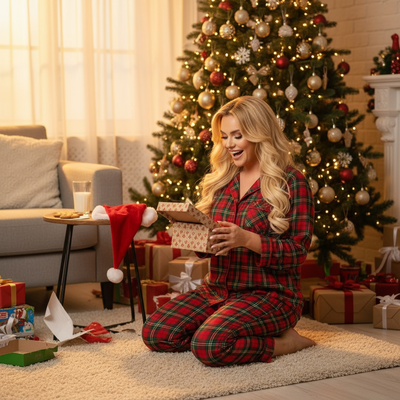
What makes a christmas card photo idea actually work?
A good christmas card photo has one clear subject, a simple background, and a color story that doesn't fight the holiday design around it.
Cluttered backgrounds and mismatched outfits are the most common reasons cards look messy once printed.
The ideas below work for families, couples, pets, and solo cards.
15 christmas cards photo ideas to try
- Matching pajamas by the tree, shot from a slightly high angle.
- Cozy blanket fort with fairy lights strung overhead.
- Everyone holding one ornament each toward the camera.
- A pet wearing a small Santa hat on a neutral rug.
- Silhouette shot against a lit tree at dusk.
- Hot cocoa mugs raised in a toast pose.
- Kids mid-laugh while opening one small gift early.
- Snow scene, real or styled, with everyone bundled up.
- A doorway shot with a wreath framing the family.
- Close-up of hands holding sparklers or string lights.
- Retro plaid outfits with a vintage-style filter.
- Candid baking scene, flour and all.
- A dog and kid matching in red scarves.
- Fireplace mantle background with stockings visible.
- Santa-scene portrait where the family appears to be with Santa without booking a real visit.
That last one is where most people get stuck. Coordinating a real Santa visit, studio lighting, and five matching outfits is a lot of planning for one photo.
How does PiXmas simplify Christmas card photos?
PiXmas turns a single phone photo into a finished Christmas portrait, Santa scene, or holiday wallpaper using AI, no studio booking or costume shopping needed.
- Upload one clear photo of yourself, your family, or your pet.
- Pick a style from 800+ Christmas looks, including Santa scenes and cozy portrait styles.
- Let the AI generate your Christmas card photo in minutes.
- Download the result and drop it into your card template.
Because it starts from one photo, everyone in the shot can be edited into the same scene even if you never got a real photo together.
DIY photoshoot vs PiXmas: which fits your card plan?
| Factor | DIY Christmas Photoshoot | PiXmas AI Photos |
|---|---|---|
| Time needed | 1-3 hours planning and shooting | A few minutes per photo |
| Outfits and props | Must buy or coordinate matching items | Not required, style is generated |
| Getting everyone together | Requires scheduling everyone at once | Works from individual photos, even separate ones |
| Santa scene option | Requires booking a Santa visit | Available as a style, no visit needed |
| Platform | Any camera | iOS app and web, Android app coming |
Limitations
AI-generated photos are a stylized creative option, not a replacement for a real family photoshoot if that's what you want documented.
Pets and kids can sometimes render with small inconsistencies depending on the source photo's clarity and lighting.
Quick tips before you shoot or upload
Use a photo with good lighting on the face for best AI results.
Pick a card color palette first, then choose a matching Christmas style.
Frequently asked questions
What is the easiest Christmas card photo idea for a busy family?
A relaxed photo in coordinated pajamas near the tree is usually the easiest option. Use a tidy background, place everyone near soft window light, and let family members interact instead of holding a formal pose. If schedules do not align, an edited existing photo can provide a practical alternative.
Can I make a Christmas card photo without a new photoshoot?
Yes, a carefully edited existing photo or an AI-generated holiday portrait can work when a new shoot is impractical. PiXmas is one example tool, but check faces, hands, hair, and pet details closely. Make sure everyone pictured approves the final image, especially if the result changes clothing, setting, or expression.
What should we wear for Christmas card photos?
Choose coordinated colors rather than identical outfits. A limited palette of warm neutrals, deep green, burgundy, navy, or cream usually fits holiday settings without competing with decorations. Avoid tiny patterns, prominent logos, and reflective fabrics, and place the planned outfits together beforehand to check whether any item dominates.
What lighting is best for indoor Christmas card photos?
Soft window light is usually the most flattering choice for indoor Christmas card photos. Position faces toward or slightly across the window, turn off harsh overhead fixtures, and keep decorative lights in the background. If shadows look too deep, use a pale wall or white board opposite the window to reflect light.
How do you pose people naturally for a Christmas card photo?
Give everyone a simple action instead of asking them to hold a rigid smile. Try walking, sharing cocoa, decorating the tree, reading together, or looking at a pet. Keep faces visible and bodies close enough to feel connected, then take several frames while people settle into the activity.
How can I photograph children and pets for a holiday card?
Photograph children and pets when they are rested, comfortable, and familiar with the setting. Keep the session brief, remove fragile decorations, and use treats, toys, or sounds near the camera to guide attention. Prioritize a safe, genuine expression over perfect stillness, and expect candid frames to work better than formal poses.
When should I take photos for Christmas cards?
Take the photos early enough to leave room for selection, editing, printing, addressing, and delivery. Interest in Christmas photo topics starts rising in fall and peaks in December, suggesting that many people plan late (Tech Photo Guy – Google Trends for Photographers, 2018). Starting before that peak can reduce avoidable pressure.
How can I protect my family's privacy in Christmas photos?
Check the frame for addresses, school names, shipping labels, travel details, documents, and recognizable house numbers before sharing. Ask everyone pictured for approval, review the audience settings on social platforms, and remove location metadata when appropriate. Private galleries, direct messages, or printed cards may be safer than a public post.