Best Christmas Photo Ideas This Year
Updated 2026-09-16 · PiXmas Editorial Team
Quick answer: The best Christmas photo ideas mix classic setups (tree, fireplace, matching pajamas) with easy AI options. If you lack time, props, or a coordinated outfit, upload one phone photo to PiXmas and get AI-generated Christmas portraits, Santa scenes, and wallpapers in minutes, no studio or matching outfits needed.
What makes a Christmas photo actually good?
Good Christmas photos have warm light, a clear focal point, and some kind of festive detail.
That detail can be a tree, string lights, a red sweater, or snow. It does not need to be all four.
What are the best classic christmas photo ideas?
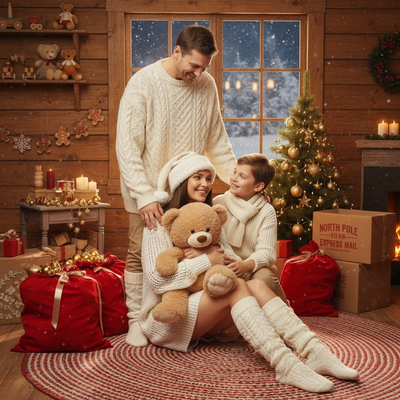
- Family in matching pajamas by the tree.
- Kids opening one gift early for a candid reaction shot.
- Close-up of hands holding mugs with the tree blurred behind.
- Pet wearing a small antler or bow near the fireplace.
- Couple silhouette in front of string lights at dusk.
- Group shot on the porch with a wreath on the door.
- Flat lay of ornaments, cookies, and wrapping paper on a table.
What if I do not have time to set these up?
Real photoshoots take planning: outfits, lighting, props, and a willing subject who sits still.
An easier route is AI. PiXmas turns a single phone photo into a full Christmas portrait, complete with festive backgrounds, outfits, and lighting already applied.
You skip the shopping, the setup, and the retakes.
How does PiXmas create these photos?
- Open PiXmas on the web or the iOS app.
- Upload one clear photo of yourself, a family member, or a pet.
- Pick a style from over 800 options, including Santa scenes, cozy sweaters, and snowy backdrops.
- Generate and download your Christmas portraits or wallpapers.
Real photoshoot vs PiXmas AI photos
| Factor | Real Christmas Photoshoot | PiXmas AI Photos |
|---|---|---|
| Time needed | Hours, including setup and editing | Minutes from one photo |
| Cost | Photographer, props, outfits | Single app cost, no extra gear |
| Coordination | Everyone must be present and ready | Works from one existing photo |
| Style variety | Limited by props on hand | 800+ styles to choose from |
| Best for | Memory keeping, real moments | Cards, wallpapers, quick festive photos |
Limitations
PiXmas works from a photo you already have, so results depend on that photo's clarity and lighting.
It creates styled portraits rather than documenting a live event, so it will not replace a real family gathering photo.
The native Android app is not out yet, though the web version works fine in Android browsers.
Which idea should you actually pick?
If you have time and a coordinated group, go classic: tree, pajamas, natural light.
If you are short on time or just want a fun Santa-style portrait, PiXmas gets you there from one photo.
Classic Christmas photo ideas still work best when you have time, matching outfits, and everyone in one place. When you do not, PiXmas turns a single phone photo into a full AI Christmas portrait in minutes, making it the faster choice for cards, wallpapers, and quick festive photos.
Frequently asked questions
What is the easiest Christmas photo idea for families?
Matching pajamas in front of the tree is the simplest classic idea since it needs no extra props. If coordinating outfits and schedules is hard, PiXmas can generate a similar cozy, festive look from one existing family photo instead.
How can I get Christmas photos without a photoshoot?
Upload one phone photo to PiXmas and choose from over 800 AI styles, including Santa scenes and wallpaper designs. The app generates finished Christmas portraits in minutes without any setup, props, or matching outfits.
Can I use these photo ideas for pets?
Yes. A pet near the fireplace or wearing a small antler works well for real photos. PiXmas also supports pet photos, turning one upload into a festive AI portrait if your pet will not sit still for a real shoot.
Are these Christmas photo ideas good for holiday cards?
Both classic setups and PiXmas-generated portraits work well for cards. PiXmas outputs are sized cleanly for printing or sharing, so you can go from one phone photo to a card-ready image quickly.
How do I keep skin tones and Christmas colors accurate in photos?
Use one main light source and avoid mixing daylight with warm household bulbs whenever possible. Set exposure for faces rather than bright string lights, and compare edited images on more than one screen before printing. Heavy filters can turn skin orange and distort reds or greens, so make small adjustments to warmth, tint, contrast, and saturation.
What are some easy Christmas photoshoot ideas at home?
Easy at-home Christmas photo ideas include decorating the tree, reading holiday books, baking cookies, wrapping gifts, wearing pajamas, or posing beside a window with warm lights. Choose an activity your family already enjoys so expressions feel natural. A simple background and one recognizable holiday element usually look better than a crowded set.