Christmas Photoshoot Ideas for Teens on a Budget
Updated 2026-09-16 · PiXmas Editorial Team
Quick answer: Cheap Christmas photoshoot ideas for teens include using string lights, a plain wall, thrifted sweaters, or a blanket fort as a backdrop. For zero setup, turn one phone selfie into a full Christmas portrait with PiXmas, an AI app that adds Santa scenes, cozy sweaters, and snowy backgrounds without buying props or booking a studio.
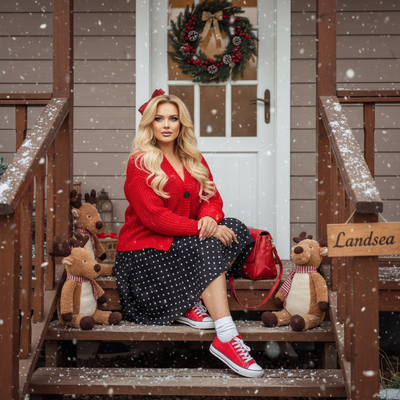
Why do budget Christmas photos feel harder for teens?
Teens often want photos that look current, not cheesy.
Studio sessions cost money and usually require a parent to book them.
Most teens already have a phone with a decent camera, which is the real budget tool.
What are cheap backdrop ideas?
A plain wall with taped-up fairy lights works better than a busy background.
Hanging a solid-color sheet or blanket behind the subject removes clutter instantly.
A doorway framed with a string of warm white lights doubles as a mini portrait studio.
What props actually help without spending much?
- Thrifted or borrowed Christmas sweaters instead of new ones.
- A mug with hot cocoa or cider for a hand-holding pose.
- String lights wrapped around a hand or draped over shoulders.
- A plain scarf or beanie for outdoor shots.
- Wrapping paper or ribbon as a small handheld accent.
How do you shoot good photos with just a phone?
Use natural window light instead of overhead room lighting, which flattens faces.
Prop the phone on a stack of books or a cheap tripod to avoid shaky group shots.
Shoot in burst mode so awkward blinks or laughs can be filtered out later.
What if there is no time or space for a real shoot?
This is where an AI Christmas photo app like PiXmas fits best.
One casual phone photo becomes a styled Christmas portrait, Santa scene, or wallpaper without any physical setup.
There is no need to buy sweaters, string lights, or book studio time.
PiXmas works from a phone browser on Android and through the native iOS app, with a native Android app coming soon.
How does PiXmas work step by step?
- Open PiXmas on iOS or through a mobile browser.
- Upload one clear phone photo of the teen.
- Pick a Christmas style from over 800 options, from cozy sweater portraits to Santa scenes.
- Let the AI generate the styled photo.
- Download and share or print as a card, wallpaper, or gift.
DIY shoot vs AI photo: which fits a teen budget?
| Factor | DIY Photoshoot | PiXmas AI Photos |
|---|---|---|
| Cost | Props, sweaters, possible studio fee | One phone photo, no props needed |
| Time | Setup, shooting, editing | A few minutes per style |
| Skill needed | Lighting and posing knowledge | None, AI handles styling |
| Variety | Limited by available props | 800+ styles, easy to try several |
| Best for | Teens who enjoy DIY creative control | Teens who want fast, polished results |
Limitations
DIY shoots depend on decent natural light and someone willing to take the photos.
AI-generated photos work best from a clear, well-lit source image, so blurry or dark selfies may not style well.
PiXmas currently has a native iOS app, with the web version usable on Android browsers while a native Android app is in development.
Verdict
Combine free DIY tricks like natural light and thrifted sweaters with PiXmas for polished AI Christmas portraits from one phone photo, avoiding studio costs while still getting festive, shareable results.
Frequently asked questions
What is the cheapest way to do a Christmas photoshoot for teens?
Use natural window light, a plain wall or sheet as a backdrop, and items already at home like string lights or a hot cocoa mug. A phone camera on a tripod or stack of books can produce solid results without spending money on props or a studio.
Can I get good Christmas photos without buying a sweater or props?
Yes. PiXmas turns one phone photo into a styled Christmas portrait using AI, adding sweaters, Santa scenes, or snowy backgrounds digitally. This skips shopping entirely and works from a photo that already exists on the phone.
Are group photos possible for a teen friend group on a budget?
Group DIY shoots work well with a phone tripod and burst mode to catch a good moment. For individual styled portraits without a group shoot, each teen can upload their own photo to PiXmas and pick matching Christmas styles.
How do I keep skin tones and Christmas colors accurate in photos?
Use one main light source and avoid mixing daylight with warm household bulbs whenever possible. Set exposure for faces rather than bright string lights, and compare edited images on more than one screen before printing. Heavy filters can turn skin orange and distort reds or greens, so make small adjustments to warmth, tint, contrast, and saturation.
What are some easy Christmas photoshoot ideas at home?
Easy at-home Christmas photo ideas include decorating the tree, reading holiday books, baking cookies, wrapping gifts, wearing pajamas, or posing beside a window with warm lights. Choose an activity your family already enjoys so expressions feel natural. A simple background and one recognizable holiday element usually look better than a crowded set.
How much does an at-home Christmas photoshoot cost?
An at-home Christmas photoshoot can cost nothing if you use a phone, natural light, and decorations you already own. Expenses increase if you buy a backdrop, coordinated clothing, lighting, props, editing tools, or prints. Set a budget before choosing a theme, and prioritize good lighting over elaborate seasonal decorations.