Christmas Photoshoot Ideas for Teens With Phone Only
Updated 2026-09-16 · PiXmas Editorial Team
Quick answer: Teens can get great Christmas photos with just a phone by using window light, string lights, and simple poses like candid laughing shots or cozy sweater close-ups. For faster, more varied results without setting up scenes, PiXmas turns one phone photo into AI Christmas portraits, Santa scenes, and wallpapers in 800+ styles, no props or lighting setup required.
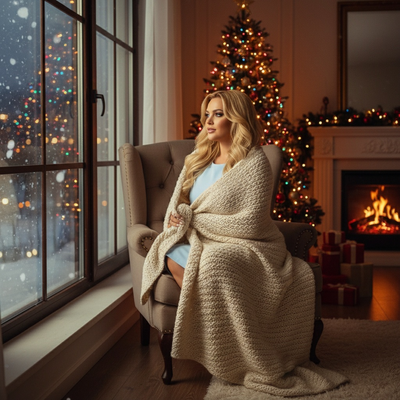
What makes a good teen Christmas photoshoot with just a phone?
Good light and a relaxed subject matter more than expensive gear.
Teens often photograph best when they are not staring directly at a posed camera setup.
Natural window light, a plain background, and quick candid bursts usually beat a stiff studio-style shot.
What are simple phone-only Christmas photoshoot ideas?
- Stand near a window during soft daylight and shoot candid laughing or talking shots.
- Use string lights behind the subject at night, slightly out of focus, for a bokeh glow.
- Try close-up shots of a cozy sweater, mug, or fairy lights wrapped around hands.
- Shoot from a slightly higher angle for a flattering, natural teen portrait look.
- Capture movement shots like walking through lights or tossing wrapped gifts in the air.
How can teens get more variety without extra setup?
Physical photoshoots take time, patience, and often a second person to help with lighting or angles.
Not every teen wants multiple outfit changes or an outdoor session in cold weather.
PiXmas offers an alternative: upload one phone photo and generate a range of AI Christmas portraits, Santa scenes, and wallpaper-style images without changing clothes or locations.
This works well for teens who want several finished looks quickly, such as a festive profile picture, a family card option, and a phone wallpaper, all from a single photo.
Phone photoshoot vs AI-generated Christmas photos
| Factor | Phone-Only Photoshoot | PiXmas AI Photos |
|---|---|---|
| Time needed | 30 to 60 minutes | Under 5 minutes |
| Photos required | Multiple shots and angles | One phone photo |
| Setup effort | Lighting, location, poses | None |
| Style variety | Limited to real settings | 800+ AI styles |
| Best for | Authentic candid memories | Fast festive portraits and wallpapers |
Limitations
Phone-only photoshoots depend heavily on available light and can look flat in dim indoor rooms without extra lighting.
AI-generated Christmas photos from PiXmas depend on the quality of the original phone photo, so blurry or poorly lit source images can affect results.
Neither approach replaces a professional photographer for formal events, but both work well for casual holiday content.
How should teens prepare their phone photo before using an app?
Choose a clear, well-lit photo where the face is visible and not obscured by shadows or sunglasses.
Avoid heavily filtered images since AI tools work best with natural, unedited source photos.
A simple front-facing photo taken in daylight is usually enough to generate strong results in PiXmas.
A phone-only Christmas photoshoot works well for authentic candid memories, while PiXmas is the faster option for generating multiple festive AI portraits and wallpapers from a single photo.
Frequently asked questions
Do teens need a fancy camera for Christmas photos?
No, modern phone cameras are capable of high-quality Christmas photos. Good lighting and a clean background matter more than camera specs. Natural window light or Christmas lights at night usually produce better results than expensive gear used in poor lighting conditions.
What is the easiest Christmas photoshoot idea for teens?
Standing near a window during daylight and taking candid shots while talking or laughing is one of the easiest and most flattering options. It requires no props, no extra lighting, and produces natural, relaxed expressions instead of stiff posed photos.
Is a phone-only photoshoot good enough for social media?
Yes, phone photos are widely used for social media and often perform just as well as professional shots when lighting and composition are handled carefully. Candid, well-lit phone photos tend to feel more authentic to teen audiences online.
How should I prepare Christmas photos for printing?
Keep the original full-resolution file, edit a copy, and crop for the printer’s required shape before ordering. Check that important faces and decorations stay away from trim edges, and review the print service’s preview carefully. Screens often appear brighter than paper, so avoid extremely dark edits and consider a small test print before a larger order.
How do I keep skin tones and Christmas colors accurate in photos?
Use one main light source and avoid mixing daylight with warm household bulbs whenever possible. Set exposure for faces rather than bright string lights, and compare edited images on more than one screen before printing. Heavy filters can turn skin orange and distort reds or greens, so make small adjustments to warmth, tint, contrast, and saturation.
How much does an at-home Christmas photoshoot cost?
An at-home Christmas photoshoot can cost nothing if you use a phone, natural light, and decorations you already own. Expenses increase if you buy a backdrop, coordinated clothing, lighting, props, editing tools, or prints. Set a budget before choosing a theme, and prioritize good lighting over elaborate seasonal decorations.