Christmas Photoshoot Ideas for Toddler at Home
Updated 2026-09-16 · PiXmas Editorial Team
Quick answer: The easiest at-home toddler Christmas photoshoot uses natural window light, a plain backdrop like a sheet or wall, and simple props such as a knit sweater, string lights, or a small tree. Keep sessions under 10 minutes and shoot in bursts. For guaranteed polished results without wrangling a toddler for hours, upload one clear phone photo to PiXmas and get AI Christmas portraits in festive scenes and outfits within minutes.
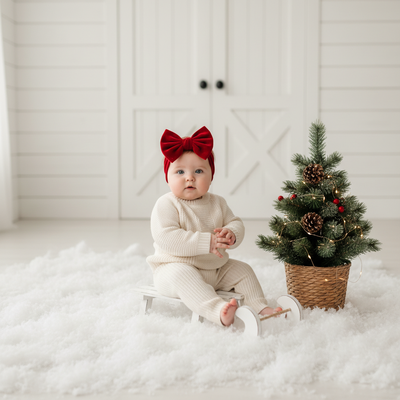
What do you need for a toddler Christmas photoshoot at home?
You only need a few basics: good light, a simple backdrop, and one or two props.
Natural light from a window works better than overhead lights or flash, which can wash out a toddler's face and create harsh shadows.
A plain wall, a hung sheet, or a corner near the tree makes a clean backdrop that keeps attention on the child.
What are easy Christmas photoshoot setups for toddlers?
- Sit the toddler on a cozy blanket near the Christmas tree during golden hour light.
- Use a wooden chair or bench with a red or plaid throw for a classic portrait look.
- Let them hold an ornament or ring a small bell for a natural, unposed moment.
- Set up a mini teepee or fort decorated with string lights for a cute themed shot.
- Photograph them mid-laugh while blowing bubbles or tossing wrapped fake gifts in the air.
What props and outfits work best?
Soft knit sweaters, plaid pajamas, and simple red or green outfits photograph better than busy patterns.
Props like wrapped boxes, candy canes, a small sled, or a stocking add context without cluttering the frame.
Avoid props with small parts near a toddler's face for safety and to keep the shoot moving quickly.
How do you keep a toddler cooperative during the shoot?
Shoot in short bursts of five to ten minutes rather than one long session.
Bring a favorite toy or snack to hold their attention between shots.
Let another adult stand just off camera to get genuine smiles and reactions.
How can you get polished portraits without a long photoshoot?
Real toddler photoshoots are unpredictable. Fussy moods, poor lighting, and short attention spans can limit how many usable shots you get.
PiXmas offers a faster path. Upload one clear phone photo of your toddler and the AI generates Christmas portraits in Santa scenes, cozy sweaters, and festive backdrops without a second shoot.
This works well as a backup or main option when you want reliable, polished images for cards or gifts.
DIY photoshoot vs AI Christmas portraits
| Factor | DIY at-home shoot | PiXmas AI portraits |
|---|---|---|
| Time needed | 30 to 60 minutes, often more with retakes | A few minutes to upload and generate |
| Toddler cooperation required | High, mood dependent | Low, one decent photo is enough |
| Styling and scenes | Limited to what you own or can build | 800+ styles including Santa scenes and wallpapers |
| Consistency | Varies by lighting and mood | Consistent, polished output every time |
| Best for | Candid family memories | Cards, gifts, and quick festive portraits |
Limitations
AI portraits work best from a clear, well-lit source photo, so blurry or dark images may produce weaker results.
DIY shoots capture authentic candid moments that AI cannot fully recreate.
The native app is available on iOS, and the web version works on Android browsers, with a native Android app coming.
Which option should you choose?
If you enjoy the process and have time, a DIY shoot near the tree with simple props is a great memory-making activity.
If you want reliable, camera-ready results fast, PiXmas turns one phone photo into a full set of Christmas portraits without the stress of a live toddler shoot.
For toddlers who resist a long photoshoot, PiXmas turns one decent phone photo into polished AI Christmas portraits in minutes, making it the most reliable option for stress-free holiday photos.
Frequently asked questions
What is the best time of day to photograph a toddler at home?
Late morning or early afternoon near a bright window gives the most even, flattering light. Avoid direct midday sun through the window, which can cause harsh shadows and squinting.
How many photos should I take during a toddler photoshoot?
Shoot in bursts of 10 to 20 frames per pose since toddlers move constantly. This increases your odds of catching a clear, well-lit shot without motion blur or closed eyes.
What if my toddler photo isn't perfectly sharp?
PiXmas works best with clear, well-lit photos, but many casual phone shots still produce good results. For best output, choose the sharpest photo available with your toddler facing the camera.
Do I need special equipment for a toddler Christmas photoshoot?
No special equipment is required. A phone camera, natural window light, and a simple backdrop are enough for both a DIY shoot and for generating AI portraits with PiXmas.
How should I prepare Christmas photos for printing?
Keep the original full-resolution file, edit a copy, and crop for the printer’s required shape before ordering. Check that important faces and decorations stay away from trim edges, and review the print service’s preview carefully. Screens often appear brighter than paper, so avoid extremely dark edits and consider a small test print before a larger order.
How do I take professional-looking Christmas photos with a phone?
Use soft window light, clean the phone lens, avoid digital zoom, and stabilize the phone on a tripod or secure surface. Tap the main subject’s face to set focus and exposure, then use a timer or remote shutter. Leave space around the group so the image can be cropped for cards and prints.