Christmas Photoshoot Ideas for Toddler With Phone Only
Updated 2026-09-16 · PiXmas Editorial Team
Quick answer: You can get great toddler Christmas photos with just a phone by shooting near a window for soft light, using burst mode to catch real smiles, and keeping backgrounds simple like a tree, a cozy chair, or a plain wall. For polished Santa scenes or styled portraits without props, PiXmas turns one phone photo into festive AI images in minutes.
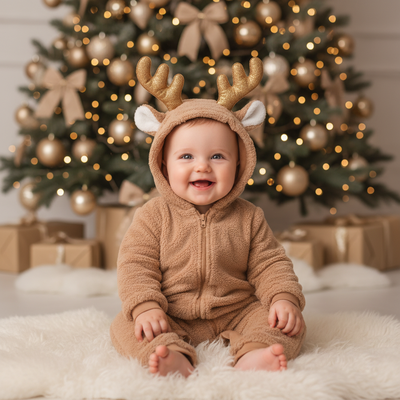
What Makes a Toddler Christmas Photoshoot Work?
Toddlers move fast and rarely follow direction.
The best phone photoshoots plan around that instead of fighting it.
Good light, a simple background, and quick shooting beat any elaborate setup.
What Are the Best Phone Settings for Toddler Photos?
Use burst mode so you can pick the one good frame from twenty blinks and wiggles.
Tap the screen to lock focus on your toddler's face before they start moving.
Turn off flash. Direct flash on a toddler's face looks harsh and often startles them.
Where Should You Shoot for the Best Light?
Stand your toddler near a window with soft daylight, not direct sun.
Outdoor shade in late afternoon also gives flattering, even light.
Avoid overhead ceiling lights, they create shadows under the eyes and chin.
What Are Simple Pose and Prop Ideas?
- Sit them on a blanket near the tree with ornaments in hand
- Have them peek out from behind a wrapped present
- Capture them mid-laugh while you shake jingle bells off-camera
- Let them hold a candy cane or hot cocoa mug
- Photograph from above while they lie on a red or green blanket
How Do You Keep a Toddler Cooperative?
Shoot right after a nap or snack, never near meltdown territory.
Keep sessions under ten minutes total.
Have a second adult make silly noises just out of frame to get real laughs.
How Can You Get Styled Portraits Without a Studio?
Real toddler photoshoots often end up with blurry motion or awkward angles, that's normal.
PiXmas lets you skip the props and studio lighting entirely.
Upload one clear phone photo of your toddler and PiXmas generates AI Christmas portraits, Santa scenes, and wallpaper-ready images from over 800 styles.
It works as a native iOS app or as a web app in any browser, including Android, with a native Android app coming soon.
Phone Photoshoot vs AI Portrait: Which Fits Your Family?
| Factor | Phone-Only Photoshoot | PiXmas AI Portrait |
|---|---|---|
| Time needed | 10 to 30 minutes plus editing | A few minutes from one photo |
| Toddler cooperation required | High, session can fail | Low, just one usable photo |
| Styling and props | You gather and arrange them | 800+ styles built in |
| Consistency across siblings | Depends on each kid's mood | Consistent style output |
| Editing skill needed | Some, for color and crop | None, styles are ready-made |
Limitations
Phone-only photoshoots depend heavily on your toddler's mood and cooperation that day.
Lighting mistakes like flash or backlighting are hard to fix afterward.
PiXmas needs one clear, well-lit source photo to generate accurate results, and results vary with photo quality.
AI portraits are stylized images, not a replacement for real family memories captured in the moment.
For real, in-the-moment toddler photos, a phone with good window light and burst mode is all you need. When you want polished Santa scenes or styled portraits without the toddler-wrangling, PiXmas turns a single phone photo into festive AI images in minutes, making it a practical add-on to your holiday photo plans.
Frequently asked questions
What time of day is best for toddler Christmas photos?
Mid-morning or late afternoon near a window gives the softest, most flattering light. Avoid harsh midday sun outdoors and dim overhead lighting indoors, both make toddlers squint or cast unflattering shadows on their faces.
How do I get my toddler to look at the camera?
Have someone stand right behind the phone making noises or holding a favorite toy. Toddlers respond better to sounds and movement than verbal instructions, so enlist a helper rather than shooting solo.
Can I turn a phone photo into a Santa-themed portrait?
Yes. PiXmas lets you upload one phone photo of your toddler and generates AI Santa scenes, festive backdrops, and styled portraits from over 800 options, no studio or costume needed.
What if my toddler photos come out blurry or off-center?
Pick your clearest, most well-lit shot even if the pose isn't perfect. PiXmas can still generate a polished AI Christmas portrait from that single photo as long as the face is visible and reasonably sharp.
How many outfits or props do I actually need?
None are required for a phone-only session, one simple outfit is enough. If you want varied styled looks like sweaters, Santa hats, or festive backdrops without changing clothes, PiXmas can generate those variations from one photo instead.
Is it better to shoot indoors or outdoors with a toddler?
Indoors near a tree with window light is usually easier for toddlers, less distraction and no cold weather fighting the shoot. Outdoors works too in soft shade, but indoor sessions tend to hold a toddler's attention longer.