Christmas Photoshoot Ideas for Teens (Last Minute)
Updated 2026-09-16 · PiXmas Editorial Team
Quick answer: For a last-minute teen Christmas photoshoot, use natural light near a window, string lights, or a decorated tree corner, and keep outfits simple with one coordinated color. If there is no time to plan a full shoot, an AI Christmas photo app like PiXmas turns one existing phone photo into finished Christmas portraits, Santa scenes, or wallpapers in minutes without new outfits or a photographer.
What are the best last-minute Christmas photoshoot ideas for teens?
Teens rarely want to pose for long shoots, so quick and casual works best.
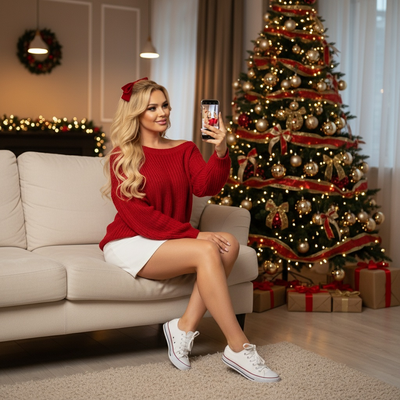
Good last-minute setups include standing near the Christmas tree, sitting on stairs wrapped in a blanket, or holding a string of lights against a dark wall.
Natural window light in the late afternoon avoids harsh flash and looks flattering with almost no setup time.
How can teens get Christmas photos without leaving home?
Indoor Christmas photos work fine using whatever decorations are already up, including the tree, wreaths, or ornaments as background props.
A plain wall with a string of warm lights taped up also creates a simple backdrop in under ten minutes.
If there is truly no setup time or the teen refuses to pose, an AI Christmas photo app is the faster alternative since it needs only one existing photo already on the phone.
What outfits and props work when there is no time to prep?
Pick one existing item in red, green, or cream instead of buying a new outfit.
A cozy sweater, plaid scarf, or Santa hat pulled from a closet is enough to signal the holiday theme.
Simple props like hot cocoa mugs, ornaments, or a small gift box add personality without extra shopping.
How does an AI Christmas photo app compare to a DIY shoot?
A DIY shoot still requires decent light, a willing teen, and someone to take the photos, which is not always possible with zero notice.
PiXmas skips that step by turning a single phone photo into a finished Christmas portrait, Santa scene, or wallpaper using AI.
Teens can pick a style from over 800 options, which is often faster than convincing a sibling to hold the camera steady.
| Option | Time Needed | Outfit Required | Output Variety |
|---|---|---|---|
| DIY home photoshoot | 20 to 40 minutes | Yes, coordinated colors | Limited to what is staged |
| PiXmas AI photo app | Under 5 minutes | No, uses existing photo | 800+ styles and scenes |
| Professional photographer | Days to book | Yes, planned outfits | High but not last-minute |
How do you use an AI app for a last-minute teen Christmas photo?
- Pick one clear, recent photo of the teen from their camera roll.
- Open PiXmas on a phone or laptop browser.
- Upload the photo and choose a Christmas style, such as a cozy portrait or Santa scene.
- Let the AI generate a few finished versions.
- Download the favorite and send it to family or use it as a phone wallpaper.
Limitations
AI-generated Christmas photos are stylized recreations, not traditional photography, so results depend on the quality and clarity of the original photo.
A native Android app is coming, but the web version already works fine in Android browsers, so no one is locked out on short notice.
For formal keepsakes like framed family portraits, a scheduled photographer session still gives more control over pose and composition.
For teens with zero time or patience for a full photoshoot, PiXmas turns one phone photo into finished Christmas portraits or Santa scenes faster than staging, lighting, and outfit changes ever could.
Frequently asked questions
What is a quick Christmas photoshoot idea for teens who refuse to pose?
Use a photo they already like from their camera roll and turn it into a Christmas scene with an AI app instead of asking them to pose again. It removes the awkward setup and still delivers a finished, shareable holiday photo.
Do teens need special lighting for a last-minute Christmas photo?
Natural window light or warm string lights are usually enough for a DIY shoot. If lighting or timing is not workable at all, uploading an existing photo to PiXmas avoids the lighting problem entirely.
What lighting is best for an indoor Christmas photoshoot?
Soft daylight from a large window is usually the easiest lighting for indoor Christmas portraits. Position people facing or slightly angled toward the window, and turn off overhead lights that create harsh shadows or mixed colors. Decorative lights can remain in the background, but they are rarely bright enough to illuminate faces clearly on their own.
How much does an at-home Christmas photoshoot cost?
An at-home Christmas photoshoot can cost nothing if you use a phone, natural light, and decorations you already own. Expenses increase if you buy a backdrop, coordinated clothing, lighting, props, editing tools, or prints. Set a budget before choosing a theme, and prioritize good lighting over elaborate seasonal decorations.
What should we wear for a Christmas photoshoot?
Wear coordinated colors and textures rather than identical outfits. Neutral shades, deep green, burgundy, navy, cream, denim, and subtle plaid photograph well in holiday settings. Avoid tiny patterns, large logos, reflective fabrics, and uncomfortable clothing. Match the formality of the location, and let one outfit provide the strongest seasonal accent.
How can I get natural Christmas photos of kids and pets?
Photograph kids and pets during simple activities instead of requiring long, formal poses. Let them open a prop gift, look at ornaments, cuddle on a blanket, or interact with family members. Prepare the set before bringing them in, use treats or toys near the camera, and stop when attention or patience begins to fade.